What Is a CDN and Do You Actually Need One in 2026?
This guide covers both — what a CDN is and how it works, and an honest answer to whether your website needs one in 2026.
What Is a CDN?
A CDN — Content Delivery Network — is a geographically distributed network of servers that stores copies of your website's files and delivers them to visitors from the server closest to their location.
Without a CDN, every visitor to your website gets their content from your origin server — wherever your hosting is located. If your server is in New York and a visitor is in Singapore, their browser has to send a request across the Atlantic Ocean, to the US East Coast, and wait for the response to travel back. That round trip adds hundreds of milliseconds of latency to every single resource the page needs to load.
With a CDN, your files are copied to dozens or hundreds of servers around the world. When that visitor in Singapore requests your website, they get the files from a CDN server in Singapore — or at least in the same region — rather than from New York. The round trip is dramatically shorter and the page loads significantly faster.
How a CDN Actually Works
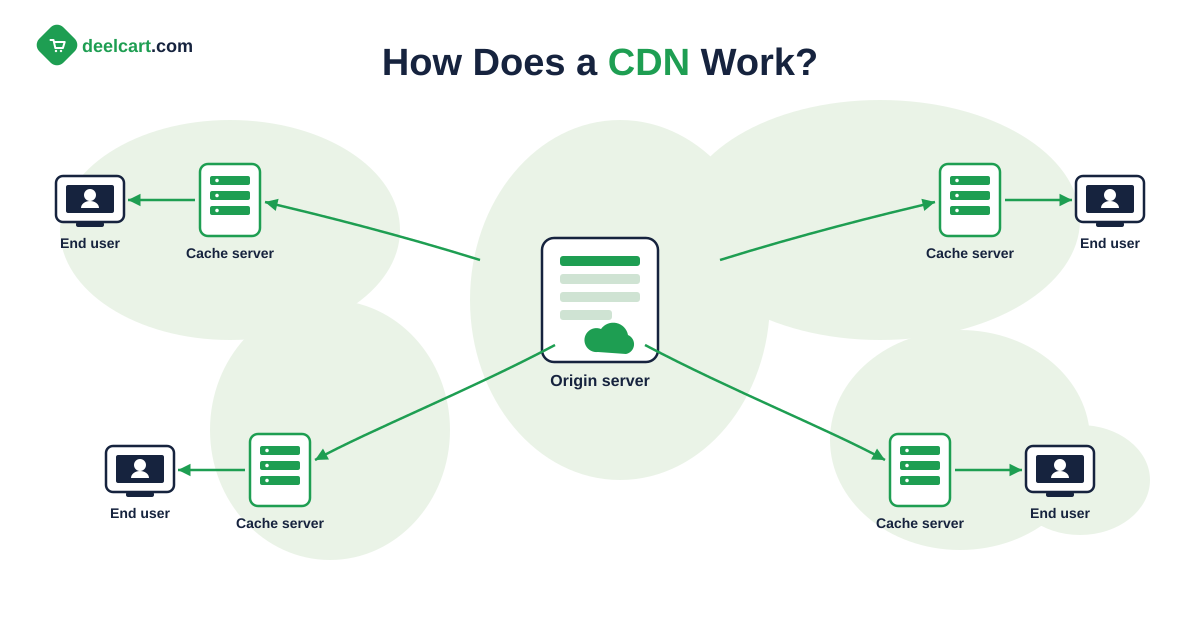
Understanding the mechanics helps explain both what CDNs do well and where their limits are.
Points of Presence
CDNs operate through a network of Points of Presence — often called PoPs or edge locations. Each PoP is a data centre with servers that can cache and serve your content. Major CDNs like Cloudflare, Fastly, and Akamai have hundreds of PoPs distributed across every populated continent.
When you configure a CDN for your website, traffic is routed through the CDN's network. The CDN handles the connection between the visitor and the edge server. The edge server either serves the file from its cache or fetches it from your origin server, caches it, and serves it.
Caching
The core mechanism of a CDN is caching — storing a copy of your files at the edge server so they can be served without going back to your origin on every request.
When a visitor requests a file that is already cached at the nearest edge server, the request never reaches your origin server. The edge server responds directly — faster, and without adding any load to your hosting.
When a visitor requests a file that is not yet cached — the first request for that file at that edge location, or after the cache has expired — the edge server fetches it from your origin, caches it, and serves it. Subsequent requests for the same file from nearby visitors hit the cache.
Cache duration is controlled by HTTP headers — specifically Cache-Control — that your server sets. Static files like images, CSS, and JavaScript should have long cache durations — a year is common. Dynamic content like HTML pages may have short or zero cache duration, depending on how frequently the content changes.
What CDNs Cache and What They Do Not
Static assets — images, CSS files, JavaScript files, fonts, videos, documents — are the primary use case for CDN caching. These files are the same for every visitor and change infrequently, making them ideal cache candidates.
Dynamic content — personalised pages, shopping cart contents, user-specific data, real-time information — is typically not cached by CDNs or cached with very short durations. A logged-in user's dashboard cannot be cached and served to every visitor — it is different for each user.
Modern CDNs handle this through cache segmentation — caching static assets while passing dynamic requests through to the origin, and through edge computing features that allow simple dynamic logic to run at the edge rather than at the origin.
What CDNs Actually Do for Your Website
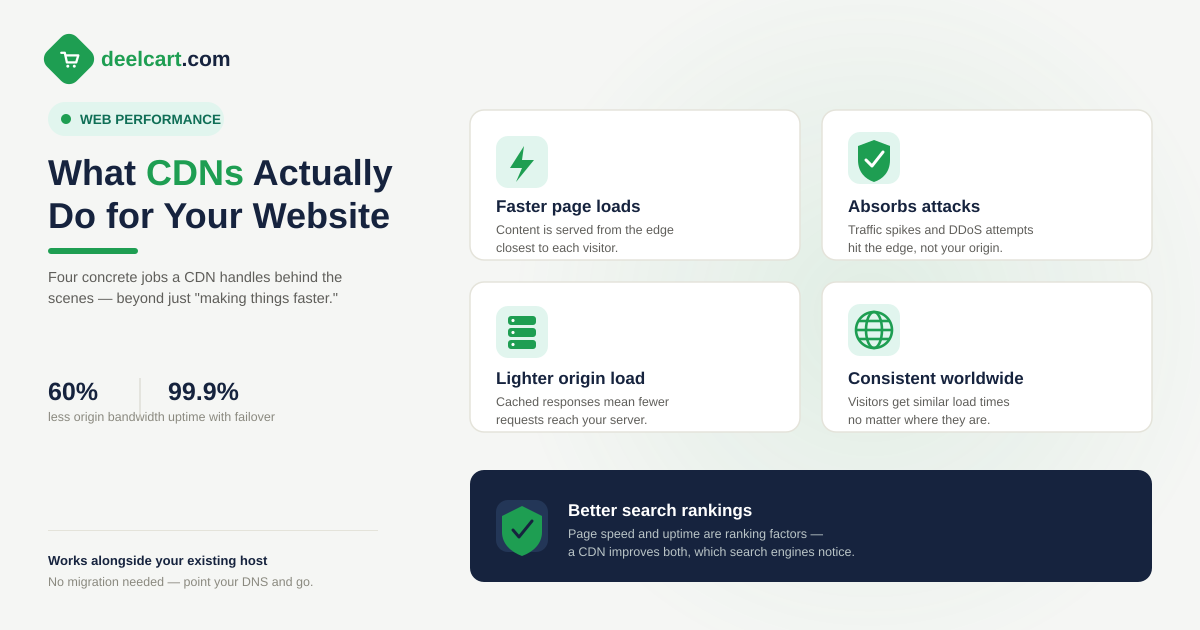
Beyond the basic caching and delivery mechanism, CDNs provide several concrete benefits.
Faster Load Times for Global Visitors
The primary and most significant benefit. Visitors geographically distant from your origin server get dramatically faster load times because they receive files from a nearby edge server rather than from a distant origin.
The latency reduction is largest for visitors farthest from your origin. A visitor in the same city as your server gets minimal benefit from a CDN — the round trip was already short. A visitor on the other side of the world gets the biggest benefit — potentially seconds of improvement in load time.
Reduced Load on Your Origin Server
When your CDN is caching effectively, a large proportion of requests never reach your origin server. The CDN handles them entirely. This means your origin server handles less traffic — which reduces the cost of hosting and improves its ability to handle traffic spikes.
For sites that receive sudden traffic spikes — a viral article, a product launch, a mention in a popular newsletter — CDN caching absorbs most of the spike traffic at the edge. Without a CDN, the spike hits your origin server directly and can overwhelm it.
DDoS Protection
Most CDNs include DDoS — Distributed Denial of Service — protection as part of their service. When an attacker sends massive volumes of traffic to your website to overwhelm it, the CDN absorbs and filters that traffic at the edge before it reaches your origin server.
Cloudflare in particular has become the industry standard for DDoS protection — its network capacity is large enough to absorb attacks that would overwhelm most origin hosting configurations. Even the free Cloudflare plan includes meaningful DDoS protection.
Automatic Compression
CDNs typically apply Brotli or Gzip compression to text-based assets automatically — reducing the size of HTML, CSS, JavaScript, and other text files before delivery. Smaller files transfer faster, improving load times for all visitors.
Some origin servers are not configured for compression. A CDN applied in front of an unoptimised origin can meaningfully improve performance through compression alone, even before caching benefits are counted.
SSL and HTTPS
CDNs handle SSL termination at the edge — they provide and manage SSL certificates for your domain and handle the HTTPS connection between the visitor and the edge server. The connection between the edge and your origin can be configured separately.
This simplifies SSL management and ensures HTTPS is available even if your origin server has a basic or self-signed certificate. Cloudflare provides free SSL certificates as part of its free plan.
HTTP/2 and HTTP/3
CDNs typically upgrade connections to HTTP/2 and HTTP/3 automatically. If your origin server is still using HTTP/1.1, the CDN can proxy the connection and serve visitors over HTTP/2 or HTTP/3 regardless.
HTTP/2 and HTTP/3 improve performance through multiplexing — handling multiple requests simultaneously over a single connection — and through faster connection establishment. For visitors on mobile networks, HTTP/3's improvements to connection reliability are particularly significant.
Do You Actually Need a CDN in 2026?
The honest answer is: it depends on your website and your visitors. Here is how to think through whether a CDN is worth it for your specific situation.
You Almost Certainly Need a CDN If:
Your visitors are geographically distributed. If your website has significant traffic from multiple continents or multiple countries far from your origin server, a CDN meaningfully improves the experience for distant visitors. A European website with 30% of its traffic from Asia or North America will see measurable improvement.
You have high traffic and want to reduce hosting costs. CDN caching reduces origin server load. For high-traffic sites, the reduction in origin requests can allow you to run on smaller, cheaper hosting. The CDN cost is often less than the hosting savings.
You want DDoS protection without enterprise pricing. Cloudflare's free plan provides meaningful DDoS protection that would cost thousands of dollars per month from specialist providers. If your site is at any meaningful risk of being targeted, Cloudflare is worth using for protection alone.
Your origin server is slow. If your hosting has a slow Time to First Byte — over 600 milliseconds — a CDN with aggressive caching can significantly improve perceived performance even for nearby visitors by serving cached responses faster than your origin can generate them.
You run a media-heavy site. Images, videos, and downloadable files benefit enormously from CDN delivery. A photography portfolio, a video hosting service, a software download site, or any site with substantial media files should use a CDN — the bandwidth cost savings alone often justify it.
You use WordPress or another dynamic CMS. WordPress generates pages dynamically from a database on every uncached request. A CDN with page-level caching — or a caching plugin that works well with CDN delivery — dramatically reduces the database load and improves response times.
You Probably Do Not Need a CDN If:
Your visitors are almost entirely local. A local business website serving customers in one city, a community site with hyperlocal membership, or a government service for a single municipality — if your visitors are in the same geographic area as your server, the latency reduction from a CDN is minimal.
Your site is low traffic and already fast. A personal blog with a few hundred monthly visitors served from well-configured hosting in the same region as those visitors is already fast. Adding a CDN adds configuration complexity without meaningful benefit.
Your content is highly dynamic and personalised. E-commerce checkout flows, user dashboards, real-time data applications — these cannot be cached at the CDN level and the CDN provides limited benefit for the dynamic portions of the page. Static assets can still be served through a CDN but the overall benefit is reduced.
You use a hosting platform that already includes CDN. Vercel, Netlify, Cloudflare Pages, and similar platforms serve your site from a global CDN by default — no separate CDN configuration needed. If your hosting already includes global CDN delivery, adding another CDN layer adds complexity without benefit.
The Free CDN Option — Cloudflare
For most websites in 2026, the CDN decision comes down to one question: should I put Cloudflare in front of my website?
Cloudflare offers a free plan that includes CDN delivery from its global network of over 300 PoPs, DDoS protection, automatic HTTPS and SSL, Brotli compression, HTTP/2 and HTTP/3, basic analytics, and basic caching rules.
This is extraordinary value. The same capabilities from competing CDNs would cost hundreds of dollars per month. Cloudflare's free plan is sustainable because their business model is selling advanced features to enterprise customers — the free plan funds the network growth that makes those enterprise features possible.
Setting up Cloudflare takes approximately 15 minutes — add your domain, update your nameservers to Cloudflare's, and your traffic is routed through their network. No code changes required.
The main consideration with Cloudflare is that your DNS moves to Cloudflare's control. This is not a problem for most websites — Cloudflare's DNS is fast and reliable — but some organisations have policies against moving DNS to third-party providers.
For the vast majority of websites — personal sites, small business sites, blogs, portfolios, small e-commerce stores — Cloudflare free is the answer to the CDN question. Use it.
When to Pay for a CDN
The free Cloudflare plan is sufficient for most websites. There are situations where paying for a CDN — either Cloudflare's paid plans or a competing CDN — makes sense.
You need advanced caching rules. Cloudflare free allows basic caching configuration. Complex caching logic — caching specific URL patterns with different TTLs, bypassing cache for authenticated users while caching for anonymous users, purging cache programmatically on content updates — requires a paid Cloudflare plan or a more advanced CDN.
You need image optimisation. Cloudflare's Image Resizing feature — automatic resizing and format conversion at the edge — is a paid feature. If your site has many images that need to be served at different sizes for different devices, paying for image optimisation at the CDN level can replace image processing infrastructure.
You need edge computing capabilities. Cloudflare Workers and similar edge compute features allow running JavaScript at the CDN edge — enabling personalisation, A/B testing, authentication, and other dynamic capabilities at CDN speed. These are paid features.
You have specific geographic or compliance requirements. Some CDNs offer specific data residency guarantees, HIPAA compliance, or specific regional PoP coverage that Cloudflare free does not provide.
You need advanced analytics and logging. Detailed CDN logs with request-level data, real-time analytics, and integration with observability platforms are typically paid features.
CDN vs Hosting — Understanding the Relationship
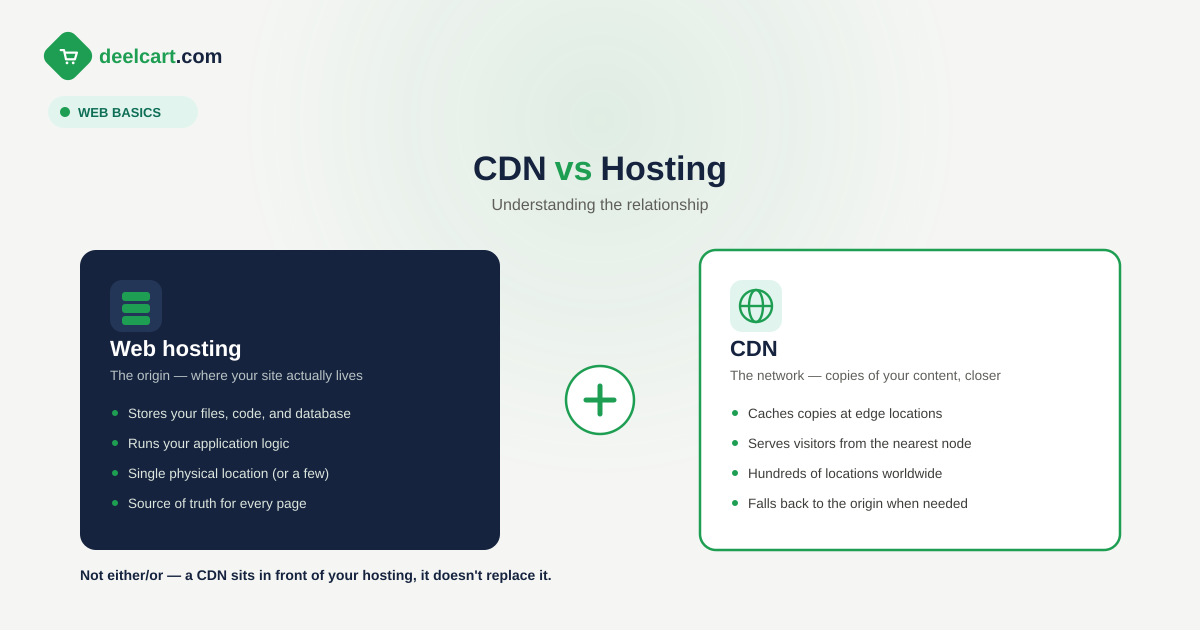
A CDN is not a replacement for hosting. It is a layer in front of your hosting.
Your origin server still needs to exist. It still needs to be capable of generating your pages, handling database queries, and processing requests that cannot be served from cache. A slow or unreliable origin server is still a problem even with a CDN in front of it — the CDN can mask the problem for cached requests but cannot fix it for uncached ones.
The right way to think about CDN and hosting is complementary — good hosting provides a fast, reliable origin. A CDN makes that fast origin available closer to every visitor in the world.
For a typical small website, the right combination in 2026 is affordable, well-configured shared or VPS hosting with Cloudflare free in front of it. This provides better global performance than expensive hosting without a CDN, at lower total cost.
Popular CDN Options in 2026
| CDN | Best For | Free Plan | Starting Price |
|---|---|---|---|
| Cloudflare | Most websites — best free tier | Yes — very generous | $20/month Pro |
| Fastly | Developer-focused, edge compute | Limited trial | Usage-based |
| AWS CloudFront | AWS-hosted applications | Free tier first year | Usage-based |
| BunnyCDN | Cost-effective media delivery | No | $0.01/GB |
| Akamai | Enterprise — largest network | No | Custom enterprise pricing |
| KeyCDN | Simple, affordable media CDN | No | $0.04/GB |
For most readers of this article, the answer is Cloudflare free. The others are worth knowing about but solve problems that most small and medium websites do not have.
Frequently Asked Questions
Does a CDN replace web hosting?
No. A CDN sits in front of your hosting — it caches and delivers your files globally but your origin server still needs to exist and handle requests that cannot be served from cache. Think of a CDN as a distribution layer on top of your hosting, not a replacement for it.
Will a CDN improve my Google rankings?
Indirectly yes. CDNs improve Core Web Vitals scores — particularly LCP — by serving files faster. Since Google uses Core Web Vitals as a ranking signal, better scores can improve rankings. The effect is most significant for websites with global traffic where visitors far from the origin currently experience slow load times.
Does Cloudflare slow down my website?
Occasionally, for very fast origins serving visitors in the same region, Cloudflare can add a small amount of latency — the cost of routing through an additional network layer. In practice this is measured in single-digit milliseconds and is outweighed by Cloudflare's other optimisations — compression, HTTP/2, and caching — for the vast majority of websites.
How does a CDN affect my website analytics?
CDN traffic is typically transparent to analytics tools like Google Analytics because the analytics JavaScript runs in the visitor's browser regardless of whether assets were served from a CDN. CDN-level analytics — request counts, cache hit rates, bandwidth — are separate and available in your CDN dashboard.
Can a CDN help with WordPress?
Yes significantly. WordPress generates pages dynamically which makes it inherently slower than static sites. A CDN combined with a caching plugin — WP Rocket, W3 Total Cache, or LiteSpeed Cache — caches generated pages at both the WordPress level and the CDN level. Visitors get pre-built cached pages rather than dynamically generated ones, dramatically improving load times. Cloudflare also has a specific WordPress plugin that integrates caching more tightly.
Is a CDN worth it for a new website?
For most new websites — yes, and especially because Cloudflare is free. Setting up Cloudflare takes 15 minutes and immediately provides faster delivery, DDoS protection, and automatic HTTPS. There is almost no downside for a new website with a global or even regional audience. The only reason to skip it is if your audience is entirely local and your hosting is already in the same region.
Justin is a self-taught developer who builds and runs DeelCart himself — from the articles to the server it runs on. He manages his own Linux infrastructure and writes guides based on tools and workflows he actually uses day to day.