How I Automatically Check Thousands of Time-Sensitive Listings for Expiration
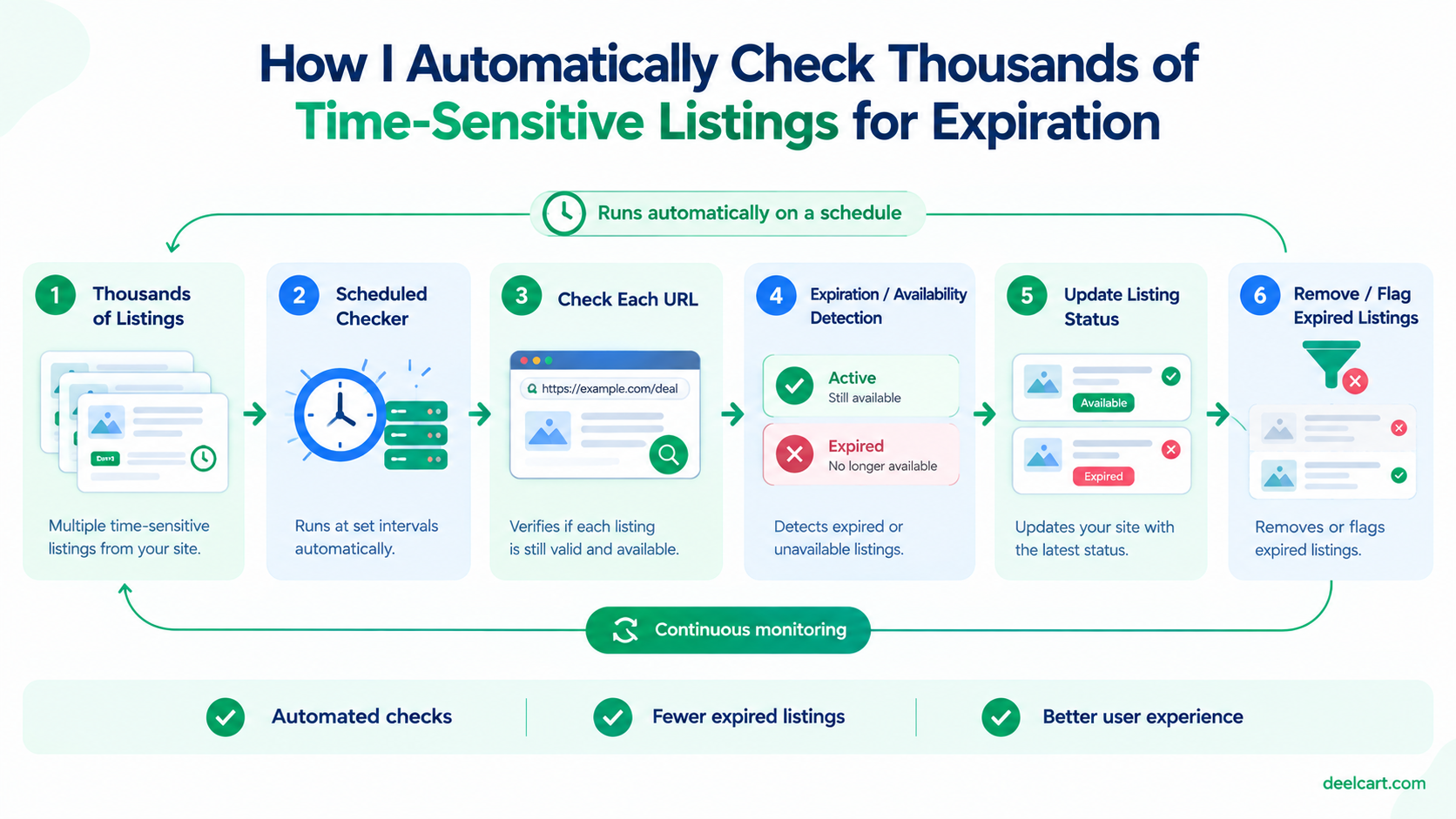
I run this kind of check across thousands of listings on one of my sites. This is the actual system behind it — including the part that's genuinely hard: doing this at scale without getting rate-limited or blocked by the sites you're checking.
Why a Simple Fetch Request Usually Isn't Enough
The naive version of a validity checker is a plain HTTP request to each URL, checking the status code. This works for some sites, and fails silently for a lot of others, for a few reasons:
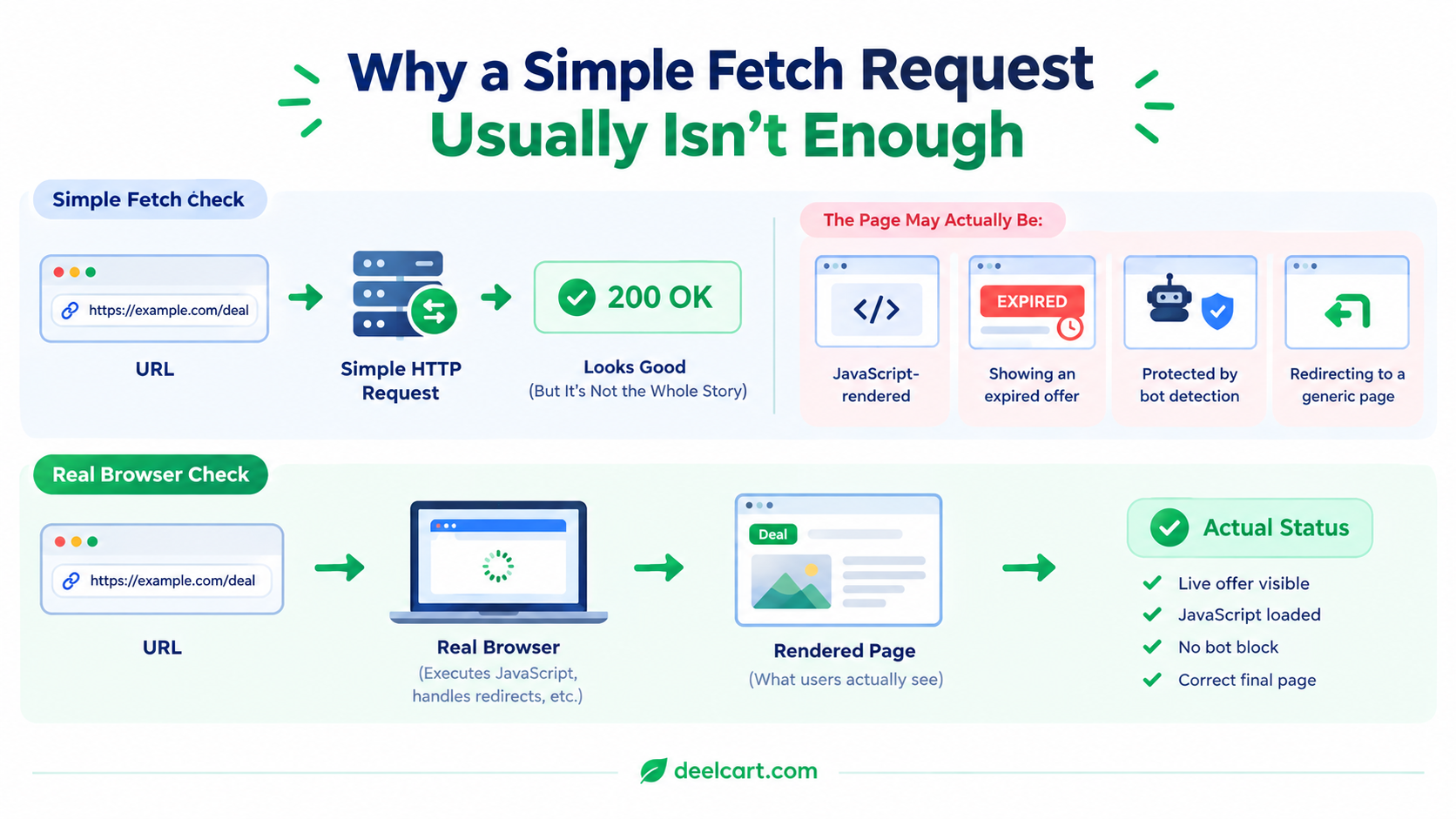
- Many pages are JavaScript-rendered. A plain HTTP GET returns the initial HTML shell before client-side JavaScript runs, which can mean the actual "this offer has expired" message never appears in the response you're checking — you'd see a 200 OK on a page that's visually showing an expired notice to a real visitor.
- Basic bot detection. Sites that get scraped frequently often have some layer of bot detection that a plain server-side HTTP request trips, returning a CAPTCHA page or a block response instead of the real content — which again shows up as "looks fine" if you're only checking the status code.
- Redirects that don't reflect reality. A dead offer sometimes redirects to a generic homepage with a 200 status rather than a 404, which a naive check reads as "still valid."
The Actual Approach: A Managed Headless-Browser API
Rather than running and maintaining my own headless browser infrastructure (which comes with its own real cost — proxy rotation, browser crash recovery, CAPTCHA handling, keeping Chromium updated), I use a managed scraping API service that handles the browser rendering and proxy rotation on their end. You send a URL, you get back the rendered page content, and the service deals with the infrastructure problems that would otherwise be a full project on their own.
The check itself looks roughly like this:
async function checkListingValidity(listing) {
  try {
    const response = await fetch('https://api.scraping-service.example/extract', {
      method: 'POST',
      headers: {
        'Authorization': `Bearer ${process.env.SCRAPE_API_KEY}`,
        'Content-Type': 'application/json',
      },
      body: JSON.stringify({ url: listing.url, browserHtml: true }),
      signal: AbortSignal.timeout(20000), // don't let one slow page hang the whole batch
    });

    if (!response.ok) {
      return { listingId: listing.id, status: 'check_failed' };
    }

    const { browserHtml } = await response.json();
    const isExpired = EXPIRATION_INDICATORS.some(text => browserHtml.includes(text));

    return { listingId: listing.id, status: isExpired ? 'expired' : 'valid' };
  } catch (err) {
    return { listingId: listing.id, status: 'check_failed', error: err.message };
  }
}
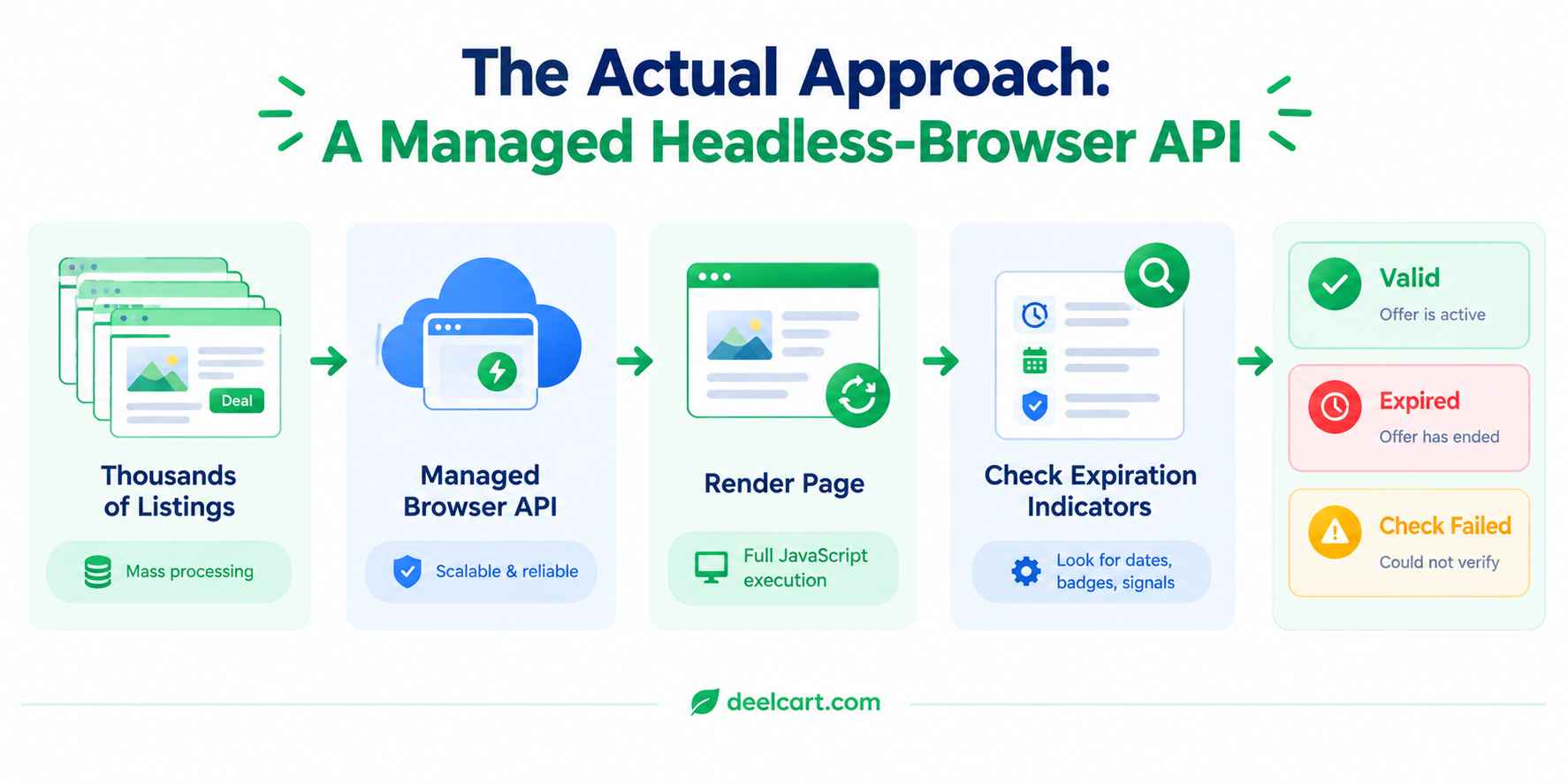
EXPIRATION_INDICATORS is a list of text snippets that reliably show up on an expired listing's page — this list has to be maintained by hand as you observe new phrasing, and it will occasionally need updating when a site changes its own wording.
The Timeout Is Not Optional
Notice the AbortSignal.timeout(20000) above. Without an explicit timeout, a single slow-to-respond page can hang a request far longer than you want, and if you're checking listings in any kind of batch or loop, one hung request can end up blocking or badly delaying everything behind it, depending on how the batch is structured.
In practice, some checks do time out — a page is slow, the rendering service is under load, or the target site is just having a bad moment. That's expected and needs to be handled as its own case (check_failed), not treated the same as a confirmed "expired" result. Conflating "we couldn't check this" with "this is confirmed dead" is a real mistake — it means a temporary network hiccup can cause you to wrongly unpublish something that's actually still perfectly valid.
Rate Limiting: The Part That Actually Matters at Scale
The single most important thing about running this at scale isn't the scraping logic — it's not hammering the sites you're checking. Firing off a few thousand requests as fast as possible is the fastest way to get every one of your requests blocked, and it's an unreasonable load to put on someone else's server for what is, from their side, just a health check.
I run checks in small batches with deliberate spacing between them, not as one massive parallel burst:
async function checkBatch(listings, batchSize = 5, delayMs = 2000) {
  const results = [];

  for (let i = 0; i < listings.length; i += batchSize) {
    const batch = listings.slice(i, i + batchSize);
    const batchResults = await Promise.all(batch.map(checkListingValidity));
    results.push(...batchResults);

    if (i + batchSize < listings.length) {
      await new Promise(resolve => setTimeout(resolve, delayMs));
    }
  }

  return results;
}
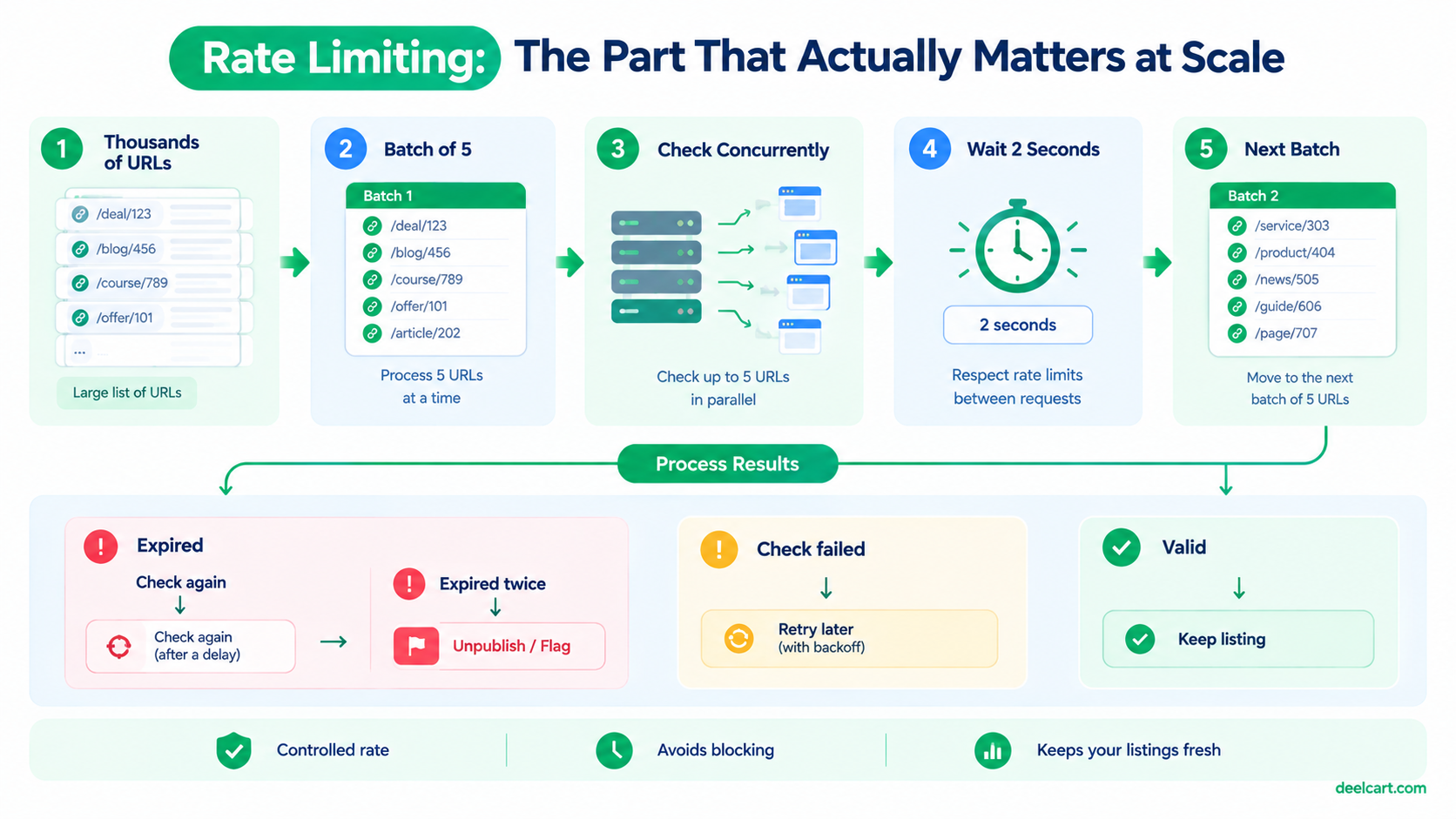
This runs a small number of checks concurrently, then deliberately pauses before the next batch, rather than firing everything at once. It's slower — checking thousands of listings this way takes real time rather than finishing in a few seconds — but it's the difference between a sustainable, long-running system and one that gets your checking IP range blocked within a day.
Deciding What To Do With a "Failed" vs. "Expired" Result
A result of expired is confident enough to act on directly — unpublish or flag the listing. A result of check_failed is not the same thing and shouldn't trigger the same action on the first occurrence. My actual rule: a listing only gets automatically unpublished after it comes back expired on two separate check cycles, not on the first one.
This one rule has prevented more false-positive unpublishing than anything else in the system. A single check_failed or a single ambiguous result doesn't mean much on its own — a pattern across two independent check runs is a much stronger signal that something is genuinely wrong rather than a one-off network blip.
What This Costs You If You Skip It
Skipping automated re-checking entirely doesn't just mean "some content becomes outdated eventually" — it actively erodes trust in the whole site. A visitor who clicks through to a dead or expired listing once will generalize that experience to the rest of your site, even if 95% of your listings are still perfectly valid. At any real scale, the cost of not running these checks compounds over time in a way that isn't obvious until you look at how old your oldest never-rechecked listings actually are.
Frequently Asked Questions
Why not just check listings when a user reports one as broken?
User reports are a useful supplementary signal, but they're reactive and incomplete — most visitors who hit a dead link just leave rather than reporting it, so you'd only catch a small fraction of actual dead listings this way. Proactive scheduled checking catches problems before very many visitors ever encounter them.
How often should listings actually be re-checked?
This depends entirely on how quickly your specific content type tends to go stale. Something with a fixed, known expiration date doesn't need re-checking before that date arrives; something with no fixed timeline benefits from a recurring check on a schedule (daily, weekly) tuned to how frequently you've actually observed it going stale in practice.
Is a managed scraping API worth the cost compared to running your own headless browser?
For a small number of checks, self-hosting a headless browser (via something like Puppeteer or Playwright) is cheaper and gives you full control. Once you're dealing with sites that have real bot detection, needing proxy rotation to avoid getting blocked, and running checks at a scale where browser crashes and memory leaks become a maintenance burden of their own, a managed service usually ends up cheaper in total time cost even though it has a direct per-request price.
What's the biggest mistake people make building something like this?
Treating "the check failed" and "the listing is confirmed expired" as the same outcome. They're not, and conflating them is the single most common way this kind of system ends up wrongly unpublishing content that was actually fine — usually because of a transient network issue, a temporary rate limit, or the checking service itself having a bad moment.
Further Reading
Justin is a self-taught developer who builds and runs DeelCart himself — from the articles to the server it runs on. He manages his own Linux infrastructure and writes guides based on tools and workflows he actually uses day to day.