Static Site Generators vs Traditional CMS: What's Right for Your Project?
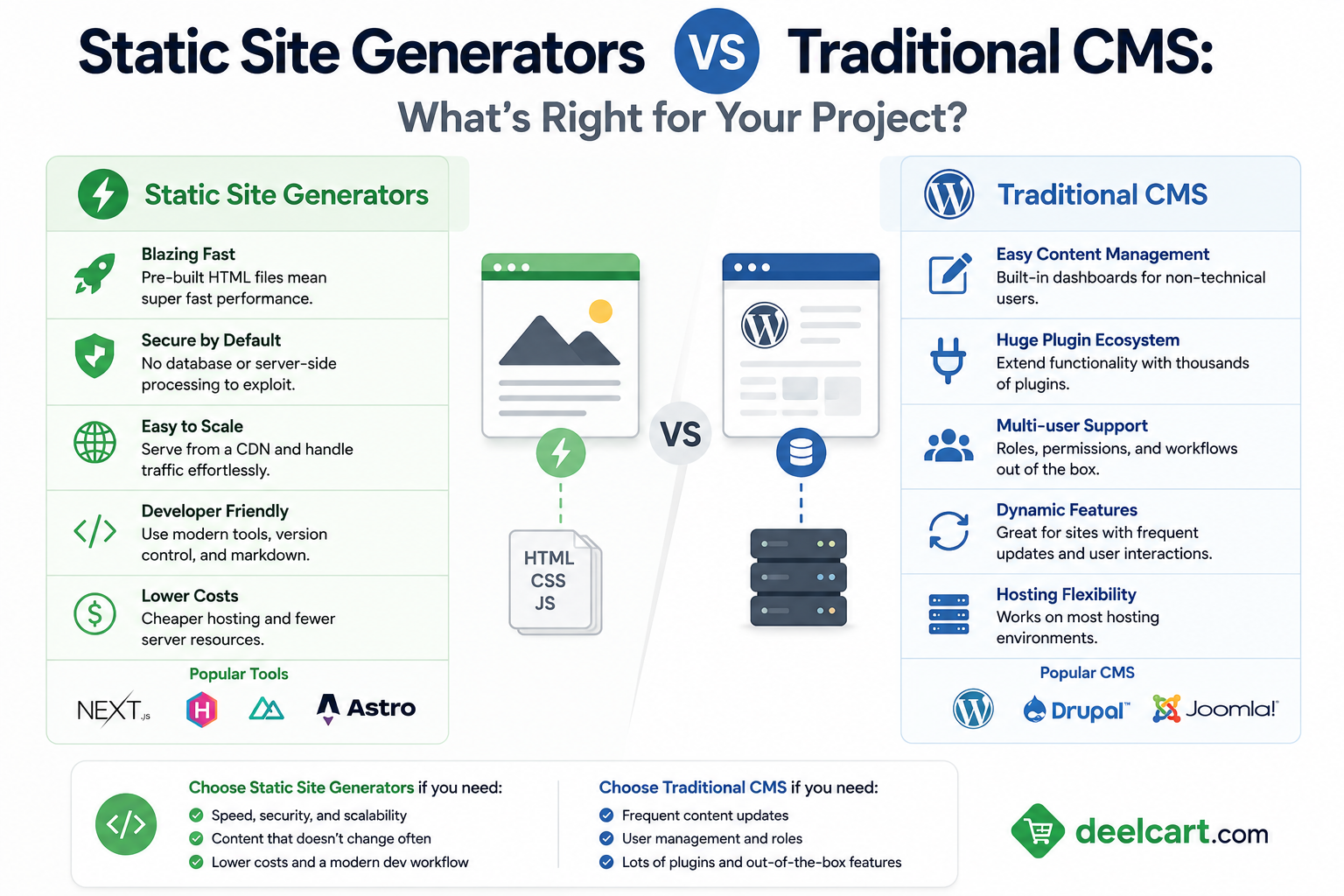
Then static site generators arrived and complicated the picture. Jekyll, Hugo, Gatsby, Next.js, Astro — tools that pre-build your entire website into static HTML files and serve them directly from a CDN without a database or server-side rendering in the request path.
Both approaches work. Both have genuine strengths. The right choice depends on your project, your team, and your priorities — and getting it wrong means either rebuilding sooner than you planned or living with a tool that fights you instead of helping you.
This guide covers both approaches honestly — what each one is, where each one wins, and how to choose the right one for your specific situation.
What Is a Traditional CMS?
A traditional CMS is a server-side system that stores content in a database and generates pages dynamically on every request. When a visitor loads a page, the server queries the database, fetches the content, applies a template, and returns HTML to the browser.
WordPress is the most widely deployed traditional CMS — it powers approximately 43% of all websites on the internet in 2026. Drupal is the most powerful, favoured by government and enterprise organisations with complex content requirements. Joomla occupies the middle ground between the two.
Traditional CMSes have been refined over decades. They come with admin interfaces that non-technical users can operate independently, plugin ecosystems with thousands of extensions, and hosting solutions that handle the server infrastructure for you.
What Is a Static Site Generator?
A static site generator (SSG) is a build tool that takes your content — typically written in Markdown or pulled from a headless CMS — and your templates, and produces a complete set of static HTML, CSS, and JavaScript files. These files are then deployed to a CDN and served directly to visitors without any server-side processing.
Next.js is the most widely used in 2026 — technically a hybrid framework that supports static generation alongside server-side rendering. Astro has grown rapidly with its islands architecture that ships minimal JavaScript. Hugo is the fastest builder by far, processing thousands of pages per second. Gatsby pioneered the approach but has lost ground to newer options.
The key difference is when pages are generated. Traditional CMSes generate pages at request time — when a visitor asks for the page. Static site generators generate pages at build time — before any visitor requests them.
Performance
Performance is where static sites have their clearest and most consistent advantage.
A statically generated page is pre-built HTML sitting on a CDN. When a visitor requests it, the CDN delivers the file — no database query, no server-side rendering, no application code executing in the request path. The response time is limited only by the CDN's network speed and the file transfer time.
A dynamic CMS page requires the server to execute PHP or another language, query the database, wait for the query result, apply the template, and return the assembled HTML — all in the request path. Each of these steps adds latency.
With aggressive caching, WordPress and other traditional CMSes can approach static site performance. A properly configured WordPress site with a full-page cache — where the generated HTML is stored and served without querying the database — behaves much like a static site for cached pages. But the cache has to be warmed, has to be invalidated correctly when content changes, and requires careful configuration to avoid serving stale content.
Static sites have no equivalent complexity. There is no cache to configure, no cache invalidation to manage, no risk of a cache miss causing a slow response. Performance is consistently fast by default.
Core Web Vitals impact: Google uses Core Web Vitals as a ranking signal. Static sites consistently produce better LCP, CLS, and INP scores than equivalent dynamic sites — not because the content is better, but because the delivery architecture is faster and more predictable.
Winner on performance: Static site generators — significantly and consistently, with no configuration required.
Security
Every server-side application is an attack surface. WordPress in particular has a long history as a target for attackers — not because WordPress is poorly written, but because its market dominance makes it worth attacking. Automated bots continuously scan the internet for WordPress installations and probe known vulnerabilities.
A static site has a dramatically smaller attack surface. There is no database to SQL-inject. There is no PHP application to exploit. There is no admin login page for brute-force attacks. There is no plugin ecosystem with third-party code running server-side. The files served from a CDN are exactly the files you deployed — no server-side execution happens at all.
This does not mean static sites are completely immune to security concerns — the build pipeline, the hosting service, and any client-side JavaScript can have vulnerabilities. But the attack surface is genuinely smaller and the consequences of a compromise are generally less severe.
Traditional CMSes require ongoing security maintenance — keeping the core updated, keeping plugins updated, monitoring for vulnerability disclosures, and responding quickly when known exploits are published. Teams that do not maintain this discipline are running known-vulnerable software.
Winner on security: Static site generators — smaller attack surface by architecture.
Scalability
Static sites scale effortlessly. A page served from a CDN handles one visitor or one million visitors with identical performance — CDNs are designed for exactly this. There is no application server to overload, no database connection pool to exhaust, no memory pressure from concurrent requests.
Traditional CMSes require infrastructure planning to handle traffic spikes. A shared hosting WordPress site that receives a sudden surge of traffic — from a viral article or a product launch — will likely slow down or go offline. Handling traffic spikes on a dynamic CMS requires either over-provisioning servers to handle peak load or implementing auto-scaling, which adds complexity and cost.
Caching reduces this problem significantly — a fully cached WordPress page requires almost no application resources to serve. But getting caching right requires effort and expertise, and cache misses under load can cascade into slow database queries that bring the site down.
Winner on scalability: Static site generators — scales to any traffic level by default.
Content Management Experience
This is where traditional CMSes have their clearest advantage — and where the gap between the approaches is most significant.
WordPress's admin interface is one of the most widely recognised software interfaces in the world. Non-technical users — writers, editors, marketing managers, business owners — can log in, create a post, add images, set categories, and publish without any technical knowledge. The interface is intuitive, extensively documented, and familiar to an enormous number of people.
Static site generators have no equivalent built-in content management. Content is typically written in Markdown files stored in a Git repository. For technical users this is often preferable — Markdown is fast to write, version control is built in, and content lives alongside code. For non-technical users this is a significant barrier — editing a Markdown file in a Git repository is not something a marketing manager or business owner can do independently.
Headless CMSes bridge this gap. Tools like Contentful, Sanity, Strapi, Prismic, and Netlify CMS provide a WordPress-like admin interface while delivering content via API to a static site generator at build time. This gives you the editorial experience of a traditional CMS with the performance and security benefits of a static site. But it adds an additional tool, additional cost, and additional complexity to the stack.
Winner on content management: Traditional CMS — significantly better out-of-the-box editorial experience without additional tools.
Developer Experience
For developers, static site generators are generally the more enjoyable and productive environment.
Modern SSG frameworks — Next.js, Astro, Nuxt — use contemporary JavaScript tooling, component-based architecture, and modern deployment workflows. Code lives in Git, changes are reviewed in pull requests, deployments happen automatically via CI/CD, and the development environment is fast and reliable.
WordPress development — writing PHP templates, navigating the WordPress hook system, dealing with the global state that runs through much of WordPress core — feels dated by comparison. The gap between writing a React component in Next.js and writing a WordPress PHP template is significant, and most developers find the former more productive and more pleasant.
The WordPress developer ecosystem is also complicated by years of accumulated legacy. Best practices from 2015 conflict with best practices from 2020 conflict with best practices from 2025. Finding good, current, opinionated guidance for WordPress development is harder than finding equivalent guidance for Next.js or Astro.
Winner on developer experience: Static site generators — especially for developers coming from modern JavaScript backgrounds.
Cost
The cost comparison depends heavily on scale and stack choices.
Static site hosting is often free or nearly free for moderate traffic levels. Vercel, Netlify, Cloudflare Pages, and GitHub Pages all offer generous free tiers for static sites. Deployment is automated. Infrastructure management is zero. For small to medium sites, hosting a static site costs essentially nothing.
WordPress hosting ranges from a few dollars per month on shared hosting to hundreds of dollars per month on managed WordPress hosting like WP Engine or Kinsta. Shared hosting is cheap but unreliable under load. Managed hosting is expensive but handles updates, security, and performance optimisation.
Headless CMS costs change the picture for static sites. If you need a headless CMS for editorial workflow, Contentful's free tier is limited and paid plans start at $300 per month. Sanity and Prismic have more accessible pricing but still add cost. A static site with a paid headless CMS can cost significantly more than a WordPress site on managed hosting.
Development cost often favours WordPress for simple sites — there are thousands of WordPress themes and plugins that handle common requirements without custom development. Static sites require more custom development to achieve equivalent functionality.
Winner on cost: Depends on stack. Static site hosting alone is cheaper. Static site with headless CMS can be more expensive. WordPress shared hosting is the cheapest overall option. WordPress managed hosting is comparable to or more expensive than headless CMS options.
SEO
Both approaches can achieve excellent SEO. The difference is how much effort is required.
Static sites have natural SEO advantages — fast load times, excellent Core Web Vitals scores, clean HTML with no server-generated bloat, and reliable uptime. These are real advantages that translate to ranking signals.
WordPress has decades of SEO tooling built up around it. Plugins like Yoast SEO and Rank Math provide comprehensive on-page optimisation guidance, automatic sitemap generation, structured data support, and breadcrumb markup — features that require custom development on static sites.
The honest SEO comparison is that a well-configured WordPress site with good hosting and proper caching can match a static site on technical SEO. The static site gets there more easily and with less maintenance. Both can rank well — the content quality, backlink profile, and authority of the site matter far more than the underlying technology for the vast majority of SEO outcomes.
Winner on SEO: Tie — static sites win on technical performance by default, WordPress wins on tooling richness.
Real-World Use Cases
When Static Site Generators Win
Marketing websites and landing pages with stable content that rarely changes are perfect for static generation. A company website, a product landing page, a documentation site — content is updated infrequently, traffic can be high, and performance matters for conversion. These are the original and best use cases for static generation.
Documentation sites are among the clearest wins for static generation. Docs are written in Markdown by developers, live in Git alongside code, and need to be fast and searchable. Docusaurus, MkDocs, and similar SSG-based documentation tools have become the standard for developer documentation.
Developer portfolios and personal blogs where the author is comfortable with Markdown and Git. The editorial workflow of writing in a text editor and pushing to Git is natural for developers and produces excellent results.
High-traffic media sites where performance and scalability are critical and content is published by a technical team comfortable with the editorial workflow. The New York Times, Shopify, and other large organisations have moved portions of their content to static generation for performance reasons.
E-commerce at scale using static generation for product pages — pre-building thousands of product pages and serving them from a CDN — while using API calls for cart and checkout functionality. This produces excellent product page performance without sacrificing dynamic commerce capabilities.
When Traditional CMS Wins
Sites with non-technical content editors who need to publish independently without developer involvement. A local business whose owner updates their own website, a nonprofit where volunteers publish news, a media organisation with a team of non-technical writers — these situations require the accessibility of a WordPress-style admin interface.
Content-heavy sites with complex editorial workflows — multiple authors, editors, approval workflows, content scheduling, content versioning. WordPress handles this out of the box. Replicating it with a static site generator and headless CMS requires significant custom development.
Sites requiring complex dynamic functionality tightly integrated with content — e-commerce with complex product relationships and real-time inventory, membership sites with gated content, community platforms with user-generated content. While all of these can be built with a static front end and API back end, the architecture is more complex and the development investment is higher.
Projects with tight timelines and limited budget where WordPress themes and plugins dramatically accelerate delivery. A functional WordPress site can be built and deployed by a single developer in days using existing themes and plugins. An equivalent static site requires more custom development.
Sites where the client will self-manage ongoing changes without technical support. The client independence that WordPress provides is genuinely valuable — a client who can update their own website without calling a developer saves ongoing maintenance cost for everyone.
The Hybrid Approach — Jamstack and Headless CMS
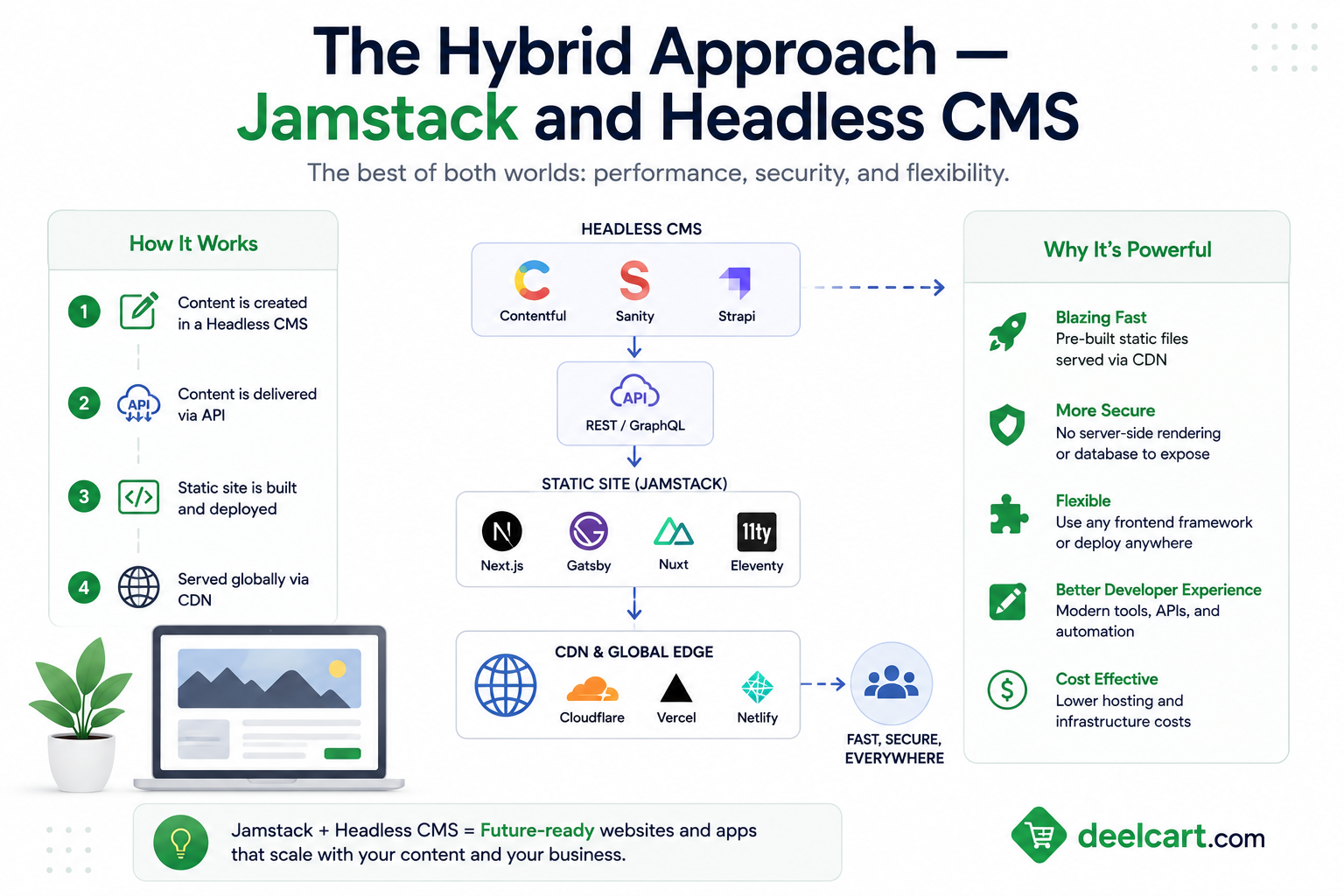
The binary choice between static generation and traditional CMS has been complicated by the rise of headless architectures.
A headless CMS separates the content management layer from the presentation layer. Editors manage content in a WordPress-like admin interface. A static site generator pulls that content via API at build time and generates the site. Visitors get a static, fast, secure site. Editors get a familiar content management experience.
This approach — sometimes called Jamstack — tries to capture the best of both worlds. It largely succeeds on performance and security. The cost is added architectural complexity — you are now managing two systems instead of one, integrations between them, and build pipelines that trigger when content changes.
Popular headless CMS options in 2026:
- Contentful — most mature, generous free tier, enterprise-grade
- Sanity — flexible schema, real-time collaboration, developer-friendly
- Strapi — open source, self-hostable, full control over data
- Prismic — slice-based content modelling, strong Next.js integration
- WordPress as headless — use WordPress for content management and its REST API or GraphQL endpoint to feed a static front end — combines familiar editing with modern front-end tooling
Choosing the Right Approach
| Your Situation | Best Choice |
|---|---|
| Marketing site with stable content | Static site generator |
| Non-technical client needs to self-manage | Traditional CMS |
| Documentation site | Static site generator |
| Blog with multiple non-technical authors | Traditional CMS or headless CMS |
| Developer portfolio or personal blog | Static site generator |
| E-commerce store | Traditional CMS with WooCommerce or headless |
| High-traffic content site needing performance | Static site generator with headless CMS |
| Tight deadline, limited budget | Traditional CMS with existing theme |
| Complex membership or community site | Traditional CMS |
| Developer-managed content in Git | Static site generator |
Frequently Asked Questions
Is WordPress dead in 2026?
No. WordPress powers 43% of the internet and that number has not declined significantly despite the rise of static site generators. It remains the most practical choice for non-technical users and content-heavy sites. Static site generators have taken market share in specific categories — developer tools, documentation, performance-critical marketing sites — but WordPress's dominance in the broader web market is unchanged.
Can a static site have dynamic features like forms, search, and comments?
Yes — through client-side JavaScript and third-party services. Forms can be handled by Netlify Forms, Formspree, or a serverless function. Search can be implemented with Algolia or Pagefind. Comments can be handled by Disqus or a custom serverless endpoint. These integrations work well but each adds complexity and potential cost that a traditional CMS handles natively.
How often does content need to change to make static generation impractical?
Frequency alone is rarely the limiting factor — modern static site platforms rebuild and deploy in seconds to minutes for most sites. The limiting factor is editorial workflow. If content needs to be published by non-technical users, the Markdown-in-Git workflow is impractical regardless of frequency. If content is published by developers or through a headless CMS with automated build triggers, frequent updates are handled well.
Is Next.js a static site generator?
Next.js is a hybrid framework that supports multiple rendering strategies — static site generation, server-side rendering, and incremental static regeneration — within the same project. Different pages can use different strategies. This makes Next.js more flexible than a pure SSG but also more complex. Astro and Hugo are purer static site generators. Next.js is better described as a full-stack React framework with static generation capabilities.
What is Incremental Static Regeneration?
Incremental Static Regeneration (ISR) is a Next.js feature that allows static pages to be updated in the background after deployment without rebuilding the entire site. A page can be configured to regenerate every hour, every day, or on demand via a webhook. This addresses one of the main limitations of static generation — the need to rebuild the entire site when content changes — by allowing individual pages to be refreshed independently.
Should I migrate my WordPress site to a static site generator?
Rarely, unless you have a specific performance, security, or cost problem that static generation would solve. Migration has significant cost — rebuilding templates, recreating functionality, training editors on new workflows, and migrating content. That cost needs to be justified by concrete benefits. If your WordPress site performs well, is secure, and your editors are happy, the case for migration is weak. If you are fighting constant security incidents, poor Core Web Vitals scores, or scaling problems, migration is worth evaluating.
Justin is a self-taught developer who builds and runs DeelCart himself — from the articles to the server it runs on. He manages his own Linux infrastructure and writes guides based on tools and workflows he actually uses day to day.