GitHub Copilot vs Claude Code: Which is Better for Teams in 2026?
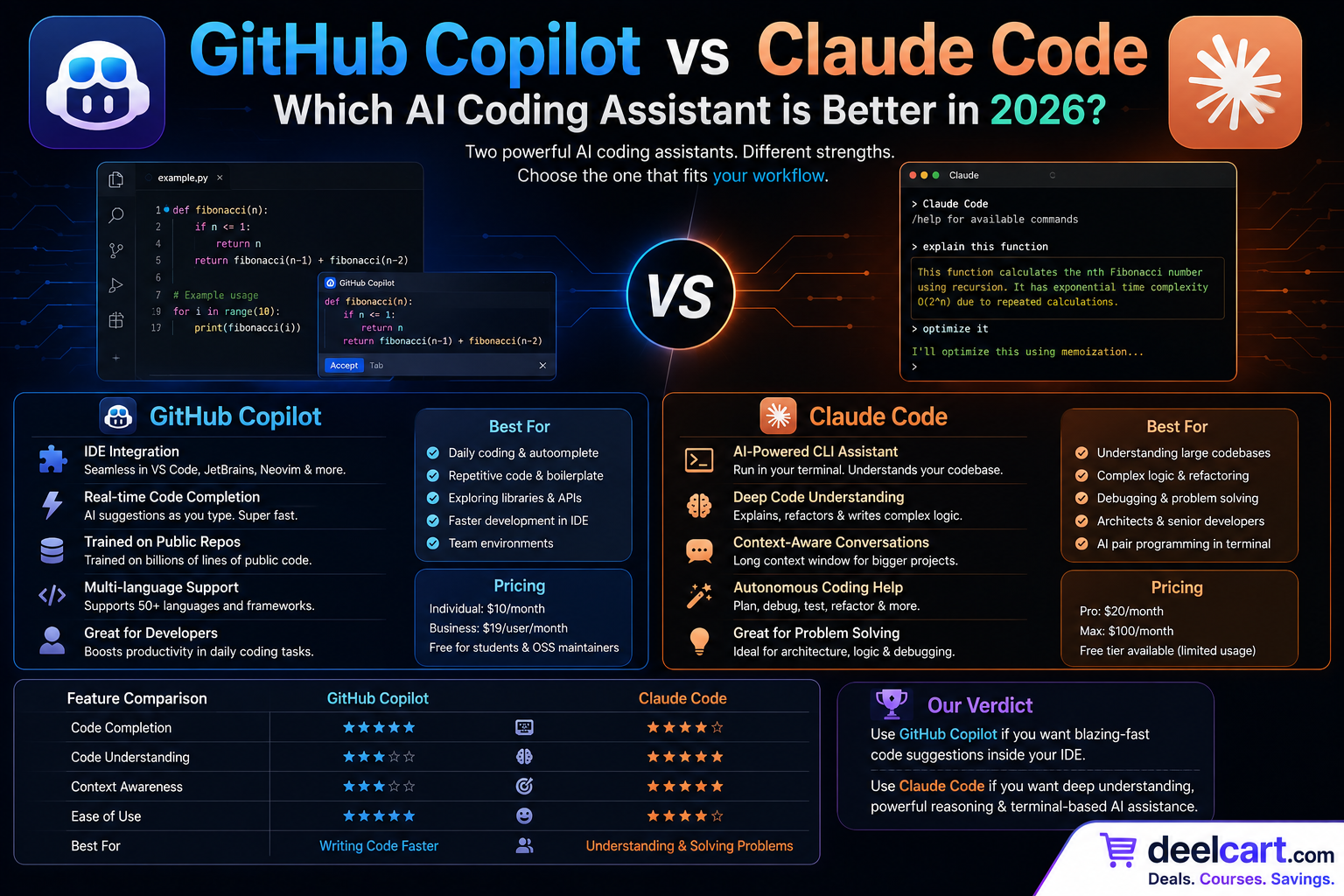
GitHub Copilot and Claude Code are the two most talked-about AI coding tools for professional engineering teams right now. They take fundamentally different approaches to AI-assisted development, and choosing the wrong one for your team's workflow can mean months of friction and lost productivity.
This guide compares GitHub Copilot and Claude Code across every dimension that matters for engineering teams — capabilities, workflow integration, pricing, security, and real-world performance — so you can make the right choice for your organisation.
The Core Difference
Before diving into the details, it helps to understand the fundamental philosophical difference between these two tools.
GitHub Copilot is an embedded coding assistant. It lives inside your editor and helps you write code faster — completing lines, suggesting functions, and answering questions in a chat panel. It works alongside you as you code, making the writing process faster and less repetitive.
Claude Code is an agentic coding tool. It operates in your terminal and can autonomously read files, write code, run commands, execute tests, and make changes across your entire codebase. Instead of assisting while you type, it handles entire tasks end to end while you review the results.
This distinction shapes everything else about how each tool fits into an engineering team's workflow.
GitHub Copilot — Overview
GitHub Copilot launched in 2021 and has become the most widely adopted AI coding tool in the world with over 1.8 million paid subscribers. It is built on OpenAI's models and deeply integrated into the GitHub ecosystem — which means it works naturally with pull requests, code review, Actions workflows, and repository management.
Core capabilities:
- Inline code completion: Suggests code as you type inside your editor, accepting with Tab
- Copilot Chat: Conversational AI panel inside VS Code, JetBrains, and other editors for questions, explanations, and refactoring
- Copilot in GitHub.com: Chat directly on GitHub — ask questions about repositories, get PR summaries, and review code changes
- Pull request summaries: Automatically generates descriptions of what changed in a PR
- Copilot Workspace: Plan and implement multi-file changes from a GitHub issue
- CLI assistance: Suggests and explains terminal commands
- Multi-model support: Choose between GPT-4o, Claude, and Gemini as the underlying model
- Visual Studio Code
- JetBrains IDEs (IntelliJ, PyCharm, WebStorm, etc.)
- Neovim
- Visual Studio
- Xcode (via extension)
- Azure Data Studio
Claude Code — Overview
Claude Code is Anthropic's agentic coding tool, launched in 2025 and rapidly adopted by engineering teams that need to handle complex, multi-file tasks rather than just inline suggestions. It runs as a CLI tool in your terminal and can be integrated into VS Code and other editors, but its primary interface is a conversational terminal session where you delegate tasks rather than write code yourself.
Core capabilities:
- Autonomous file operations: Reads, writes, creates, and edits files across your entire codebase
- Terminal command execution: Runs shell commands, test suites, build scripts, and more
- Multi-file refactoring: Makes coordinated changes across dozens of files in a single session
- Git operations: Creates branches, stages changes, writes commit messages, and opens PRs
- Debugging: Runs code, reads error output, diagnoses problems, and applies fixes iteratively
- Test writing and execution: Generates tests and runs them to verify they pass
- Extended thinking: Can reason through complex architectural problems before writing code
- MCP integration: Connects to external tools and data sources via Model Context Protocol
- Terminal (primary interface)
- VS Code extension
- GitHub Actions (via headless mode)
- Any environment with a command line
Head-to-Head Comparison
Code Quality
Both tools produce high-quality code, but in different contexts.
GitHub Copilot excels at in-context completions — when you are already in a file and it can see the surrounding code, it produces accurate, stylistically consistent suggestions that match your codebase's patterns. Its suggestions for common patterns, boilerplate, and well-established frameworks are fast and reliable.
Claude Code excels at complex, reasoned code generation. When a task requires understanding relationships between multiple files, planning an implementation approach, or solving a non-trivial algorithmic problem, Claude's underlying model produces more thoughtful, architecturally sound code. It is particularly strong at TypeScript, Python, and Rust.
For simple, repetitive coding tasks — filling in function bodies, writing getters/setters, completing obvious patterns — Copilot's inline suggestions are faster. For complex feature implementation, refactoring large modules, or solving hard bugs, Claude Code produces better results.
Winner: Tie — Copilot for speed on simple tasks, Claude Code for quality on complex ones.
Codebase Understanding
This is where the two tools differ most dramatically.
GitHub Copilot has awareness of the files you have open in your editor and some context from your repository. Copilot Workspace can work across a repository, but its understanding is limited to what fits in its context window.
Claude Code has deep codebase understanding. It actively reads files, follows imports, traces function calls, and builds a comprehensive picture of your project before making changes. When you ask it to implement a feature, it first explores the relevant parts of the codebase to understand existing patterns, then implements in a way that is consistent with how the rest of the project works.
For small projects or single-file tasks, this difference is minimal. For large codebases with complex interdependencies — monorepos, microservices, large legacy systems — Claude Code's ability to reason across the entire project is a significant advantage.
Winner: Claude Code — meaningfully better at understanding and working within large, complex codebases.
Editor Integration
GitHub Copilot wins decisively here. Its inline completion experience — the ghost text that appears as you type — is polished, fast, and available in every major editor. The workflow is frictionless: you write, Copilot suggests, you accept or ignore, you keep writing. There is no context switching.
Claude Code requires switching to a terminal session or a separate panel. For developers accustomed to never leaving their editor, this context switch takes adjustment. The VS Code extension improves this, but the experience is not as seamless as Copilot's inline suggestions.
Winner: GitHub Copilot — the inline editor experience is more integrated and frictionless.
Handling Complex Tasks
This is Claude Code's strongest category.
GitHub Copilot is excellent for incremental assistance — helping you write the next function, explaining a section of code, suggesting a fix for a specific error. It is not designed to handle tasks that span multiple files, require planning, or involve running and iterating on code.
Claude Code handles end-to-end tasks autonomously. You can say "add pagination to the user list API, write tests for it, and update the frontend component to handle the new response format" — and Claude Code will implement the entire feature across every relevant file, run the tests, fix any failures, and present you with a complete, working implementation to review.
For engineering teams working on features that span multiple files and services, this capability is transformative.
Winner: Claude Code — not close. Autonomous multi-file task completion is its core strength.
GitHub and CI/CD Integration
GitHub Copilot is deeply integrated with GitHub. It works natively in the GitHub web interface, understands repository context, summarises pull requests, and integrates with GitHub Actions. For teams whose workflow is centred on GitHub, this native integration is genuinely valuable.
Claude Code also integrates with GitHub but through a different model. Claude Code can run in GitHub Actions as a headless agent — you can trigger it on issues or PRs to perform tasks automatically. The @claude mention in a GitHub issue can trigger Claude Code to analyse the problem and open a PR with a fix.
Winner: GitHub Copilot for native GitHub UI integration. Claude Code for automated CI/CD agent workflows.
Security and Privacy
Both tools have enterprise security options, but with different approaches.
GitHub Copilot Enterprise:
- Code snippets are not used to train models by default
- IP indemnification for generated code
- Private model fine-tuning on your codebase (Copilot Custom Models)
- SOC 2 Type II compliant
- Integration with GitHub Advanced Security
- Conversations are not used to train models by default on paid plans
- SOC 2 Type II compliant
- No code retention on API calls
- Can be run in air-gapped environments via the API with appropriate setup
Winner: Tie — both meet enterprise security requirements. GitHub Copilot's IP indemnification is a notable advantage for risk-conscious organisations.
Pricing
GitHub Copilot:
- Individual: $10/month
- Business: $19/user/month
- Enterprise: $39/user/month
- Usage-based pricing via Anthropic API
- Pro plan: $20/month with Claude Code access included
- Max plan: $100/month for heavy usage
- Team and Enterprise plans available with negotiated pricing
Winner: GitHub Copilot for predictable team pricing. Claude Code for flexible individual or selective use.
Which Tool Is Right for Your Engineering Team?
| Your Situation | Best Choice |
|---|---|
| Fastest inline code completion | GitHub Copilot |
| Complex multi-file feature implementation | Claude Code |
| Deep GitHub and PR workflow integration | GitHub Copilot |
| Large or complex codebase navigation | Claude Code |
| Predictable per-seat team pricing | GitHub Copilot |
| Automated CI/CD agent workflows | Claude Code |
| Refactoring large legacy codebases | Claude Code |
| Writing tests automatically | Claude Code |
| Junior developers learning to code | GitHub Copilot |
| IP indemnification requirement | GitHub Copilot Enterprise |
The Case for Using Both
The most productive engineering teams in 2026 are not choosing between Copilot and Claude Code — they are using both for different parts of their workflow.
A practical setup looks like this:
- GitHub Copilot stays active in the editor at all times for inline completion, quick explanations, and PR summaries — the constant low-friction assistance that speeds up daily coding
- Claude Code is invoked for larger tasks — implementing a feature from a ticket, refactoring a module, writing a test suite, debugging a complex issue — where autonomous multi-file operation saves hours of work
Real-World Use Cases
Use GitHub Copilot when:
- Writing a new function and want suggestions as you type
- You need a quick explanation of an unfamiliar code pattern
- Reviewing a pull request and want an AI summary of the changes
- Writing repetitive boilerplate — tests, getters, serializers
- Onboarding junior developers who benefit from inline learning
- Implementing a new feature that touches multiple files and services
- Refactoring a large module or migrating to a new pattern across the codebase
- Debugging a complex issue that requires reading logs, running code, and iterating
- Writing and running a complete test suite for an existing module
- Setting up a new project structure from scratch
- Making a breaking API change and updating all consumers automatically
Frequently Asked Questions
Can Claude Code replace GitHub Copilot entirely?
For most developers, no. Claude Code does not provide the same real-time inline completion experience that Copilot delivers as you type. If you want AI suggestions appearing as you write code in your editor, you still need Copilot or a similar tool. Claude Code is better thought of as a complementary tool for larger autonomous tasks.
Is Claude Code safe to use on proprietary codebases?
Yes, on paid Anthropic plans. Code processed through the API is not used to train models, and Anthropic is SOC 2 Type II compliant. For organisations with strict data residency requirements, check Anthropic's enterprise data processing agreements before deploying.
Which tool is better for junior developers?
GitHub Copilot. Its inline suggestions teach juniors how code should be written by showing them idiomatic patterns as they type. The learning experience is built into the workflow. Claude Code is more suited to experienced developers who can effectively delegate tasks and critically review AI-generated output.
Does GitHub Copilot work with Claude's models?
Yes. GitHub Copilot supports multiple underlying models including Claude. You can switch to Claude as the model powering Copilot Chat in your editor settings. This means you can get Claude's reasoning quality within the Copilot interface.
How much does it cost to run Claude Code for a full engineering team?
This varies significantly based on usage. Teams that use Claude Code for large tasks daily can spend $50 to $200+ per developer per month on API costs. Teams that use it selectively for complex tasks will spend significantly less. Anthropic's Max plan at $100/month provides a high usage ceiling for individual heavy users. Enterprise pricing is available for large teams.
Conclusion
GitHub Copilot and Claude Code are both excellent tools that solve genuinely different problems.
GitHub Copilot is the right choice if your team wants frictionless, always-on AI assistance embedded in the editor, deep GitHub integration, and predictable per-seat pricing. It is the safe default for most engineering teams adopting AI for the first time.
Claude Code is the right choice if your team frequently handles complex multi-file tasks, large codebase refactoring, or wants to automate entire development workflows with an AI agent. Its ability to autonomously plan, implement, test, and commit code is unlike anything Copilot offers.
For teams serious about maximising developer productivity in 2026, the answer is not either-or — it is both, used strategically for the tasks each one handles best.
Justin is a self-taught developer who builds and runs DeelCart himself — from the articles to the server it runs on. He manages his own Linux infrastructure and writes guides based on tools and workflows he actually uses day to day.