Why Most Productivity Apps Fail Within a Month (and What Actually Sticks)
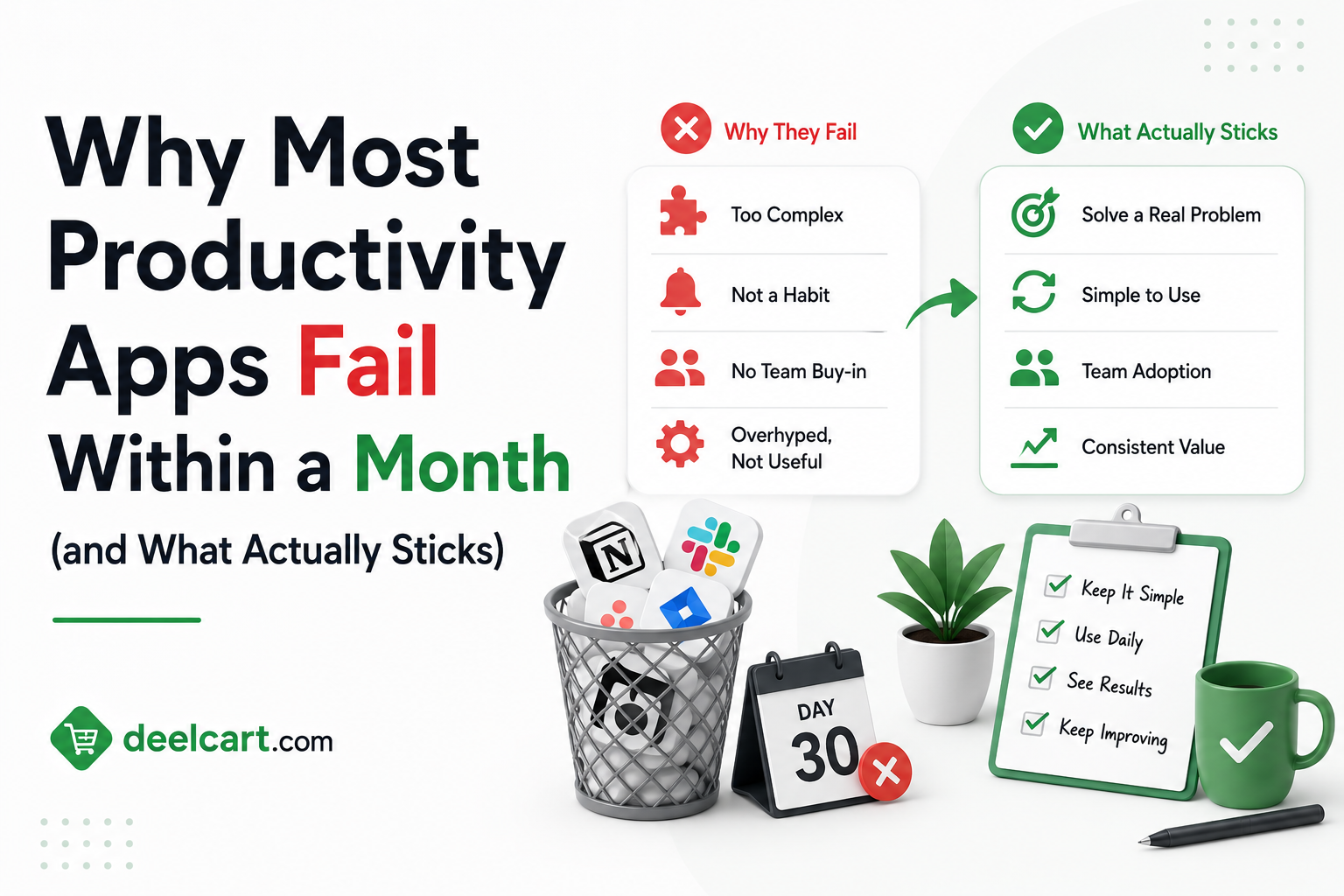
By February most of those apps are gathering dust in a folder on the second page of the home screen. The tasks are incomplete. The habits are abandoned. The system that felt so promising three weeks ago is now just another source of guilt.
This is not a willpower problem. It is not a motivation problem. It is a design problem — and understanding it changes how you think about productivity tools entirely.
The Productivity App Industry Has a Dirty Secret
The productivity app market is worth billions of dollars. Notion, Todoist, Things, TickTick, Obsidian, Roam, Asana, Monday, ClickUp — the list of tools promising to make you more organised, more focused, and more effective is essentially endless.
Here is what the industry does not advertise: the median new user stops actively using a productivity app within three to four weeks of downloading it. App store reviews are littered with people describing the same cycle — excited adoption, initial productivity boost, gradual abandonment, guilt, repeat with the next app.
This is not a coincidence. It reveals something fundamental about what productivity apps actually are versus what they claim to be.
Why Productivity Apps Feel Productive Without Making You Productive
Setting up a productivity system feels productive. Creating task lists, organising projects, designing your perfect workspace in Notion, building your habit tracker — all of these activities generate a sense of progress and control.
The problem is that the feeling of being organised is not the same as actually doing the work. Psychologists call this substitution — replacing a harder, more anxiety-inducing activity with a related but easier one that provides a similar emotional reward.
Writing a task list is easier than doing the tasks on it. Designing a beautiful Notion workspace is easier than writing the report you have been avoiding. The app provides the dopamine hit of accomplishment without the friction of actual output.
This is why the first week with a new productivity app almost always feels great. You are spending time in the app — setting things up, adding tasks, building your system. The activity feels purposeful. But most of what you are doing is meta-work — work about work — rather than actual work.
When the novelty wears off and the app stops feeling exciting, the reality emerges: the system requires maintenance, the tasks are still daunting, and the app has not changed anything fundamental about how you work.
The Real Reasons Apps Get Abandoned
The System Requires Too Much Maintenance
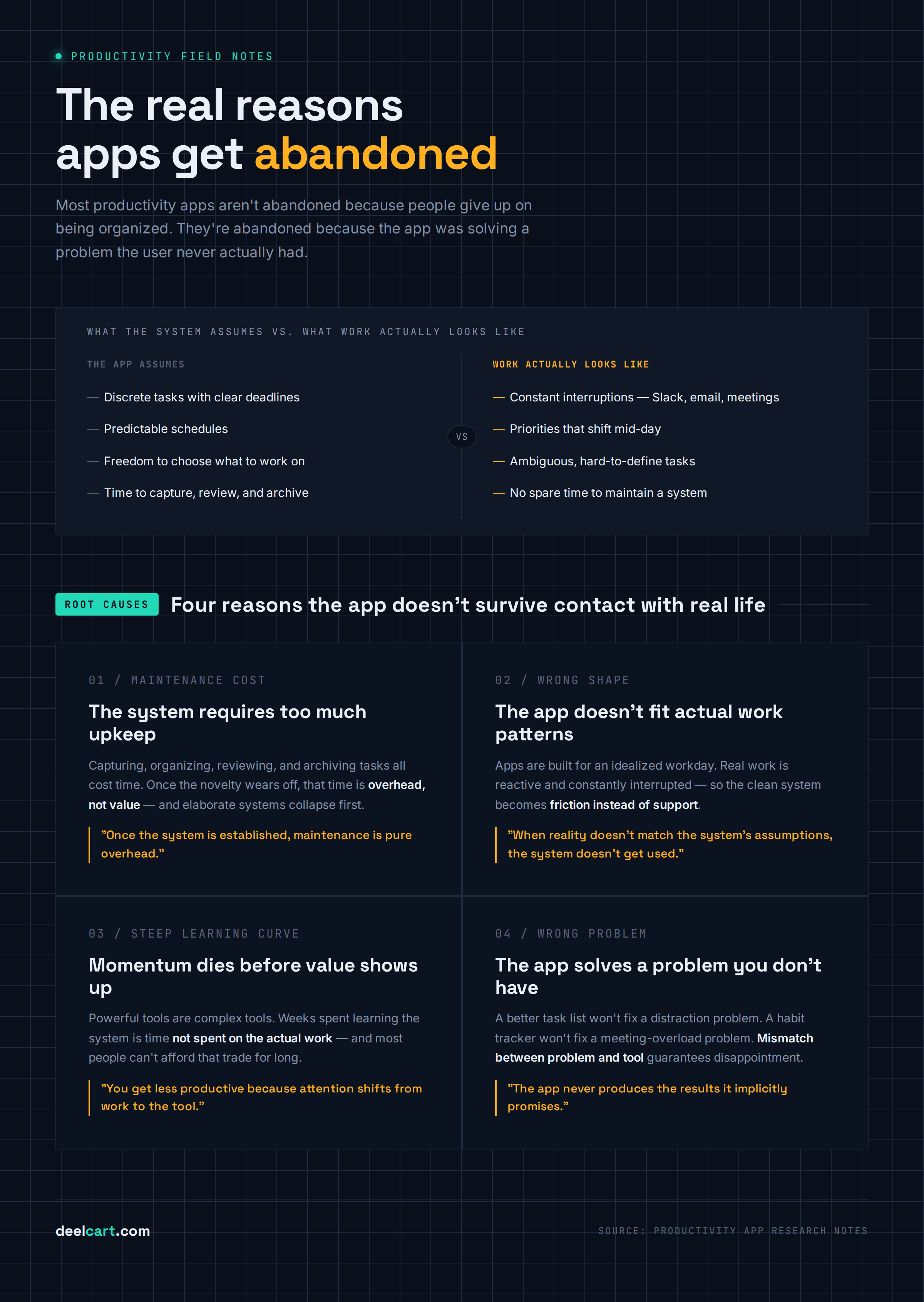
Every productivity system has a maintenance cost. Tasks have to be captured, organised, prioritised, reviewed, updated, and archived. Projects have to be structured. Recurring tasks have to be configured. Integrations have to be set up and maintained.
When the system is new, this maintenance feels like value creation — you are building something. Once the system is established, maintenance is pure overhead. You are spending time on the system instead of on the work the system is supposed to support.
The heavier the system, the higher the maintenance cost, and the more likely it collapses under its own weight. A person who builds an elaborate GTD system with dozens of contexts, areas of responsibility, and weekly review protocols is taking on significant ongoing maintenance. When life gets busy — which it always does — the review does not happen, tasks pile up unreviewed, the system becomes unreliable, and then it becomes useless.
The apps that survive long-term are almost always the ones with low maintenance overhead — where keeping the system current takes minutes rather than hours.
The App Does Not Fit Actual Work Patterns
Productivity apps are typically designed around an idealised version of how people work — discrete tasks, clear deadlines, predictable schedules, and the freedom to decide what to work on at any given moment.
Most people's actual work does not look like this. Work is reactive — emails, Slack messages, and meeting requests constantly interrupt planned work. Priorities change mid-day. Tasks are ambiguous and hard to define. Meetings consume blocks of time that were supposed to be focused work. The actual shape of work is messy in ways that clean task management systems are not designed to handle.
When reality does not match the system's assumptions, the system does not get used. An engineer in a meeting-heavy environment cannot follow a time-blocking schedule. A customer success manager responding to inbound requests all day cannot plan their work the way a task list assumes. The app becomes friction rather than support.
The Learning Curve Kills Momentum
Many productivity apps are designed to be powerful — which means they are complex. ClickUp, Notion, Obsidian with a plugin ecosystem, or any GTD implementation requires significant time investment before it produces value.
The classic productivity app trap is spending weeks learning the tool before you can use it effectively. During that time you are not getting more productive — you are getting less productive because you are redirecting attention from actual work to learning a tool.
Most people do not have weeks of reduced productivity to invest in a new system. When results are not visible quickly, the app gets abandoned before the learning curve is cleared.
The App Targets the Wrong Problem
The most common reason productivity apps fail is that they target task management — capturing and organising what needs to be done — but the user's actual problem is something else entirely.
If your productivity problem is that you get distracted by social media, a better task list does not help. If your problem is that meetings consume all your time, a habit tracker does not help. If your problem is that you consistently underestimate how long tasks take, a beautifully organised Notion workspace does not help.
Productivity apps are excellent tools for a specific type of problem — managing large volumes of tasks across multiple projects with multiple stakeholders. For people whose problem matches that description, productivity apps provide genuine value. For everyone else, the mismatch between problem and tool means the app never produces the results it implicitly promises.
What the Research Actually Says About Productive Habits
Decades of psychology research on habit formation, motivation, and behaviour change points toward conclusions that are somewhat uncomfortable for the productivity app industry.
Environment Design Beats Willpower
The single most reliable finding in behaviour change research is that changing your environment is more effective than trying to change your behaviour through willpower or motivation.
You are more likely to eat healthy food if healthy food is within arm's reach and junk food requires effort to access. You are more likely to exercise if your gym clothes are visible and your route to the gym is convenient. You are more likely to focus if your phone is in another room and your browser has social media sites blocked.
Most productivity apps are designed to change behaviour through better organisation and planning — they are software for your brain. The more powerful intervention is changing your physical and digital environment to make the behaviour you want the path of least resistance.
Productivity apps that address environmental design — blocking distracting sites, enabling Do Not Disturb, creating friction for off-task behaviour — have much higher long-term impact than apps that only help you organise tasks.
Implementation Intentions Work
Research by psychologist Peter Gollwitzer consistently shows that the most effective way to follow through on intentions is to attach them to specific situational cues — "I will do X when Y happens" rather than "I will do X."
"I will exercise" has much lower follow-through than "I will exercise at 7am Monday, Wednesday, and Friday immediately after dropping my kids at school."
The productivity tool implication is that scheduling specific tasks at specific times in a calendar is more effective than maintaining a task list. A calendar forces you to confront the reality of time constraints — you cannot schedule 12 hours of work into an 8-hour day. A task list has no such constraint and grows to contain everything you might ever do, making prioritisation difficult.
People who keep their task list in a calendar — blocking time for specific work — consistently outperform people who maintain sophisticated task lists but leave when they will do the work unspecified.
Small Wins and Completion Momentum
Behavioural research on motivation consistently shows that the feeling of progress is one of the most powerful drivers of continued effort. Teresa Amabile's research at Harvard found that making progress on meaningful work — even small progress — was the most common source of positive inner work life.
Productivity systems that produce visible progress — tasks completed, habits checked, goals moved forward — maintain motivation better than systems that only organise future work. The design implication is that tracking completion is as important as capturing tasks.
Apps that make completion visible and satisfying — a satisfying animation when a task is ticked, a streak counter for a habit, a progress bar for a project — are using this psychology deliberately. Apps that are purely organisational without completion feedback miss an important motivational mechanism.
Friction Kills Habits
Every additional step between the stimulus and the behaviour reduces the probability of the behaviour happening. James Clear popularised this as the Two-Minute Rule in Atomic Habits — making habits easier to start increases follow-through dramatically.
For productivity apps this means that apps requiring you to navigate to a specific view, select a project, add metadata, and then capture a task before you can record what you need to do have high friction and low adoption. Apps where capturing a task takes one tap or one keyboard shortcut have low friction and higher adoption.
The capture friction problem is particularly important because capturing tasks is the keystone behaviour of any task management system. If capture is inconvenient, the system does not get used. If the system does not get used, it does not represent reality. If the system does not represent reality, you cannot trust it, and you go back to keeping everything in your head.
What Actually Sticks — Patterns From Long-Term Productivity App Users
 Actually Sticks — Patterns From Long-Term Productivity App Users" style="max-width:100%;border-radius:8px;margin:16px 0;display:block;" />
Research into people who successfully maintain productive systems over years — rather than weeks — reveals consistent patterns.
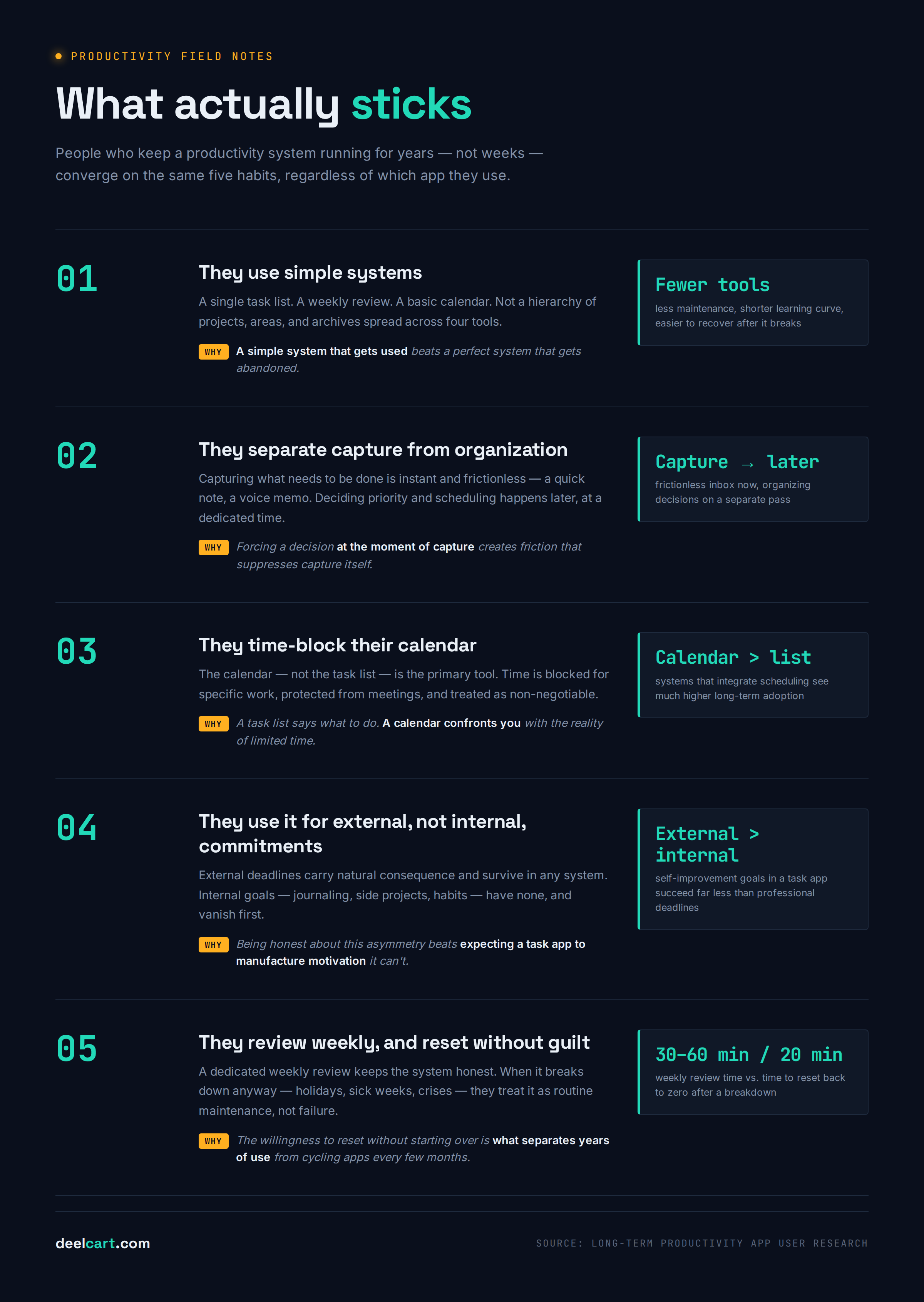
They Use Simple Systems
The most durable productivity systems are almost always simple. A single task list, a weekly review, a basic time-blocking calendar. Not a elaborate hierarchy of projects, areas, resources, and archives. Not a multi-tool ecosystem where information flows between Notion, Todoist, Google Calendar, and a habit tracker.
Simplicity reduces maintenance overhead. Simplicity reduces learning curve. Simplicity makes it easier to recover when the system breaks down — because systems always break down. A simple system that gets used is worth infinitely more than a perfect system that gets abandoned.
They Separate Capture from Organisation
The most effective productivity practitioners separate the act of capturing what they need to do from the act of deciding where it goes and when they will do it. Capture needs to be instant and frictionless — a quick note, a voice memo, an inbox item. Organisation happens later, at a dedicated time, when you have the attention to make good decisions about priority and scheduling.
Apps that conflate capture and organisation — requiring you to categorise, tag, and schedule a task at the moment you think of it — create friction that reduces capture. Apps with a frictionless inbox that gets processed later match how productive people actually work.
They Time-Block Their Calendar
The most consistently productive people across multiple studies and surveys use their calendar as their primary productivity tool — not a task list. They block time for specific types of work, protect that time from meetings, and treat calendar appointments with themselves as non-negotiable.
A task list tells you what to do. A calendar tells you when you will do it. The calendar is the more powerful constraint because it confronts you with the reality of limited time.
Productivity systems that integrate task management with calendar time-blocking — or that replace the task list with a calendar entirely — have much higher long-term adoption than systems that manage tasks and scheduling separately.
They Use Their System for External, Not Internal, Commitments
The most reliable predictor of whether a task management system gets used is the ratio of external commitments to internal ones.
External commitments — things you have promised to other people, deadlines set by others, deliverables your job depends on — have natural consequence. If you miss them, something bad happens. You will find these in your system regardless of how well the system is designed.
Internal commitments — things you want to do, personal projects, aspirational habits, long-term goals — have no natural consequence. If you skip a day of journaling or delay a personal project, nothing immediate happens. These are the tasks that disappear from systems first.
Effective productivity systems are honest about this asymmetry. They are excellent tools for managing external commitments and moderate tools for building intrinsically motivated personal projects. People who try to use productivity apps primarily to drive self-improvement goals — exercise habits, creative projects, learning goals — have much lower success rates than people using the same tools for professional task management.
They Review Weekly and Reset When They Fall Off
People who maintain productivity systems over years share two habits that short-term users typically lack.
The first is a weekly review — a dedicated 30 to 60 minute session where they look at the past week, update the system, plan the coming week, and ensure the system reflects reality. The weekly review is the maintenance habit that keeps the system from becoming stale and unreliable.
The second is the ability to reset without guilt after a breakdown. Systems break down. Holidays happen. Sick weeks happen. Major work crises happen. Effective productivity practitioners treat a system breakdown as a normal maintenance event — they spend 20 minutes getting back to inbox zero and updated tasks, and they move on. They do not treat a missed week as evidence that the system has failed and they should start over with a new app.
The willingness to reset without starting over is the difference between people who use productivity systems for years and people who cycle through new apps every few months.
The Apps and Tools That Actually Survive
Given all of this, which types of productivity tools tend to survive beyond the initial enthusiasm?
Simple task managers with low friction capture. Todoist, Things 3, and Apple Reminders — tools that make adding a task fast, that present tasks clearly, and that do not require maintenance-heavy organisation. These are not glamorous but they are reliable.
Calendar-first tools. Tools that integrate task management into the calendar — or products like Fantastical that present a unified view of tasks and calendar events — match how effective people actually work better than standalone task lists.
Distraction blockers. Freedom, Cold Turkey, and equivalent tools that remove distracting sites and apps address the actual productivity problem for many people — focus — rather than organisation. The behaviour change is environmental and therefore more durable.
Single-purpose habit trackers. Simple streak-based apps for one or two specific habits — not elaborate multi-habit tracking systems. The social accountability features in apps like Streaks, Habitica, or even a shared spreadsheet with a friend have outsized impact on follow-through.
Paper and pen. Consistently underrated. No maintenance overhead. No notifications. No features to learn. No updates. No subscription. A daily paper task list or a paper calendar is technology-free, infinitely flexible, and has zero friction. Many highly productive people use paper for daily planning and digital tools only for longer-horizon tracking and reference.
What to Do Instead of Downloading Another App
If your productivity app keeps failing you, the answer is probably not a new app. It is one of the following.
Diagnose the actual problem first. Are you struggling to track what needs to be done? A task manager helps. Are you distracted constantly? A blocker helps. Are your days consumed by meetings? A calendar audit helps. Are you avoiding hard work by doing easy work? No app helps — that is an emotional regulation problem that requires different intervention.
Reduce your system to its minimum viable version. Whatever system you use now, cut it in half. Remove the projects you have not touched in a month. Simplify the structure. Reduce the number of tools. A system you actually use is better than a comprehensive system you maintain in theory.
Commit to weekly review before adding any new feature. If you are not doing a weekly review, no additional tool or technique will work reliably. The weekly review is the keystone habit that makes every other productivity practice function. Do that first.
Give any new system 90 days before evaluating it. The enthusiasm of the first two weeks is not a useful signal. The maintenance reality of week six is the real test. Commit to any system for at least 90 days before deciding whether it works for you.
Accept that productivity is boring. The productive life looks very different from how it is marketed. It is not about finding the perfect system or the perfect app. It is about doing the work — often unpleasant, often tedious, often in conditions that are less than ideal — consistently over time. The apps that help with that are not the exciting ones. They are the boring, reliable, low-maintenance ones.
Frequently Asked Questions
Why do I keep switching productivity apps?
The most common cause is the honeymoon effect — new systems feel great for two to three weeks because setting them up is itself stimulating and rewarding. When the novelty fades and the system requires maintenance without the excitement of creation, it gets abandoned. The solution is committing to a system for 90 days minimum and distinguishing between "this system is wrong for me" and "the honeymoon period is over."
Is Notion good for personal productivity?
Notion is an excellent tool for documentation, wikis, and structured databases. It is a mediocre tool for personal task management for most people — it requires significant setup and ongoing maintenance, capture is slower than dedicated task managers, and the flexibility that makes it powerful for knowledge work makes it easy to build an overly complex personal system that collapses. Most people who try Notion for personal productivity end up using a fraction of its features and would be better served by a simpler dedicated tool.
How many productivity apps should I use?
As few as possible. One task manager, one calendar, and one notes app covers the needs of most people. Every additional tool adds integration complexity, maintenance overhead, and potential for information to fall between the cracks. The goal is fewer, simpler tools that you actually use — not a comprehensive ecosystem of integrated tools that you manage instead of doing work.
Does time blocking actually work?
Yes — it is one of the most consistently supported productivity techniques in research and practitioner experience. Time blocking works because it converts abstract intentions into concrete scheduled commitments, forces confrontation with time constraints that task lists obscure, and protects focused work time from the reactive pull of email and messages. The main failure mode is scheduling too many time blocks and not protecting them from meetings and interruptions.
What is the best productivity system for someone with ADHD?
People with ADHD consistently report better outcomes with external structure rather than self-imposed organisation systems — accountability partners, body doubling, physical timers, and environmental design. Digital task management systems require the executive function that ADHD affects most — planning, prioritisation, and working memory. Systems that externalise these demands — a physical whiteboard with today's three tasks, a timer for focused work, a daily check-in with an accountability partner — tend to be more effective than sophisticated app-based systems.
Why do I feel productive when setting up a new system but not when using it?
This is the meta-work trap. Setting up a system engages the same reward systems as doing real work — you are making decisions, creating structure, solving problems. It produces a feeling of accomplishment. The difference is that actual work requires sustained effort on tasks that are often difficult and uncomfortable, without the novelty reward of creating something new. Recognising this distinction — and treating system setup as overhead rather than productivity — is the first step toward spending less time on the system and more time on the work.
Justin is a self-taught developer who builds and runs DeelCart himself — from the articles to the server it runs on. He manages his own Linux infrastructure and writes guides based on tools and workflows he actually uses day to day.