7 Best AI Coding Tools for Developers in 2026 (Compared)
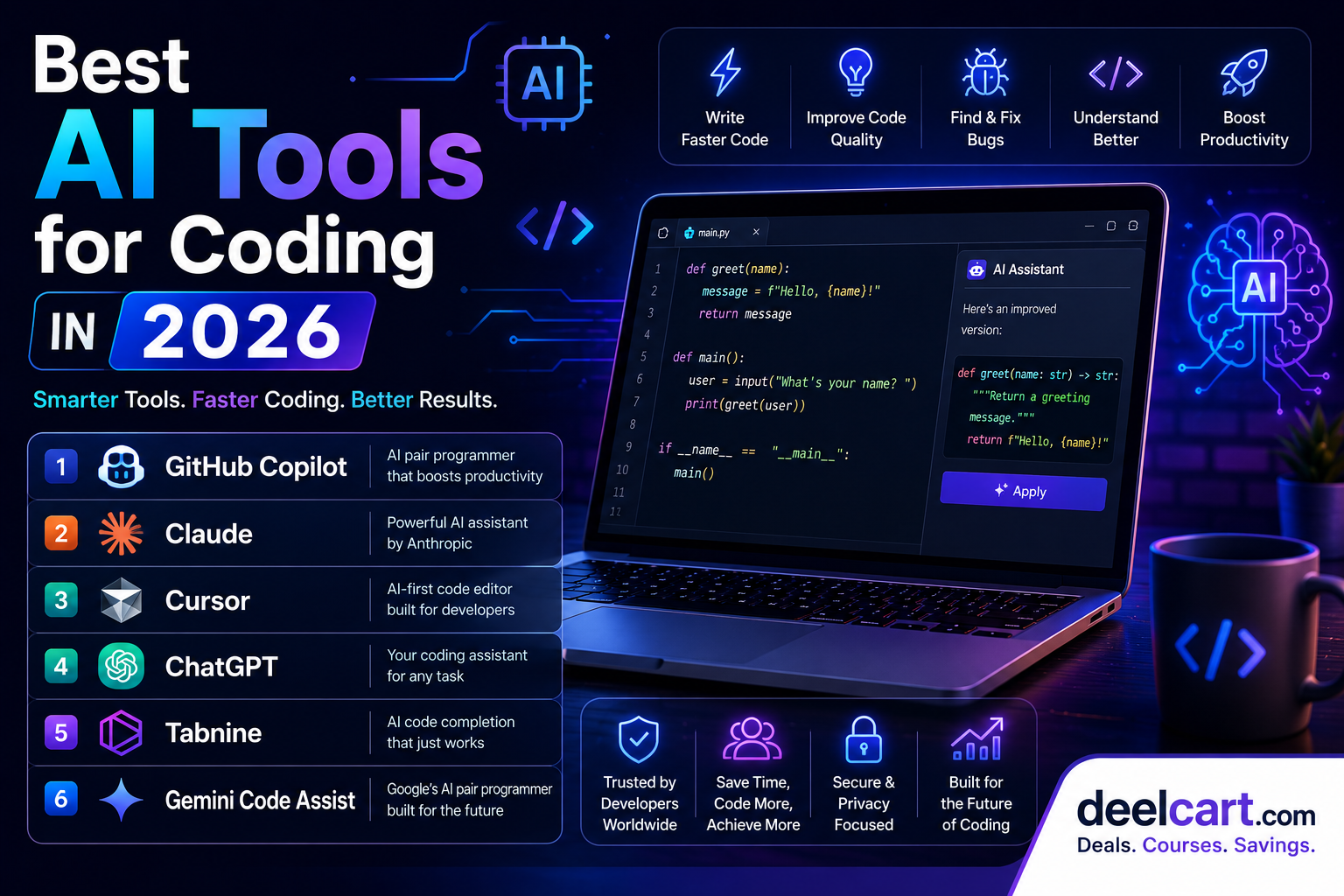
This guide covers the best AI tools for coding available right now — what each one does, who it is best for, and how to get started.
How AI Coding Tools Work
Modern AI coding assistants are trained on billions of lines of code from public repositories, documentation, and technical resources. They understand context — not just individual lines of code, but entire files, functions, and project structures.
The best AI coding tools can:
- Complete code as you type, suggesting entire functions and blocks
- Generate code from plain English — describe what you want, get working code
- Explain code — paste any code and get a plain-English explanation
- Find and fix bugs — identify errors and suggest corrections
- Write tests — generate unit tests for existing code automatically
- Refactor code — improve structure, readability, and performance
- Answer technical questions — act as an always-available senior developer
1. GitHub Copilot — Best AI Coding Assistant for Daily Development
Developer: GitHub (Microsoft) Price: $10/month individual, free for students and open source maintainers Works with: VS Code, JetBrains IDEs, Neovim, Zed, Visual Studio
GitHub Copilot is the most widely used AI coding assistant in the world and the one that started the AI coding revolution. It lives inside your code editor and suggests code as you type — completing lines, functions, and entire blocks based on your comments, function names, and surrounding code.
Copilot has evolved significantly since its launch. Copilot Chat lets you have a full conversation with the AI inside your editor, asking questions, requesting refactors, and debugging problems without switching to a browser.
Key features:
- Inline code completion: Suggests code as you type, accepting with a single key press
- Copilot Chat: Conversational AI built into your editor for questions, explanations, and refactoring
- Multi-file context: Understands your entire project, not just the current file
- Pull request summaries: Automatically writes descriptions of your code changes
- CLI assistance: Suggests terminal commands and explains what they do
- Code explanation: Highlight any code block and ask Copilot to explain it
Get started: github.com/features/copilot
2. Claude — Best AI for Complex Coding Problems and Architecture
Developer: Anthropic Price: Free tier available, Pro at $20/month Works with: Web browser, API, Claude Code CLI, VS Code extension
Claude has become the go-to AI for developers working on complex, multi-file problems that require deep reasoning rather than just code completion. While Copilot excels at inline suggestions, Claude excels at thinking through difficult problems, explaining trade-offs, and writing large amounts of high-quality code from scratch.
Claude's context window — one of the largest available — means you can paste an entire codebase and ask questions about it, or have it refactor thousands of lines at once. Claude Code, Anthropic's CLI tool, takes this further by giving Claude direct access to your terminal and file system to make changes autonomously.
Key features:
- Large context window: Paste entire files or codebases for analysis
- Complex problem solving: Explains architecture decisions, trade-offs, and best practices
- Code generation from scratch: Write detailed specs in plain English and get production-quality code
- Bug explanation: Not just finding bugs, but explaining exactly why they occur
- Claude Code: Agentic CLI tool that can read, write, and edit files autonomously
- Multi-language support: Equally strong across Python, JavaScript, TypeScript, Go, Rust, and more
Get started: claude.ai
3. Cursor — Best AI-Powered Code Editor
Developer: Anysphere Price: Free tier available, Pro at $20/month Works with: Standalone editor (built on VS Code)
Cursor is not just an AI plugin — it is an entire code editor built around AI from the ground up. It looks and feels like VS Code (it is built on the same foundation) so the transition is familiar, but AI is deeply integrated into every part of the experience.
Cursor's standout feature is its ability to understand and edit across multiple files simultaneously. Ask it to implement a feature and it will make changes across every relevant file in your project — not just the one you have open.
Key features:
- Multi-file editing: AI makes coordinated changes across your entire codebase
- Composer mode: Describe a feature in plain English and Cursor implements it end to end
- Codebase chat: Ask questions about your entire project and get accurate, context-aware answers
- Tab completion: Next-level autocomplete that predicts your next edit, not just the next word
- Shadow workspace: Cursor runs AI suggestions in a parallel workspace so they never interrupt your flow
- Bring your own model: Use Claude, GPT-4, or other models as the AI backend
Get started: cursor.com
4. ChatGPT — Best AI for Learning to Code and Quick Questions
Developer: OpenAI Price: Free tier available, Plus at $20/month Works with: Web browser, mobile app, API
ChatGPT needs no introduction. While it is not a dedicated coding tool like Copilot or Cursor, its GPT-4o model is an extremely capable coding assistant — and for many developers, especially beginners, it remains the first place they turn when stuck.
ChatGPT is particularly strong for learning. It explains concepts patiently, answers follow-up questions, adapts its explanations to your level, and can walk you through problems step by step. For someone learning to code, this conversational teaching ability is incredibly valuable.
Key features:
- Code generation: Write working code in any language from a plain-English description
- Code explanation: Paste any code and get a detailed plain-English breakdown
- Debugging help: Describe an error or paste your code and get targeted fixes
- Learning tool: Ask it to explain concepts at any level, from absolute beginner to advanced
- Canvas mode: Write and edit code in a side-by-side canvas interface
- Plugin and tool use: GPT-4o can browse the web, run Python code, and analyse files
Get started: chatgpt.com
5. Tabnine — Best AI Coding Assistant for Privacy-Conscious Developers
Developer: Tabnine Price: Free tier available, Pro at $12/month, Enterprise with private deployment Works with: VS Code, JetBrains, Neovim, Sublime Text, and more
Tabnine is an AI code completion tool that has been around longer than most of its competitors. Its key differentiator in 2026 is privacy and security — it can run entirely on your local machine or on a private server, meaning your code never leaves your infrastructure.
For developers working on sensitive codebases — financial systems, healthcare applications, government projects, or any proprietary code — this is a significant advantage. Tabnine's enterprise tier lets organisations deploy a private AI model trained on their own codebase.
Key features:
- Local AI model: Run entirely offline with no data sent to external servers
- Private deployment: Enterprise option for fully on-premises AI coding assistance
- Team learning: Enterprise model learns from your team's codebase and coding patterns
- Code completion: Fast, accurate inline suggestions across all major languages
- IDE support: Works with more editors than any other AI coding tool
- Zero data retention: Code is never stored or used to train external models
Get started: tabnine.com
6. Gemini Code Assist — Best AI for Google Cloud and Workspace Developers
Developer: Google Price: Free tier available, paid tiers for enterprise Works with: VS Code, JetBrains, Cloud Shell
Gemini Code Assist is Google's AI coding assistant, powered by the Gemini model family. It integrates tightly with Google Cloud services, making it the natural choice for developers building on GCP, using BigQuery, Cloud Run, or any other Google infrastructure.
In 2026, Gemini Code Assist has expanded significantly — it now handles full codebase analysis with one of the largest context windows of any coding AI, and its integration with Google Workspace means it can pull context from your Docs, Sheets, and Drive when helping with code.
Key features:
- Massive context window: Analyse and work with extremely large codebases
- Google Cloud integration: Deep awareness of GCP services, APIs, and best practices
- Full file generation: Generate complete files and modules from descriptions
- Code transformation: Refactor, modernise, and migrate legacy code
- Test generation: Automatically write unit tests for existing functions
- Workspace integration: Pulls context from Google Docs and Drive
Get started: cloud.google.com/gemini/docs/codeassist
Which AI Coding Tool Should You Use?
| Your Situation | Best Choice |
|---|---|
| Daily coding in any language | GitHub Copilot |
| Complex problems and architecture | Claude |
| Deepest AI editor integration | Cursor |
| Learning to code | ChatGPT |
| Privacy and sensitive codebases | Tabnine |
| Building on Google Cloud | Gemini Code Assist |
Most professional developers in 2026 use more than one AI tool. A common setup is GitHub Copilot for inline completion inside the editor, combined with Claude or ChatGPT in a browser tab for complex questions, debugging sessions, and generating larger blocks of code from scratch.
Do You Still Need to Learn to Code if You Use AI?
Yes — and this is important. AI coding tools make experienced developers significantly faster, but they do not replace the need to understand code. Here is why:
- AI makes mistakes. Models hallucinate functions that do not exist, generate code with subtle bugs, and confidently suggest wrong answers. You need to be able to spot these errors.
- AI cannot replace problem-solving skills. Breaking down a complex problem, designing an architecture, and making sound technical decisions still requires human expertise.
- AI-generated code needs review. Every line an AI writes needs to be read, understood, and verified before it goes into production.
Frequently Asked Questions
Is GitHub Copilot worth paying for?
For most developers, yes. At $10 per month, it pays for itself quickly in time saved. The free tier is also available for students and open source maintainers. If you write code daily, the productivity gain is significant.
Can AI write an entire application for me?
Increasingly, yes — for simple applications. Tools like Cursor and Claude Code can scaffold and build small to medium applications from a detailed description. However, production-quality applications still require developer oversight, testing, and iteration. Think of AI as a very fast junior developer, not a replacement for the whole team.
Frequently Asked Questions
Is GitHub Copilot worth paying for?
For most developers, yes. At $10 per month, it pays for itself quickly in time saved. The free tier is also available for students and open source maintainers. If you write code daily, the productivity gain is significant.
Can AI write an entire application for me?
Increasingly, yes — for simple applications. Tools like Cursor and Claude Code can scaffold and build small to medium applications from a detailed description. However, production-quality applications still require developer oversight, testing, and iteration. Think of AI as a very fast junior developer, not a replacement for the whole team.
Which AI coding tool is best for beginners?
ChatGPT is the most beginner-friendly because of its conversational, patient teaching style. GitHub Copilot is also excellent for beginners because it shows you how code should be written as you type. Using both together is a powerful combination for learning.
Are AI coding tools safe to use with private code?
It depends on the tool and your settings. GitHub Copilot, Claude, and ChatGPT send code snippets to external servers by default. If you are working with sensitive or proprietary code, use Tabnine's local model or check whether your AI tool of choice has a privacy mode that prevents data transmission.
Will AI replace developers?
Not in the foreseeable future. AI has made developers more productive, but it has not reduced demand for developers — if anything, it has increased it, because AI tools allow smaller teams to build more. The developers most at risk are those who refuse to adapt and learn to use AI tools effectively.
Keep Learning with Free Courses on deelcart
The best way to make use of AI coding tools is to have a solid foundation in programming. deelcart has hundreds of free programming and development courses on Udemy — covering Python, JavaScript, web development, cybersecurity, and more — all available with verified 100% OFF coupons.
Justin is a self-taught developer who builds and runs DeelCart himself — from the articles to the server it runs on. He manages his own Linux infrastructure and writes guides based on tools and workflows he actually uses day to day.