AI Coding Assistants: What They're Genuinely Good At vs Where They Still Fail
So is the frustration.
AI coding assistants fail constantly — confidently, quietly, and sometimes in ways that are hard to catch. Understanding where they excel and where they fall short is not a reason to avoid them. It is a prerequisite for using them effectively without getting burned.
This guide covers both sides honestly — what AI coding assistants are genuinely good at in 2026, and where they still regularly fail despite years of improvement.
The Honest Context
AI coding assistants have improved dramatically since the first public release of GitHub Copilot in 2021. The models are larger, better trained, more contextually aware, and more capable of handling complex multi-file tasks. Claude Code can autonomously navigate a codebase, write tests, fix failing ones, and open a pull request. Cursor can make coordinated changes across dozens of files from a single natural language instruction.
These capabilities are impressive and real. They are also still far from the level that marketing materials sometimes imply. The gap between "AI can handle entire features autonomously" and what actually happens in practice — for non-trivial codebases, unusual requirements, and edge cases — is still significant.
Knowing where that gap is makes you a dramatically more effective user of these tools.
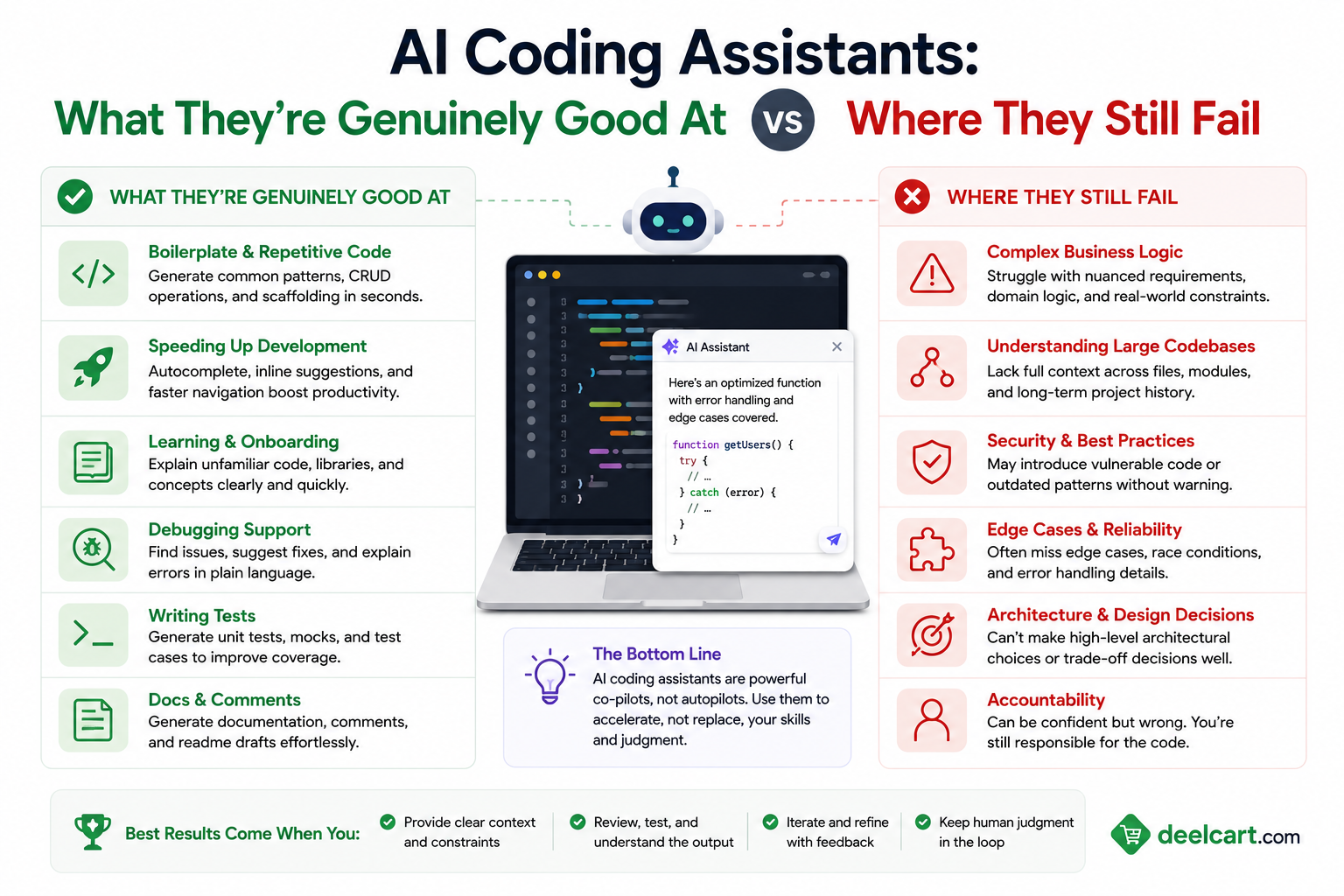
What AI Coding Assistants Are Genuinely Good At
Boilerplate and Repetitive Code
This is the clearest and most consistent win. Every codebase has boilerplate — CRUD endpoints that follow identical patterns, data transfer objects that mirror database schemas, configuration files that follow standard structures, test setup code that looks the same for every test suite.
Writing boilerplate is tedious, time-consuming, and adds no intellectual value. AI assistants handle it excellently. They know the patterns, they are consistent, and they do it instantly. A developer who previously spent 20 minutes writing the same REST endpoint structure for the fifteenth time now does it in 30 seconds.
The pattern recognition here is deep. Given a few existing examples in your codebase, AI assistants match your conventions — your naming style, your error handling pattern, your logging approach — without being told to. The generated boilerplate looks like it was written by a team member who has read your codebase rather than an outsider following generic conventions.
Explaining Unfamiliar Code
Inheriting a legacy codebase, reviewing a pull request in an unfamiliar part of the system, or trying to understand what a third-party library is actually doing — these situations used to require either finding the right person to ask or spending significant time reading documentation and tracing execution paths.
AI assistants compress this dramatically. Paste a function, a class, or a section of confusing code and ask what it does. The explanation is usually accurate, appropriately detailed, and faster than any alternative. For legacy code — particularly legacy code that uses older patterns, older libraries, or languages you are less familiar with — this is genuinely transformative.
The quality is best for well-known languages and patterns. For highly domain-specific business logic embedded in obscure code, the explanation quality drops because the AI is inferring intent from code structure rather than understanding the actual business domain.
Writing Tests for Existing Code
Test coverage for existing code is one of the most consistently valuable and consistently avoided tasks in software development. It is valuable because it prevents regressions and documents expected behaviour. It is avoided because writing tests for code you did not write — or code you wrote months ago — requires understanding the code deeply enough to define what correct behaviour looks like.
AI assistants handle this well for straightforward code. Given a function with clear inputs, outputs, and side effects, they generate relevant unit tests covering the happy path, common edge cases, and boundary conditions. The tests are not always complete — they tend to miss unusual edge cases that require domain knowledge — but they provide a solid starting point that would take significantly longer to write from scratch.
For complex code with many dependencies, intricate state, or subtle business rules, AI-generated tests require more review and often more correction. But even imperfect starting tests are faster to review and improve than writing tests from nothing.
Code Completion and Suggestion During Writing
The inline completion experience — ghost text that appears as you type, completing the current line or suggesting the next few lines — is where AI assistants are most consistently useful across all skill levels and all contexts.
The completions are often exactly what you would have written yourself, just faster. Sometimes they suggest a better approach than you were heading toward. Occasionally they complete a complex expression you were working out manually. The acceptance rate varies by developer and by task, but the time savings accumulate significantly over a day of coding.
The completion quality is highest when there is plenty of surrounding context — other functions in the same file, clear variable names, docstrings or comments explaining intent. It degrades in files with minimal context or unconventional patterns.
Documentation and Comment Generation
Writing documentation is universally acknowledged as important and universally practiced inconsistently. AI assistants close this gap significantly — generating docstrings, function comments, README sections, and inline comments from existing code accurately and quickly.
The generated documentation is generally accurate for what the code does. It is less reliable for why the code does it — the business rationale, the historical context, the trade-offs that led to a particular implementation. That context lives in developers' heads and in git history, not in the code itself, so it does not make it into AI-generated documentation.
For public APIs, function signatures, and well-defined modules, AI-generated documentation is typically production-ready with light review. For complex algorithmic code or business-critical logic, the documentation needs more validation to ensure it accurately captures the intent and not just the mechanics.
Language and Framework Syntax
Every developer switches contexts — between languages, between frameworks, between libraries. Remembering the exact syntax for something you use infrequently takes time and interrupts flow. AI assistants eliminate most of this friction.
The exact method to parse a date in Go. The correct way to configure a pytest fixture with cleanup. The syntax for a TypeScript generic with multiple constraints. The way to write a SQL window function. AI assistants handle these lookups instantly and correctly for well-documented languages and frameworks — dramatically faster than searching documentation.
For obscure languages, highly specialised frameworks, or very recent library versions, accuracy drops. The AI's training data is stronger for heavily documented and widely used technologies.
Refactoring Well-Understood Code
Renaming a concept throughout a codebase, extracting a function from a long method, converting a class-based component to a functional one, migrating from one library version to another — these refactors are well-defined but tedious. AI assistants handle the mechanical parts reliably.
The assistant knows what the refactored code should look like and can make the changes consistently. What it does less reliably is understand the full implications of a refactor in a large, interconnected codebase — which call sites it missed, which edge cases the change affects, which tests need updating. Human review of AI-assisted refactoring is still essential.
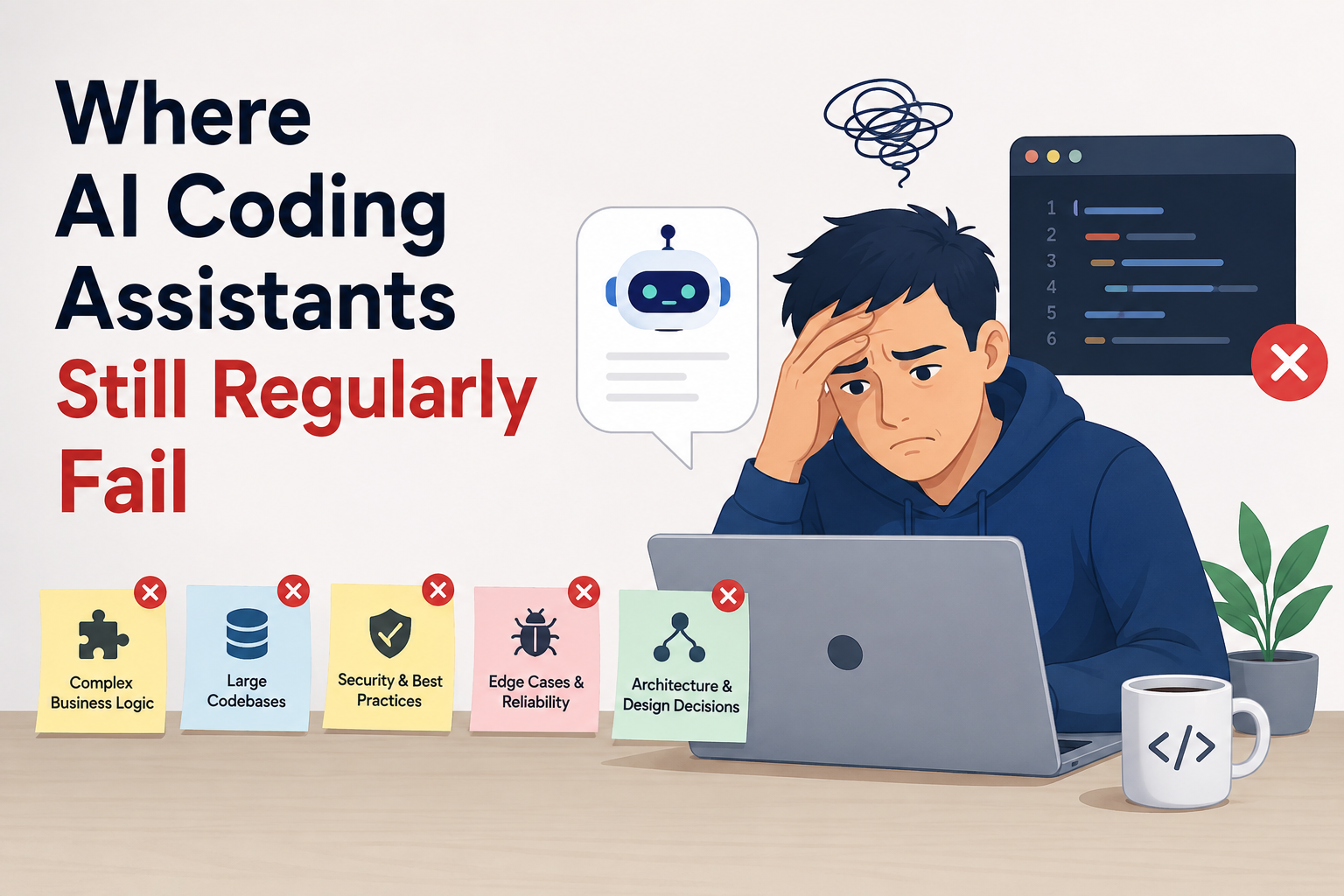
Where AI Coding Assistants Still Regularly Fail
Understanding Business Logic and Domain Constraints
Code that encodes business rules — pricing logic, eligibility criteria, compliance requirements, workflow state machines — is where AI assistants consistently struggle. The AI understands the code's structure and mechanics. It does not understand why those particular rules exist, what business constraint they encode, or what breaks if they change.
This matters most when generating code that should match existing business logic. An AI assistant given a task that involves pricing calculations might produce mathematically correct code that violates a business rule the developer knows about but did not mention. The code looks right, passes basic tests, and fails in production against a real-world case that the model had no way to anticipate.
The fundamental problem is that business logic requires domain knowledge that lives outside the codebase. No amount of improvement in model capability fully addresses this — the relevant context simply is not in the training data or the context window.
Debugging Complex, Multi-System Failures
Single-function bugs with clear symptoms are within reach — paste the function, describe the error, get a fix. Multi-system failures that span services, databases, message queues, and external dependencies are a different category entirely.
When an error emerges from the interaction between three microservices, a race condition in message processing, and a subtle database constraint, the AI cannot help in any meaningful sense without access to all the relevant logs, schemas, service definitions, and runtime state — which cannot all fit in a context window and which the AI cannot observe directly.
Experienced developers debugging complex systems use their mental model of the entire system — built from months or years of working with it — to form hypotheses about failure modes. AI assistants lack that mental model. Their debugging suggestions in complex distributed scenarios are often generic, miss the actual failure mode, and can send developers down unproductive paths.
Security-Sensitive Code
AI assistants produce insecure code regularly. SQL injection vulnerabilities in database queries. Improper input validation. Hardcoded credentials. Insecure random number generation. Missing authentication checks. Incorrect cryptographic implementations.
These errors are not rare edge cases. They appear in AI-generated code for security-sensitive operations with enough frequency that security professionals treat AI-generated code as requiring particularly careful security review.
The problem is partly that AI models are trained on public code — and public code contains a large volume of insecure patterns. The models learn to generate code that looks like typical code, which includes typical security mistakes.
Using AI assistants for authentication, authorisation, cryptography, data handling, or any security-sensitive operation without careful security review by a developer who understands the domain is genuinely dangerous. The AI will confidently produce code that passes casual review but has exploitable vulnerabilities.
Novel Algorithms and Complex Problem Solving
For problems that have well-known solutions — sorting, searching, common data structure operations, standard dynamic programming patterns — AI assistants perform excellently. For genuinely novel algorithmic problems, they are unreliable.
Competitive programming problems. Novel optimisation challenges. Algorithmic approaches that require insight beyond recombining known patterns. Graph problems that require seeing a non-obvious structure. In these domains, AI assistants often produce plausible-looking but incorrect solutions that pass obvious test cases and fail on inputs that reveal the flaw.
The issue is that AI models excel at pattern matching against their training distribution. Genuinely novel algorithmic problems, by definition, are outside that distribution. The AI produces an answer that pattern-matches to similar problems in its training data rather than solving the actual problem from first principles.
Maintaining Consistency in Large Codebases
Single-file tasks and small scoped changes are well within AI capabilities. Changes that require understanding and maintaining consistency across a large, complex codebase — hundreds of files, intricate dependency graphs, established patterns that are not fully captured in any single file — are much harder.
When an AI assistant makes a change that is locally correct but violates a convention established elsewhere in the codebase, the error is not visible without reviewing the broader context. When it adds a new abstraction that partially duplicates an existing one it did not know about, you get inconsistency that accumulates technical debt.
This is improving as context windows grow and as tools like Claude Code develop better codebase exploration. But even with large context windows, holding the full complexity of a large production codebase in a single context is not yet reliable. The AI misses things, and what it misses is often not obvious from the changed files alone.
Long-Horizon Autonomous Tasks
The marketing around agentic AI coding — give it a task, come back when it is done — is ahead of the current reality for non-trivial tasks.
For simple, well-defined tasks — write tests for this module, refactor this function to use async/await, add a new field to this model — autonomous agents work well. For complex tasks that require many decisions, navigating ambiguous requirements, and understanding system-level implications — implement this feature from scratch, migrate this service to a new architecture, fix this category of bug across the codebase — agents make mistakes that compound.
Each wrong decision creates a worse starting point for the next decision. By the time the agent presents its work, the accumulated errors can be harder to unwind than starting fresh. The promise of truly autonomous long-horizon coding is real as a direction of travel but not reliably delivered for complex tasks in 2026.
Knowing When to Stop and Ask
A significant and underappreciated failure mode is that AI coding assistants produce confident output for tasks they should either ask clarifying questions about or decline.
A human developer given an ambiguous requirement asks for clarification. An AI assistant often makes an assumption, produces code based on that assumption, and presents the result confidently. If the assumption was wrong — and with ambiguous requirements, assumptions often are wrong — you have code that solves the wrong problem.
The better models in 2026 ask clarifying questions more often than earlier models. But the calibration is not right. The models ask questions when they are not necessary and make assumptions when they should ask. Treating AI-generated code for any ambiguous task as a draft that requires specification review — before investing time in testing and integration — is a sound practice.
Using AI Coding Assistants Effectively Given These Realities
Treat AI output as a draft, not a deliverable. Review everything. The review is not optional overhead — it is the essential step that separates useful AI assistance from accumulated technical debt and hidden bugs.
Provide context about constraints that are not in the code. Business rules, security requirements, performance constraints, and architectural decisions that the AI cannot infer from the code need to be stated explicitly. The AI will not ask about what it does not know it does not know.
Use AI for the mechanical parts of hard problems. AI assistants are excellent at executing well-defined sub-tasks within a problem you have already designed. They are poor at the design work itself. Decompose the problem, design the solution, then use AI to execute the parts that are mechanical.
Apply extra scrutiny to security-sensitive code. Security review of AI-generated code should be more thorough than security review of human-written code from a trusted developer — not less. The AI's security failure modes are specific and consistent enough to look for deliberately.
Verify algorithm correctness against edge cases. For any non-trivial algorithm generated by AI, construct edge cases manually and test against them. Do not rely on the AI's own test cases — they are often designed to pass rather than to expose failure modes.
Invest in clear context. The quality of AI output scales directly with the quality of context you provide. Clear variable names, comments explaining intent, docstrings, and explicit descriptions of what you want produce dramatically better results than ambiguous requests with sparse context.
Frequently Asked Questions
Will AI coding assistants replace developers?
Not in any foreseeable timeframe — and not for the reasons usually given. The argument that "AI can write code so developers are obsolete" misunderstands what software development actually is. Writing code is a small fraction of software development. Understanding requirements, designing systems, making architectural decisions, reviewing code for correctness and security, debugging complex failures, communicating with stakeholders — none of these are addressed by code generation. AI assistants make developers more productive at the code-writing part. The demand for everything else that developers do has not decreased.
Which AI coding assistant is best in 2026?
It depends on the task. GitHub Copilot's inline completion is the most polished and most deeply integrated into editors — best for day-to-day completion. Claude Code is the strongest for complex multi-file autonomous tasks and deep reasoning about architectural problems. Cursor is the strongest integrated editor experience with AI built into every part of the workflow. Most serious users use more than one — inline completion from Copilot plus Claude or Cursor for complex tasks.
How do I catch AI-generated security vulnerabilities?
Static analysis tools catch some categories — run your existing security scanning on AI-generated code as you would on any code. Manual review with security in mind is essential for authentication, authorisation, data handling, and cryptographic operations. For high-risk areas, treat AI-generated code as coming from a junior developer whose security knowledge you cannot verify — review it accordingly. The specific failure modes to look for are SQL injection, improper input validation, insecure use of randomness, hardcoded secrets, and missing authentication checks.
Does providing more code context improve AI output quality?
Consistently yes, up to a point. More relevant context — surrounding functions, related modules, type definitions, comments explaining intent — produces significantly better output. The diminishing returns start when the context is no longer relevant to the task — dumping an entire codebase into a context window adds noise without proportional signal. Relevant, curated context is more valuable than maximum context.
Are AI coding assistants worth using for junior developers?
Yes, with important caveats. Junior developers benefit from the explanation capability — AI assistants are excellent teachers for language syntax, library usage, and common patterns. The risk is learning AI patterns rather than understanding underlying concepts. A junior developer who has AI complete their code without understanding what was generated is not learning. A junior developer who uses AI to get a first draft, then reads and understands it, then modifies it to confirm understanding, learns faster than one who works without AI. The discipline of understanding before accepting is the essential practice.
How much faster are developers with AI coding assistants?
Productivity studies show wide variation depending on task type. For boilerplate-heavy tasks, efficiency gains of 50 to 100% are consistently reported. For complex debugging or novel algorithmic work, productivity gains are minimal and can be negative if developers trust incorrect AI output. Overall productivity gains of 20 to 40% are commonly reported across typical developer workflows — but this varies significantly based on what the developer was doing before AI assistance and how effectively they use the tools.
Justin is a self-taught developer who builds and runs DeelCart himself — from the articles to the server it runs on. He manages his own Linux infrastructure and writes guides based on tools and workflows he actually uses day to day.