The Hidden Cost of Switching Productivity Tools Too Often
The cycle is familiar to anyone who has spent time in productivity communities. You discover a new tool, spend a weekend setting it up, use it enthusiastically for two or three weeks, notice its limitations, and start eyeing the next option. Repeat indefinitely.
This behaviour feels productive. Evaluating tools, setting up systems, and optimising your workflow all feel like meaningful work. They are not. They are one of the most effective ways to avoid actual work while maintaining the feeling of being busy and forward-moving.
The real cost of switching productivity tools too often is larger than it appears on the surface — and most of it is invisible.
The Obvious Costs That People Underestimate
Before getting to the hidden costs, the obvious ones are larger than most people acknowledge.
Setup time. Every new tool requires setup. Importing data, recreating your structure, configuring preferences, installing integrations, building templates, and getting the new system to the point where it does what the old system did. This is rarely the quick job it feels like at the start. A serious productivity tool switch — moving from Notion to Obsidian, from Todoist to ClickUp, from one project management system to another — typically takes five to fifteen hours of real work to execute properly.
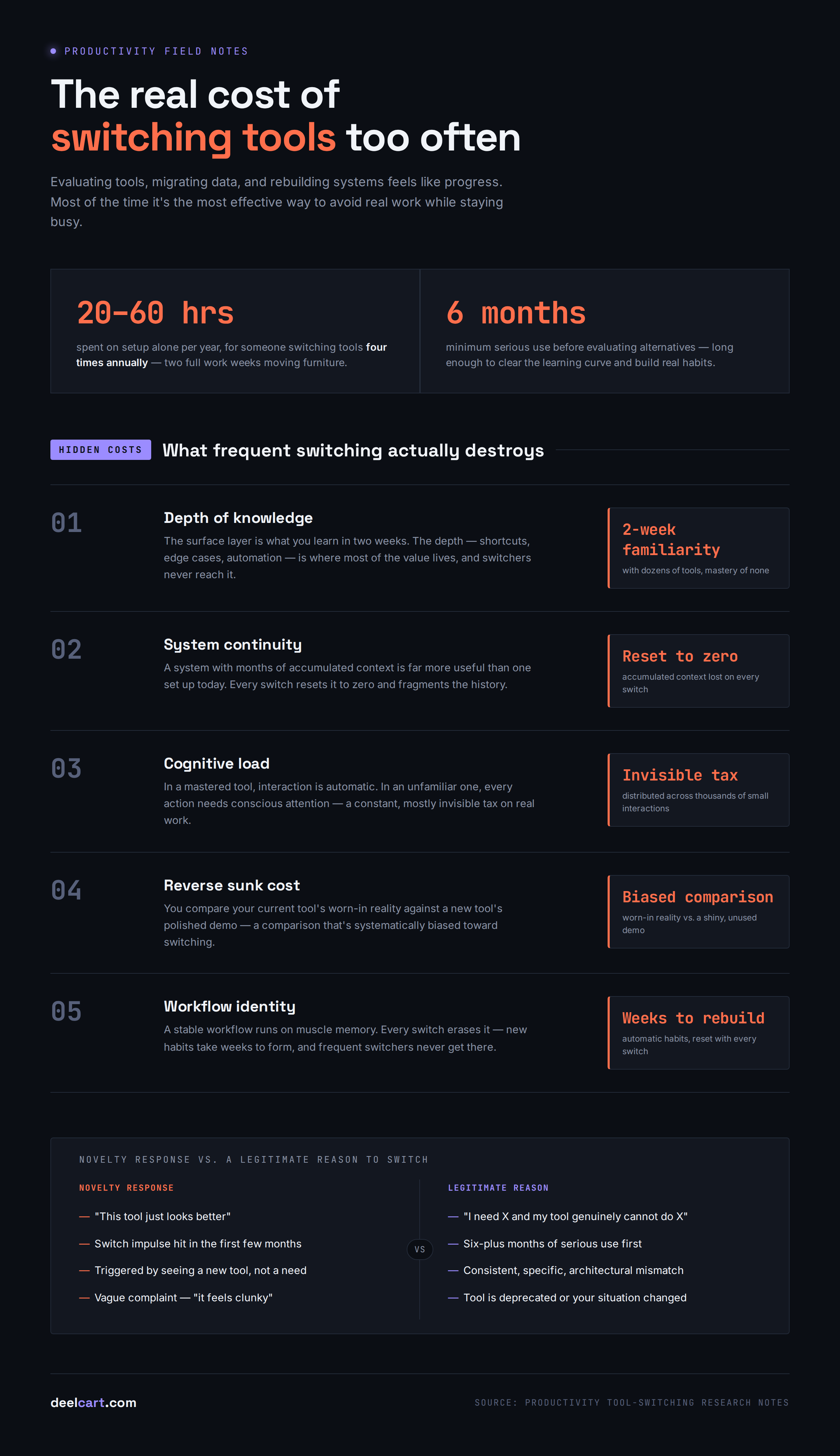
For someone switching tools four times per year, that is 20 to 60 hours spent on setup alone. Two full work weeks, every year, spent moving furniture rather than building anything.
Learning time. Every new tool has a learning curve. The time you spend reading documentation, watching tutorials, and figuring out how the new tool works is time not spent using the tool to actually get work done. The learning phase also has a productivity penalty — you are slower and less capable in the new tool than you were in the old one, for weeks or months depending on the tool's complexity.
Migration friction. Data rarely migrates perfectly between tools. Formatting is lost, links break, attachments need to be re-uploaded, relationships between items need to be recreated. Every migration involves a period of working from incomplete, partially migrated data — which introduces errors and requires manual verification.
These obvious costs add up to meaningful lost time for frequent tool switchers. But they are not the most significant costs.
The Hidden Cost — Depth of Knowledge
The most significant cost of frequent tool switching is the depth of knowledge you never develop.
Every productivity tool has a surface level and a depth. The surface level is what you learn in the first two weeks — basic features, obvious workflows, common use cases. The depth is what you discover after months of serious use — edge cases, advanced features, keyboard shortcuts that save seconds on every action, integration patterns that automate repetitive work, and workflows optimised specifically for your situation.
The depth is where most of the value lives. A power user of Notion who has used it seriously for two years can do things in minutes that a beginner takes hours to accomplish — not because the features are different but because deep familiarity makes every operation faster and more automatic.
Frequent tool switchers never reach this depth. They spend all their time in the surface layer — where everything is slightly awkward, slightly slower, and slightly more effortful than it needs to be. They accumulate two-week familiarity with dozens of tools and genuine mastery of none.
The compounding effect is significant. Every hour spent in a tool you have mastered is faster than the same hour in an unfamiliar tool. Multiply that speed difference across every task in your day, every day in a year, and the productivity gap between a tool master and a tool switcher is enormous.
The Hidden Cost — System Continuity
Productivity systems require continuity to work. A task management system that contains three months of accumulated context — tasks, projects, notes, decisions, history — is significantly more useful than one freshly set up today. A note-taking system with two years of linked, organised notes is dramatically more powerful than one started last month.
Frequent tool switching destroys this accumulated value. Every switch resets the system. The context is lost, the history is fragmented, and the new system starts from zero. The user never experiences what a mature, well-maintained productivity system feels like — because they always abandon it before it reaches maturity.
This also affects the feedback loop that makes systems improve over time. When you use a system consistently for months, you notice what works and what does not. You refine your process, develop better habits, and build a system that genuinely fits how you work. Frequent switching interrupts this feedback loop — you never get the signal from long-term use that tells you how to improve.
The Hidden Cost — Decision Fatigue and Cognitive Load
Every tool switch introduces a period of increased cognitive overhead. While you are in the unfamiliar tool, you spend mental energy on tool mechanics — how to do things in the new system — rather than on the work itself. This cognitive overhead is significant and largely invisible because it happens distributed across thousands of small interactions rather than as a single identifiable cost.
When you are working in a tool you have deeply mastered, your interaction with the tool is automatic — you do not think about it, you just use it. When the tool is unfamiliar, every interaction requires conscious attention. Where is the button? How does this feature work? What is the keyboard shortcut? This constant low-level cognitive load adds friction to everything you do.
The decision fatigue is compounded by the meta-work of tool evaluation itself. Following productivity communities means being constantly aware of new tools, reading comparisons, watching demonstrations, and forming opinions. This is pleasant if you enjoy it — and many people genuinely do — but it is a continuous draw on attention that produces no work output.
The Hidden Cost — The Sunk Cost Trap in Reverse
There is an interesting psychological dynamic in tool switching that works in reverse to the classic sunk cost fallacy.
With sunk costs, people irrationally continue investing in something because they have already invested in it — throwing good money after bad. With tool switching, people irrationally abandon investments because the next thing looks better — throwing away accumulated value before it matures.
The person who switches from a note-taking app they have used for three months to a new one is discarding three months of accumulated organisation, links, and context. They typically acknowledge this as a cost — but significantly underestimate it because the accumulated value of a system is mostly invisible until it is gone.
The grass looks greener in the new tool because you are comparing the polished demo of the new tool — optimised to look its best — against the reality of your current tool — with all its accumulated friction, workarounds, and limitations. You are not comparing your current tool at its best against the new tool at its best. You are comparing your current tool at its most familiar, worn-in, unglamorous reality against a new tool at its most exciting, full-of-potential beginning.
This comparison is systematically biased toward switching. And the bias does not diminish with experience — if anything, it intensifies for people who follow technology communities where new tools are constantly highlighted and celebrated.
The Hidden Cost — Identity and Workflow Fragmentation
Frequent tool switching fragments your workflow identity — the coherent set of habits and routines that define how you work. A stable workflow has muscle memory. You know without thinking where your tasks live, how you capture ideas, where your notes are, and how you plan your week. This automaticity is enormously valuable because it removes friction from the parts of your day that should be automatic.
Every tool switch disrupts this automaticity. The habits built around the old tool are no longer applicable. New habits take weeks to form. During the transition period you are making conscious decisions about every workflow step that should be automatic — where do I put this note? How do I find that task? What is the keyboard shortcut for this action?
For people who switch frequently, this disruption is essentially continuous. They never fully develop the automatic habits that make productive workflows feel effortless because those habits are always being reset.
Why Tool Switching Feels So Productive
Understanding why tool switching feels so good while producing so little is essential for breaking the pattern.
Novelty reward. The human brain responds positively to novelty. A new tool activates the same reward systems as other positive experiences — it feels fresh, interesting, and exciting. The excitement of a new tool is genuine but it has nothing to do with whether the tool will improve your productivity.
Setup feels like progress. Organising, structuring, and building systems feels productive. It engages the same sense of accomplishment as completing real work. But it is not real work — it is infrastructure for real work. Infrastructure has diminishing returns. The first hour of setup creates enormous value. The fifteenth hour of setting up a new system creates almost none.
Avoiding the hard thing. The most consistent feature of tool switching behaviour is that it intensifies when there is difficult work to be done. A hard project, an uncomfortable task, or a period of low motivation reliably triggers the urge to evaluate new tools. The new tool becomes a way to feel busy and forward-moving without confronting the actual work. This is not always conscious — the rationalisation is usually that a better tool would make the hard work easier. It almost never does.
Community reinforcement. Productivity communities celebrate new tools, compare features, and reward the people who use the newest and most interesting systems. This social reinforcement makes tool exploration feel like meaningful participation in a community rather than avoidance behaviour.
What Staying With a Tool Long Enough Actually Looks Like
The alternative to frequent switching is not using bad tools indefinitely. It is committing to good tools long enough to extract their real value.
A meaningful commitment to a productivity tool looks like this:
At least six months of serious use before evaluating alternatives. Six months is enough time to get past the learning curve, build real habits, and experience what the tool is like as a mature, broken-in system. It is enough time to encounter real limitations — not just surface friction — and evaluate whether those limitations actually affect your work.
Distinguishing limitations from unfamiliarity. The biggest driver of premature tool switching is mistaking unfamiliarity for limitation. Something that seems like the tool cannot do what you need is often something the tool can do — you just have not discovered how yet. Before concluding a tool cannot meet your needs, spend 20 minutes searching for how to accomplish the specific thing you need. The answer is usually there.
Fixing your system before abandoning your tool. Most productivity system problems are system problems rather than tool problems. A disorganised Notion workspace is not an argument for switching from Notion to Obsidian — it is an argument for reorganising your Notion workspace. Before attributing a system failure to the tool, honestly audit whether the failure is in how you are using the tool.
Setting a deliberate evaluation schedule. Instead of continuously monitoring the productivity tool landscape and responding to every interesting new option, set a scheduled evaluation period — once per year, at the same time each year — where you review your tools and consider whether changes are warranted. Between evaluations, ignore new tool releases and comparisons. This removes the continuous pull of novelty from your daily attention.
When Switching Is Actually the Right Decision
None of this means never switching tools. There are situations where switching is genuinely the right decision.
The tool has a fundamental mismatch with your actual work. After six months of serious use, if a core aspect of the tool consistently creates friction for your most important work — not surface friction but architectural mismatch — switching is appropriate. A task manager that cannot handle the volume of tasks your work generates, a note-taking app that lacks linking when your workflow requires linking, a project management tool that does not support the collaboration patterns your team uses — these are genuine reasons to switch.
Your situation has changed significantly. A tool that was right for a solo freelancer may be wrong for a team of ten. A tool that worked when you had one project may not scale to thirty. Significant changes in your work situation legitimately warrant re-evaluation of your tools.
A new tool offers a capability you have consistently needed. If there is something you have consistently needed to do that your current tool genuinely cannot do — not just does not do conveniently, but cannot do at all — and a new tool provides that capability, the switch may be warranted.
The tool is being deprecated or abandoned. If your tool's development has stopped, the company has been acquired and the product is being sunset, or a critical integration you depend on has been removed, switching is not a preference — it is a necessity.
The test for a legitimate switch is specificity. "This tool is better" is not a sufficient reason. "This tool does X which I consistently need and my current tool cannot do" is.
A Framework for Tool Decisions
Before switching any productivity tool, answer these questions honestly:
How long have I been using the current tool seriously? If less than six months, the default answer should be to continue. The learning curve has not been cleared and the accumulated value has not been built.
What specific limitation am I trying to solve? If the answer is vague — it feels better, it looks nicer, the community seems better — that is a novelty response, not a genuine need. If the answer is specific — I consistently need to do X and my current tool cannot do X — that is worth investigating.
Have I thoroughly explored whether my current tool can do what I need? Most perceived limitations are unfamiliarity in disguise. Spend 30 minutes looking for the solution before concluding the tool cannot do it.
What will I lose by switching? Quantify the accumulated value in your current tool — the history, the context, the habits, the depth of knowledge. Factor this into the decision rather than treating it as zero.
Am I trying to solve a tool problem or a habit problem? If your system is not working because you are not consistently using it, switching tools will not fix that. The inconsistency will follow you to the new tool.
Frequently Asked Questions
How do I know when it is genuinely time to switch tools?
The clearest signal is a specific, consistent limitation that affects your most important work — not a general feeling that the tool could be better. If you have used the tool for at least six months, have genuinely explored whether it can meet your need, and the answer is definitively no, that is a legitimate reason to switch. If the switch impulse emerged within the first few months or was triggered by seeing a new tool rather than by a specific need, it is almost certainly a novelty response.
Is it bad to try new tools at all?
No. Trying new tools is how you discover better options and how you build the knowledge to make good decisions. The problem is not trying tools — it is migrating your full workflow to every tool you try. Maintain your primary tools and try new ones in a sandboxed way — import some sample data, use them for low-stakes tasks — before making a migration decision based on months of evaluation rather than weeks of excitement.
What if my team keeps changing tools?
Team-level tool switching has all the individual costs plus the coordination overhead of training multiple people and the loss of shared institutional knowledge embedded in the old tool. If you are in a position to influence the decision, make the case for longer evaluation periods and higher bars for switching. If you are not, focus on building your own skills quickly in whatever tool the team uses — the faster you reach depth, the less the switching costs you personally.
Does this apply to development tools as well?
Yes, though the dynamics are slightly different. Developer tools — editors, debuggers, CLIs — have the same depth curve and the same cost to switching. The productivity difference between a developer who has used Vim for five years and one who switches editors every six months is measurable. That said, the developer tool landscape changes faster and some switches — moving to a significantly better version of a tool, adopting a tool that is becoming the industry standard — are more clearly justified than in general productivity tools.
How do I resist the urge to switch when I see an exciting new tool?
The most effective technique is a commitment device — a rule you set in advance that removes the decision from the moment of temptation. A rule like "I will not migrate my primary workflow to a new tool until I have used my current tool for one year" removes the need to evaluate every new tool you encounter. Instead of weighing the new tool against your current one, you simply note it, perhaps add it to a list to revisit at your annual evaluation, and return to work. The decision is already made.
Justin is a self-taught developer who builds and runs DeelCart himself — from the articles to the server it runs on. He manages his own Linux infrastructure and writes guides based on tools and workflows he actually uses day to day.