7 Best Business Automation Software in 2026 (Save Hours Every Week)
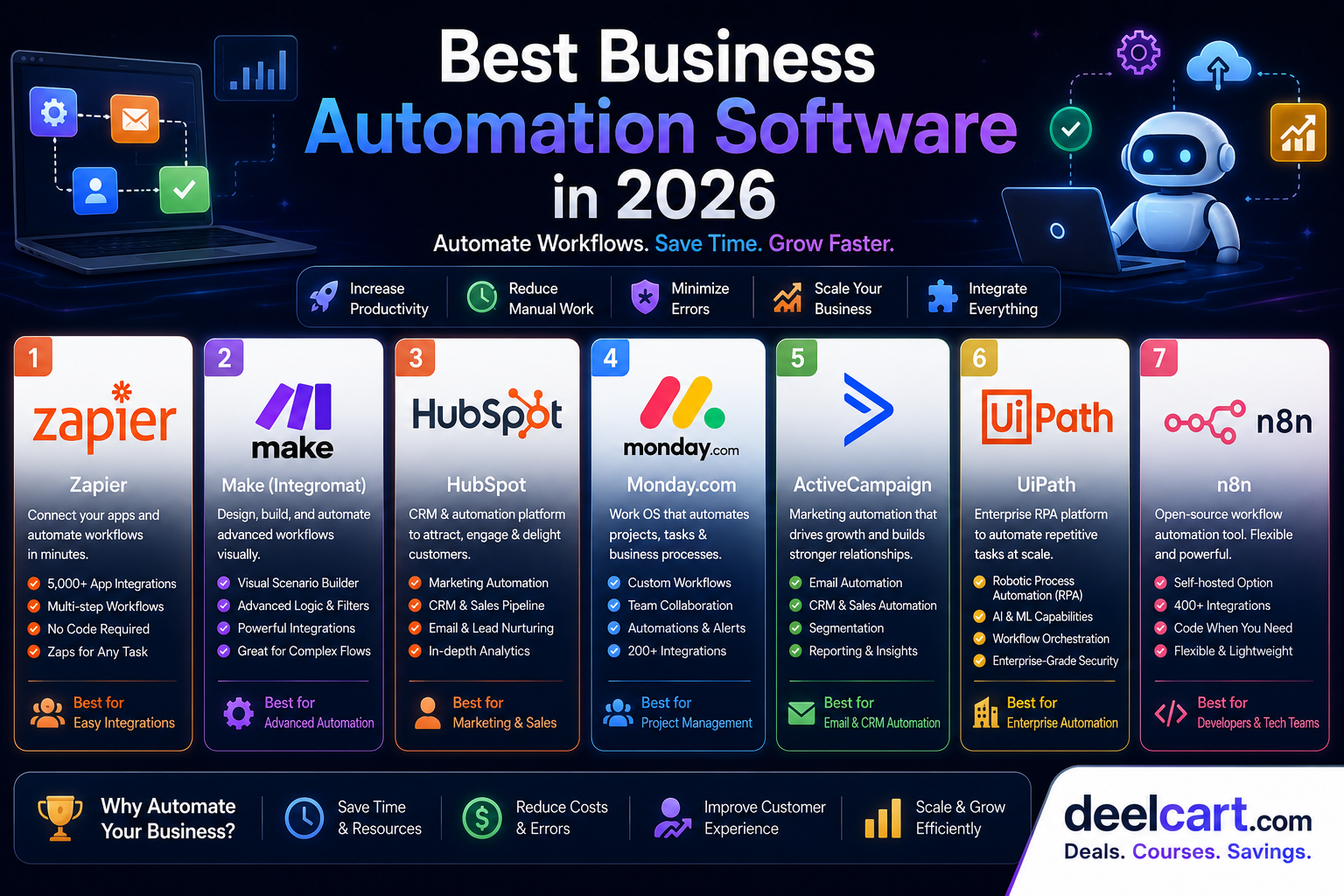
Table of Contents
- What Is Business Automation?
- 1. Zapier — Best for Connecting Apps Without Code
- 2. Make (formerly Integromat) — Best for Complex Visual Workflows
- 3. HubSpot — Best for Marketing and Sales Automation
- 4. Monday.com — Best for Project and Operations Automation
- 5. ActiveCampaign — Best for Email Marketing and Customer Journey Automation
- 6. UiPath — Best for Robotic Process Automation (RPA)
- 7. n8n — Best Open Source Automation for Technical Teams
- Which Business Automation Tool Should You Choose?
- How Much Time Can Business Automation Save?
- Frequently Asked Questions
The challenge is choosing the right automation software from a market that has exploded in the last few years. This guide covers the best business automation tools available in 2026 — what each one does, who it is best for, and how to get started.
What Is Business Automation?
Business automation is the use of software to perform repetitive tasks that would otherwise require manual human effort. Instead of an employee copying data from one system to another, an automation tool does it instantly and accurately every time.
Modern business automation covers:
- Workflow automation: Connecting apps so data flows between them automatically
- Marketing automation: Sending emails, social posts, and follow-ups based on triggers
- Sales automation: Logging calls, sending proposals, updating CRM records
- Finance automation: Processing invoices, reconciling payments, generating reports
- HR automation: Onboarding new employees, collecting documents, scheduling interviews
- Customer support automation: Routing tickets, sending responses, escalating issues
1. Zapier — Best for Connecting Apps Without Code
Developer: Zapier Inc. Price: Free tier available, paid plans from $19.99/month Best for: Small businesses, solopreneurs, non-technical teams
Zapier is the most popular no-code automation platform in the world and the easiest way to connect two or more apps without writing a single line of code. It works by creating "Zaps" — automated workflows that trigger an action in one app when something happens in another.
For example: when a new lead fills out a form on your website, Zapier can automatically add them to your CRM, send them a welcome email, notify your sales team on Slack, and create a task in your project management tool — all within seconds, with no manual work.
Key features:
- 6,000+ app integrations: Connects virtually every business app including Gmail, Slack, Salesforce, HubSpot, Shopify, QuickBooks, and thousands more
- Multi-step Zaps: Chain multiple actions together in a single workflow
- Filters and conditions: Only trigger actions when specific conditions are met
- Formatter: Transform data — dates, text, numbers — as it moves between apps
- Tables and interfaces: Built-in database and form tools for custom workflows
- AI actions: Use AI to classify, summarise, or generate content as part of a workflow
- New Shopify order → create invoice in QuickBooks → notify team in Slack
- New Gmail email from a client → create task in Asana → log in CRM
- New Typeform response → add to Google Sheets → send personalised email via Mailchimp
Get started: zapier.com
---
2. Make (formerly Integromat) — Best for Complex Visual Workflows
Developer: Make (Celonis company) Price: Free tier available, paid plans from $9/month Best for: Technical users, agencies, complex multi-step workflows
Make is Zapier's most powerful competitor. Where Zapier is optimised for simplicity, Make is optimised for power and flexibility. It uses a visual drag-and-drop canvas where you build automation workflows as flowcharts — making complex logic easy to see and understand.
Make is significantly cheaper than Zapier for high-volume automation and offers more advanced features like error handling, data transformation, and complex branching logic. It has a steeper learning curve but rewards the investment with far more capability.
Key features:
- Visual scenario builder: Build workflows as visual flowcharts with drag-and-drop
- Advanced data transformation: Transform, filter, and manipulate data with powerful built-in functions
- Error handling: Define exactly what happens when a step fails
- Iterators and aggregators: Process lists and arrays of data automatically
- Scheduling: Run automations on precise schedules — every minute, hour, day, or custom
- 1,000+ app integrations: Covers all major business apps
- HTTP module: Connect to any app with an API even without a native integration
Get started: make.com
---
3. HubSpot — Best for Marketing and Sales Automation
Developer: HubSpot Price: Free CRM, paid hubs from $15/month per seat Best for: Marketing teams, sales teams, growing businesses
HubSpot is not just an automation tool — it is a complete CRM platform with powerful automation built into every part of it. It covers marketing automation, sales automation, customer service automation, and operations automation in a single integrated platform.
Where Zapier and Make connect external apps, HubSpot automates workflows within its own ecosystem — email campaigns, lead nurturing sequences, deal pipeline management, customer support ticket routing, and more.
Key features:
- Email marketing automation: Build drip campaigns and nurture sequences triggered by contact behaviour
- Lead scoring: Automatically score leads based on their actions and demographics
- Deal pipeline automation: Move deals through stages, assign tasks, and notify reps automatically
- Workflow builder: Visual automation builder for contacts, deals, tickets, and more
- Sequences: Automated personalised email sequences for sales outreach
- Chatbot builder: Build automated chat flows for website visitors
- Reporting: Automated reports and dashboards showing marketing and sales performance
Get started: hubspot.com
---
4. Monday.com — Best for Project and Operations Automation
Developer: Monday.com Price: Free for up to 2 seats, paid plans from $9/seat/month Best for: Operations teams, project managers, teams tracking work
Monday.com is a work operating system — a visual platform where teams manage projects, track tasks, and automate operational workflows. Its automation features let you eliminate manual status updates, assignments, and notifications that eat up time in every team.
When a task moves to a certain status, Monday can automatically assign it to the right person, send a notification, update a related item, and create a new task for the next step — all without anyone touching it manually.
Key features:
- No-code automation builder: Build automations using simple if-then logic
- 200+ pre-built automation recipes: Common automations ready to activate in one click
- Status automations: Trigger actions when item status changes
- Date automations: Send reminders and create tasks based on dates and deadlines
- Integration automations: Connect Monday with Slack, Gmail, Jira, Salesforce, and more
- Workdocs: Automated document creation linked to project items
Get started: monday.com
---
5. ActiveCampaign — Best for Email Marketing and Customer Journey Automation
Developer: ActiveCampaign Price: Paid plans from $15/month Best for: E-commerce businesses, online course creators, marketers
ActiveCampaign is one of the most powerful email marketing and customer experience automation platforms available. It goes far beyond basic email newsletters — it lets you build sophisticated customer journeys that respond to individual behaviour in real time.
If a customer visits your pricing page three times, ActiveCampaign can automatically send them a targeted offer. If someone abandons their cart, it triggers a recovery sequence. If a subscriber has not opened an email in 90 days, it runs a re-engagement campaign automatically.
Key features:
- Visual automation builder: Build complex customer journey automations with a drag-and-drop canvas
- Behaviour-based triggers: Trigger emails based on website visits, purchases, email opens, and link clicks
- Lead scoring: Score contacts based on engagement and purchase behaviour
- Site tracking: Track what pages contacts visit on your website and trigger automations accordingly
- Split testing: Test different automation paths to find what converts best
- CRM integration: Built-in sales CRM with deal pipeline automation
- SMS automation: Include SMS messages in automated sequences
Get started: activecampaign.com
---
6. UiPath — Best for Robotic Process Automation (RPA)
Developer: UiPath Price: Free community edition, enterprise pricing on request Best for: Enterprise businesses, finance, healthcare, operations
UiPath is the world's leading Robotic Process Automation (RPA) platform. Where Zapier and Make automate workflows between cloud apps, UiPath automates tasks at the desktop level — it can control any software, including legacy systems that have no API, by mimicking how a human user would interact with the screen.
This makes UiPath uniquely powerful for industries like banking, healthcare, insurance, and government that rely on legacy software too old to integrate with modern automation tools.
Key features:
- Desktop automation: Automate any Windows or web application regardless of whether it has an API
- AI-powered document processing: Extract and process data from invoices, forms, and documents automatically
- Process mining: Discover which processes are best suited for automation by analysing actual user behaviour
- Attended and unattended robots: Run automations with or without human supervision
- Orchestrator: Manage, schedule, and monitor automation robots centrally
- Test automation: Automate software testing across web and desktop applications
Get started: uipath.com
---
7. n8n — Best Open Source Automation for Technical Teams
Developer: n8n GmbH Price: Free self-hosted, cloud plans from $20/month Best for: Developers, technical teams, privacy-conscious businesses
n8n is an open source workflow automation tool that you can self-host on your own server — meaning your data never leaves your infrastructure. It combines the visual workflow builder of Make with the extensibility of code, letting developers write custom JavaScript or Python nodes alongside no-code visual steps.
For technical teams who want full control over their automation infrastructure without paying per-task fees, n8n is the most powerful and cost-effective option available.
Key features:
- Self-hosted: Run on your own server with complete data ownership
- 400+ integrations: All major business apps covered
- Code nodes: Write custom JavaScript or Python inside any workflow
- Visual builder: Drag-and-drop workflow editor for non-technical team members
- Webhook support: Trigger workflows from any external system
- AI agent workflows: Build AI-powered automation agents with LLM integration
- No per-task fees: Self-hosted version has no usage limits
Get started: n8n.io
---
Which Business Automation Tool Should You Choose?
| Your Situation | Best Choice |
|---|---|
| Connect apps without code | Zapier |
| Complex workflows at lower cost | Make |
| Marketing and sales automation | HubSpot |
| Project and operations automation | Monday.com |
| Email and customer journey automation | ActiveCampaign |
| Enterprise legacy system automation | UiPath |
| Self-hosted open source automation | n8n |
For most small and medium businesses, the best starting point is Zapier for app connections and HubSpot's free CRM for marketing and sales automation. As your needs grow, Make and ActiveCampaign offer more power at competitive prices.
How Much Time Can Business Automation Save?
According to McKinsey, employees spend an average of 60% of their time on repetitive, automatable tasks — data collection, processing information, and routine communication. Even automating 20 to 30% of those tasks has a significant impact on productivity.
Common time savings from automation:
- Automatically routing leads to the right salesperson saves 2 to 3 hours per week per rep
- Automated invoice processing saves finance teams 5 to 10 hours per week
- Automated social media scheduling saves marketing teams 3 to 5 hours per week
- Automated customer support ticket routing reduces response times by 40 to 60%
Frequently Asked Questions
What is the easiest business automation tool for beginners?
Zapier is the easiest to get started with. Its simple if-then interface requires no technical knowledge, it has thousands of pre-built templates, and most users have their first automation running within 15 minutes.
Can small businesses afford automation software?
Yes. Most automation tools have free tiers or very affordable starting plans. Zapier's free plan allows 100 tasks per month, HubSpot's free CRM has no expiry, and n8n can be self-hosted for free. The cost of not automating — wasted employee time — almost always exceeds the software cost.
Do I need technical skills to use automation software?
Not for most tools. Zapier, Make, HubSpot, Monday.com, and ActiveCampaign are all designed for non-technical users with drag-and-drop interfaces and pre-built templates. UiPath and n8n have steeper learning curves and benefit from technical knowledge.
Can automation software replace employees?
Automation replaces tasks, not people. Employees freed from repetitive tasks can focus on higher-value work — strategy, relationships, creativity, and problem-solving. Most businesses that invest in automation find they can grow without proportionally growing their headcount.
Is my data safe with cloud automation tools?
Reputable automation platforms use enterprise-grade security including encryption at rest and in transit, SOC 2 compliance, and role-based access controls. If data privacy is a critical concern — for example in healthcare or finance — consider self-hosting with n8n for complete data ownership.
Keep Learning with Free Courses on DeelCart
Want to learn how to use automation tools, grow your business online, or build technical
Justin is a self-taught developer who builds and runs DeelCart himself — from the articles to the server it runs on. He manages his own Linux infrastructure and writes guides based on tools and workflows he actually uses day to day.