Zapier vs Make (Integromat): Which Automation Tool Wins in 2026?
But they are built for different types of users with different types of problems. Choosing the wrong one means either paying too much for features you do not need or hitting walls every time your workflow gets slightly complex.
This guide compares Zapier and Make across every dimension that matters — pricing, ease of use, power, reliability, and real-world performance — so you can make the right choice for your situation.
The Quick Answer
- Choose Zapier if you want the fastest setup, the most app integrations, and a tool your whole team can use without training
- Choose Make if you want more power, more complex logic, significantly lower cost per automation, and are comfortable with a steeper learning curve
What Each Tool Is Built For
Understanding the philosophy behind each tool explains most of the differences between them.
Zapier was built around simplicity. Its core concept is the Zap — a linear two-step automation where something happens in one app and that triggers an action in another. When a new lead fills out a Typeform, add them to a HubSpot contact list and send them a welcome email. Simple, predictable, and understandable by anyone in the business within minutes of seeing it.
Zapier has grown significantly beyond two-step automations — it now supports multi-step Zaps, conditional logic, filters, and more. But its design philosophy remains accessibility first. If someone without a technical background needs to build and maintain automations independently, Zapier is what most teams reach for.
Make — formerly called Integromat — was built around power. Its core concept is the scenario — a visual flowchart where data flows through modules connected by paths, with branching logic, loops, error handling, and data transformation built into the design from the start. Make treats automation as visual programming — a flowchart you design rather than a recipe you follow.
Make can do things Zapier cannot handle cleanly — processing arrays of items, making conditional branches that split into completely different paths, handling API responses with complex nested JSON structures, aggregating data from multiple sources into one output. The trade-off is that building a Make scenario requires more thinking upfront and more familiarity with the tool.
Pricing
Pricing is where Make wins most decisively — and it is not close.
Zapier Pricing
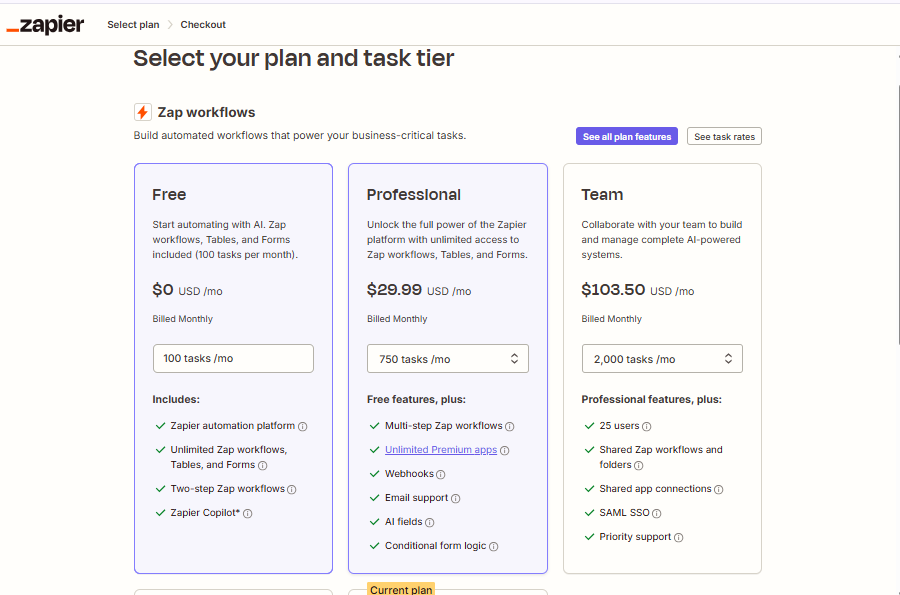
Zapier's pricing is built around tasks. A task is one action step completed in an automation. A Zap with three steps counts three tasks every time it runs.
- Free: 100 tasks per month, 5 Zaps, single-step Zaps only
- Starter: $19.99 per month — 750 tasks, 20 Zaps, multi-step Zaps, filters
- Professional: $49 per month — 2,000 tasks, unlimited Zaps, custom logic
- Team: $69 per month — 2,000 tasks shared across team members
- Company: $99 per month — advanced admin, SAML SSO, custom data retention
Make Pricing
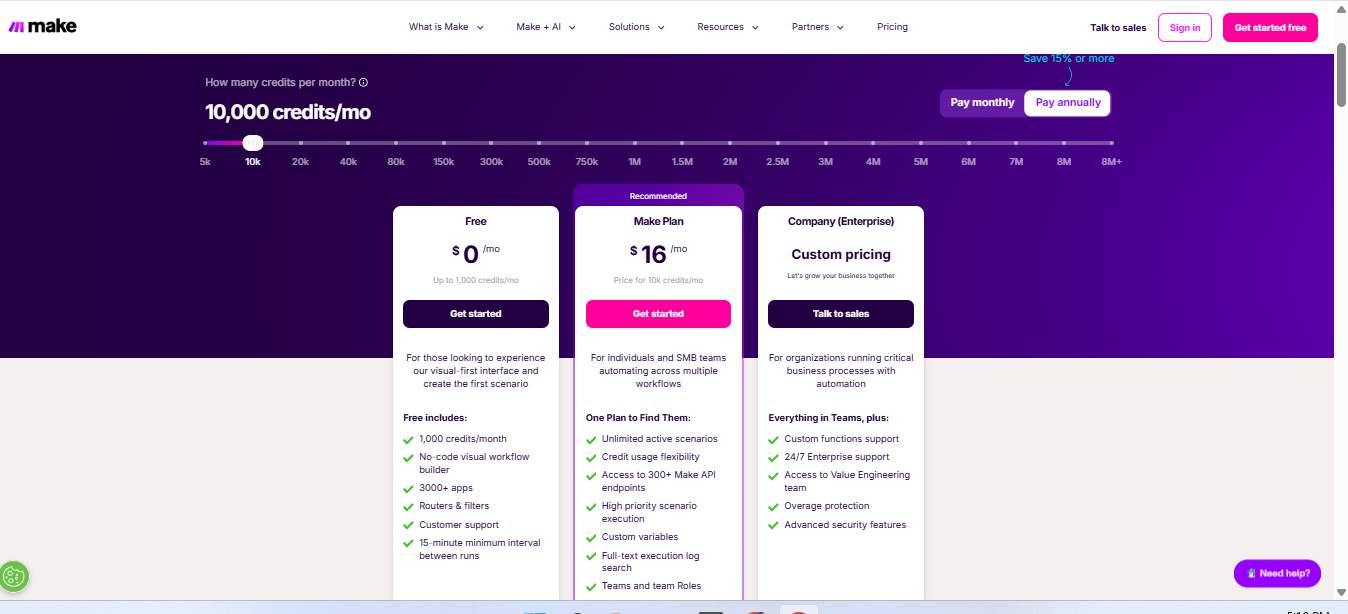
Make's pricing is built around operations. An operation is one module execution — comparable to a task in Zapier but typically priced at a lower rate for equivalent work.
- Free: 1,000 operations per month, unlimited scenarios, 15-minute minimum interval
- Core: $9 per month — 10,000 operations, 1-minute minimum interval
- Pro: $16 per month — 10,000 operations, advanced tools, custom variables
- Teams: $29 per month — 10,000 operations, team collaboration features
- Enterprise: Custom pricing
The Real Cost Comparison
At equivalent usage levels, Make is typically three to five times cheaper than Zapier. The gap widens at higher volumes because Make's operation pricing is more favourable and additional operations are cheap to purchase in bundles.
For a business running 20,000 automation steps per month — a moderate usage level for any growing company — Zapier's Professional plan at $49 per month covers 2,000 tasks and the remainder requires an upgrade to a higher plan. Make's Core plan at $9 per month covers 10,000 operations and additional packs cost $9 per 10,000 — totalling approximately $18 per month for equivalent coverage.
The price difference is real and significant. For budget-conscious teams or startups watching every subscription dollar, Make's pricing model is a compelling argument on its own.
Winner on pricing: Make — significantly and consistently cheaper at every usage level.
App Integrations
Zapier
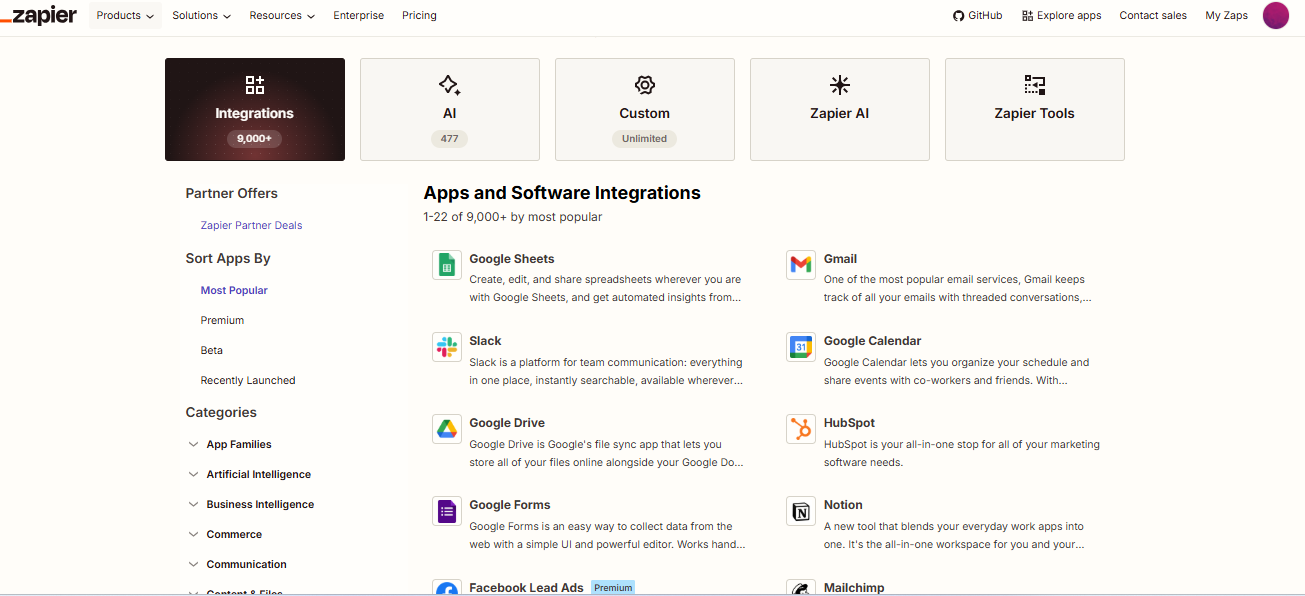
Zapier has over 6,000 app integrations — the largest library of any automation platform. This breadth is one of Zapier's most significant advantages. If there is a SaaS tool used in business, it almost certainly has a Zapier integration.
Crucially, Zapier's integrations are typically maintained by the app developers themselves — which means they tend to be current, well-documented, and aligned with the app's latest features. When a SaaS company launches a new feature, the Zapier integration often gets updated quickly.
Make
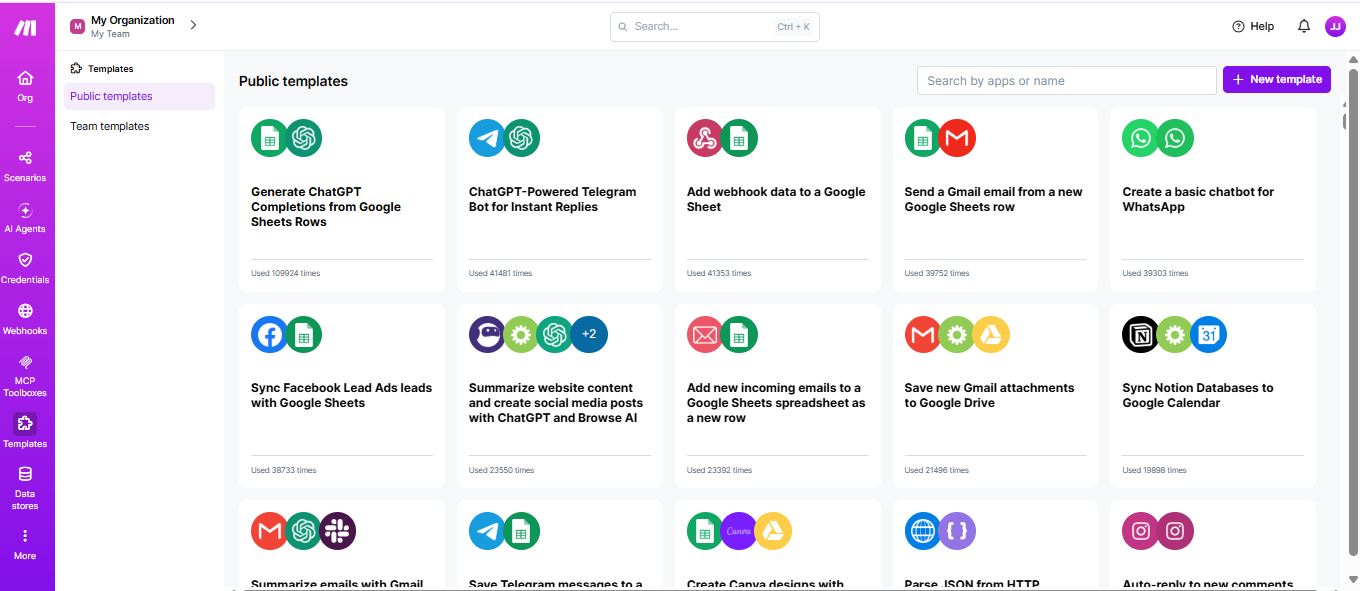
Make has approximately 1,500 native app integrations — significantly fewer than Zapier. However, Make compensates with a powerful HTTP module that allows connecting to any REST API with custom configuration. If an app has an API — which most modern SaaS tools do — Make can connect to it even without a native integration.
The HTTP module requires more technical knowledge than a native integration — you need to understand API authentication, request structure, and response parsing. For technical users this is not a barrier. For non-technical users, the absence of a native integration creates a hard stop.
Winner on integrations: Zapier — broader native integration library with better coverage for less common apps.
Ease of Use
Zapier
Zapier is designed for non-technical users. Building a Zap is a guided, linear process — choose a trigger app, choose a trigger event, choose an action app, choose an action, map the fields. The interface walks you through each step with clear language and live previews of what data looks like at each stage.
A non-technical person can build a working multi-step automation in Zapier within 30 minutes of using it for the first time. The learning curve is shallow and the interface is forgiving — mistakes are easy to spot and fix.
Zapier's error messages are relatively clear. When a Zap fails the error log explains what went wrong in terms most users can understand. Debugging is accessible without technical knowledge.
Make
Make's visual canvas — where you drag modules onto a flowchart and connect them — looks impressive and is genuinely powerful. But it requires more conceptual understanding to use effectively.
New Make users often have a period of confusion about how data flows between modules, how arrays and iterators work, how error handling is configured, and how to structure scenarios that process multiple items. These concepts are not difficult for technically minded users — but they are unfamiliar to people who have only used simpler tools.
The upside is that once you understand Make's model, you have much finer control over complex workflows. The flowchart visualisation makes it genuinely easier to reason about complex multi-branch automations than Zapier's linear list format.
Make's error messages are less user-friendly than Zapier's — they often require understanding of the underlying data structures to interpret correctly.
Winner on ease of use: Zapier — significantly more accessible to non-technical users.
Power and Flexibility
This is where Make wins decisively.
Data Transformation
Make includes a comprehensive set of built-in data transformation functions — string manipulation, date formatting, mathematical operations, array processing, JSON parsing, and more. Transforming data between one format and another is handled within Make itself without needing an intermediate step or a third-party tool.
Zapier has basic field mapping and some formatting functions but is significantly more limited for complex data transformation. Teams that need to reformat data between apps often need to add Formatter steps — which consume additional tasks — or route data through Code steps that require JavaScript knowledge.
Branching and Conditional Logic
Make supports true branching — a scenario can split into completely different execution paths based on conditions, with each path doing something entirely different. Multiple branches can handle different cases from the same trigger event.
Zapier supports conditional logic through filters and paths — but the implementation is more constrained. Complex conditional logic that requires many branches or nested conditions becomes unwieldy in Zapier's interface.
Looping and Array Processing
One of Make's most significant advantages is native support for processing arrays — lists of items. A webhook that delivers 50 order records can be iterated by Make, processing each record individually through subsequent modules. The aggregator module combines results back together after processing.
Zapier handles arrays through a feature called Line Items, which has improved but is still less intuitive and less powerful than Make's iterator and aggregator model. Teams processing bulk data — lists of contacts, multiple records, batch API responses — find Make's model much more natural.
Error Handling
Make provides dedicated error handling at the scenario level — you can define what happens when a specific module fails, route errors to a separate path, set up automatic retries with configurable intervals, and send notifications when errors occur. Error handling is a first-class design consideration in Make.
Zapier has basic error handling — Zaps can be configured to stop on error or to send an email notification. For simple automations this is sufficient. For production workflows where reliability is critical, Make's error handling capabilities are significantly more mature.
Scheduling and Triggers
Both platforms support scheduled runs, but Make allows finer granularity — running a scenario every minute on paid plans versus Zapier's minimum of five minutes on entry-level paid plans.
Make also supports scenarios triggered by webhook, by schedule, by watching for changes, and by manual execution — all within the same platform. Zapier's trigger options are comparable but its scheduling minimum interval is higher on lower-tier plans.
Winner on power and flexibility: Make — significantly more capable for complex workflows.
Reliability and Performance
Both platforms have strong reliability track records for most users. There are differences worth knowing about.
Zapier Reliability
Zapier is the older and more mature platform. Its infrastructure handles enormous scale — millions of Zaps running daily — and its core triggering mechanism is reliable. Zapier publishes a status page with historical uptime data and is transparent about incidents.
The main reliability concern with Zapier is task retry behaviour when a Zap fails — the retry logic is configurable but limited, and downstream effects of failed Zaps can be complex to debug.
Make Reliability
Make's reliability has improved significantly since its early days as Integromat. The platform now handles substantial enterprise-scale workloads. Make also publishes a status page with uptime history.
Make's error handling capabilities — discussed above — give it an advantage in building reliable workflows. A well-designed Make scenario with proper error routing and retry configuration is more resilient than an equivalent Zapier setup.
Winner on reliability: Tie — both platforms are production-ready for most business use cases.
Real-World Use Cases
When Zapier Wins
Marketing and sales teams building standard automations — new lead in HubSpot triggers a Slack notification and adds to a Mailchimp sequence. The entire business stack has native Zapier integrations, the team is non-technical, and they need to build and modify automations independently. Zapier's accessibility and breadth of integrations make it the obvious choice.
Small businesses and solopreneurs who need a handful of automations running reliably without any technical investment. Setting up email notifications for new orders, syncing contacts between a form tool and a CRM, and posting to social media when a new blog post is published — all handled in minutes in Zapier.
Teams using niche or specialised SaaS tools that have Zapier integrations but not Make integrations. If your core tool is only in Zapier's library, that decision is made for you.
Non-technical teams who self-manage automations. If the people building and maintaining automations are not technical, Zapier's accessible interface significantly reduces support overhead and dependence on developers.
When Make Wins
Operations and technical teams building complex workflows — processing webhook payloads with nested JSON, looping through arrays of records, branching into multiple paths based on data conditions. These workflows are painful to build in Zapier and natural in Make.
E-commerce automation — processing order data, syncing inventory across platforms, handling customer data at scale. Make's array processing, error handling, and data transformation capabilities handle the complexity of commerce data more reliably.
High-volume automation — teams running millions of operations per month. Make's pricing at scale is dramatically more cost-effective than Zapier. A business that would pay $800 per month in Zapier might pay $150 per month in Make for equivalent automation volume.
Development teams and technical founders who are comfortable with APIs and data structures. Make's HTTP module and flexible data handling give technical users a level of control that Zapier's guided interface does not offer.
Agencies managing automation for multiple clients — Make's team features, scenario versioning, and cost efficiency make it the preferred choice for agencies building and maintaining automations on behalf of clients at scale.
Head-to-Head Summary
| Category | Zapier | Make |
|---|---|---|
| Pricing | More expensive at every tier | 3-5x cheaper at equivalent volume |
| App integrations | 6,000+ native integrations | 1,500+ native + HTTP module |
| Ease of use | Excellent — non-technical friendly | Moderate — steeper learning curve |
| Workflow complexity | Good for simple to moderate | Excellent for complex workflows |
| Data transformation | Basic to moderate | Comprehensive |
| Array and loop processing | Limited | Native and powerful |
| Error handling | Basic | Advanced |
| Visual interface | Linear list — simple | Flowchart canvas — powerful |
| Minimum polling interval | 5 minutes (entry paid plan) | 1 minute (Core plan) |
| Best for | Non-technical teams, broad integrations | Technical teams, complex workflows, cost efficiency |
Can You Use Both?
Yes — and some organisations do. A common pattern is using Zapier for team-built automations that non-technical staff maintain independently, while using Make for complex backend workflows that a technical team builds and operates.
The maintenance overhead of running two platforms is real — two subscriptions, two sets of credentials to manage, two places to look when automations fail. For most organisations a single platform is preferable. But if your requirements genuinely span both tools' sweet spots, the hybrid approach is viable.
Migrating Between Platforms
If you start on Zapier and later decide to migrate to Make — or vice versa — expect a rebuild rather than a migration. There is no automated tool that converts Zapier Zaps to Make scenarios or the reverse. The logic must be recreated manually in the new platform.
This is worth factoring into the initial decision. Starting on Zapier because it is easier and planning to migrate to Make when you need more power means paying migration cost later. If your requirements are already complex or you are already cost-sensitive, starting on Make avoids that future cost.
Frequently Asked Questions
Is Make harder to learn than Zapier?
Yes — Make has a steeper initial learning curve. Understanding the visual canvas, how modules connect, how data flows through the scenario, and how iterators and aggregators work requires more upfront investment than Zapier's guided linear interface. Most users report becoming comfortable with Make within one to two weeks of regular use. Technical users with API experience typically adapt faster.
Can Make replace Zapier completely?
For technical teams yes — Make's HTTP module covers apps without native integrations, and Make's native library covers most major business tools. For non-technical teams Make may not be a full replacement if their automations require apps with Zapier-only integrations or if they need the accessible interface Zapier provides.
Which platform is better for agencies?
Make is the preferred choice for most automation agencies. The pricing is dramatically better at scale, the complex workflow capabilities serve sophisticated client requirements, and scenario versioning makes managing automations for multiple clients more organised. Many agencies that started on Zapier have migrated to Make as their client base grew.
Does Zapier offer better customer support than Make?
Zapier's support is generally considered faster and more accessible for non-technical users — their documentation is comprehensive and their live chat support handles common issues effectively. Make's support is adequate but the platform's complexity means some issues require more technical knowledge to resolve. Both platforms have active community forums where experienced users answer questions.
What about n8n as an alternative to both?
n8n is an open source automation tool that can be self-hosted — meaning no per-operation charges beyond your own hosting costs. It is technically comparable to Make in power and is significantly cheaper at high volume for teams with the technical capability to self-host. It is worth evaluating alongside Zapier and Make for technical teams with high automation volume and cost sensitivity.
Is Zapier worth the higher price?
For teams where non-technical users need to build and maintain automations independently, Zapier's accessibility has real value beyond the feature comparison. The time saved in training, support, and troubleshooting can justify the price premium. For teams where automations are built and maintained by technical users, the price premium is harder to justify given Make's comparable or superior capability at lower cost.
Justin is a self-taught developer who builds and runs DeelCart himself — from the articles to the server it runs on. He manages his own Linux infrastructure and writes guides based on tools and workflows he actually uses day to day.