Why Your Cloud Bill Keeps Growing (and How to Actually Control It)
Then the bills started arriving.
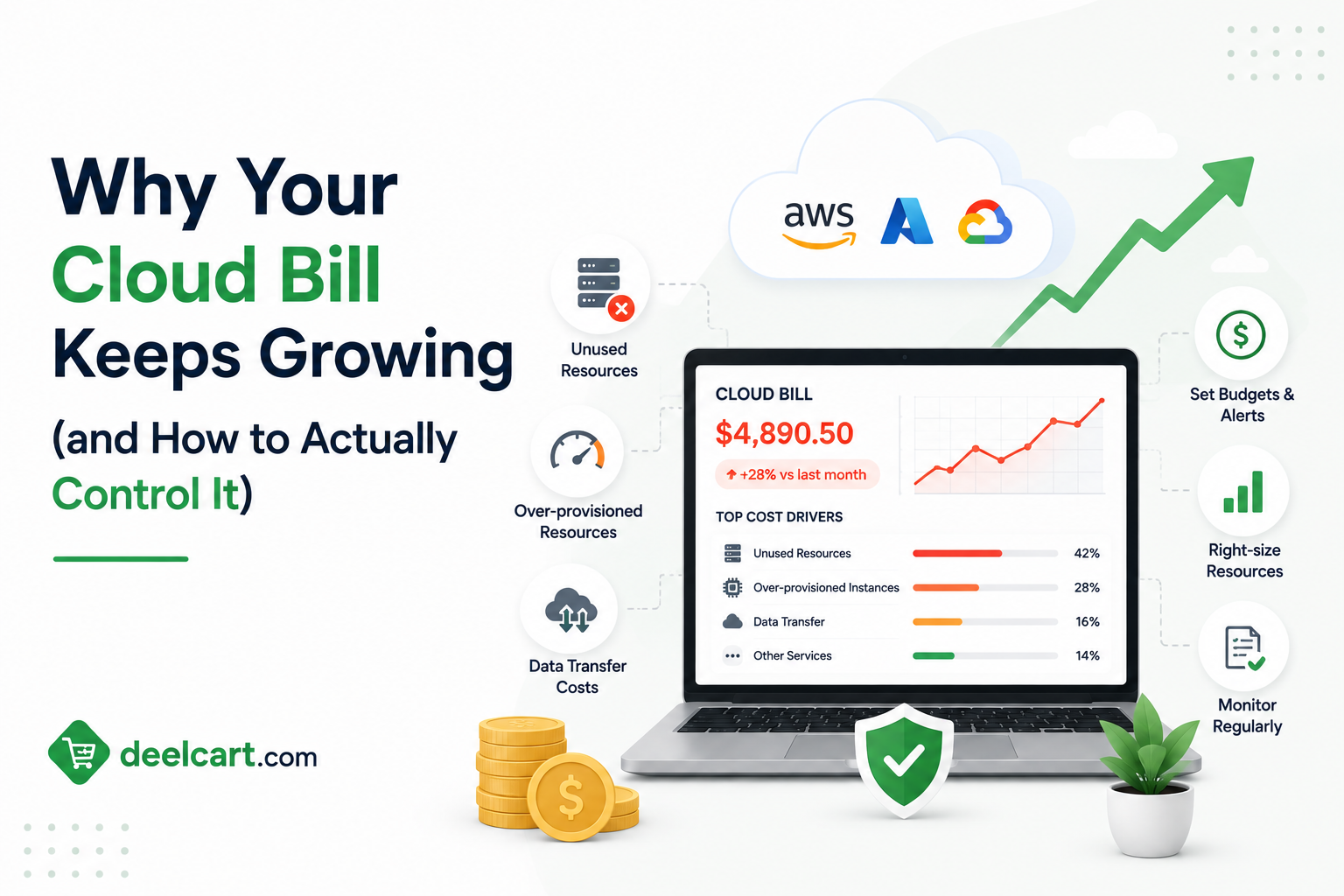
For most organisations, cloud costs grow faster than expected — often much faster than the business itself is growing. Engineers provision resources and forget about them. New services get added without cost review. Usage patterns change and pricing models do not keep up. What started as a predictable monthly bill becomes an unpredictable and uncomfortable line item that nobody in the organisation fully understands.
This guide covers the real reasons cloud bills keep growing and exactly what to do about each one.
Why Cloud Cost Is Hard to Control
Before diagnosing specific problems it helps to understand why cloud billing is fundamentally difficult to manage.
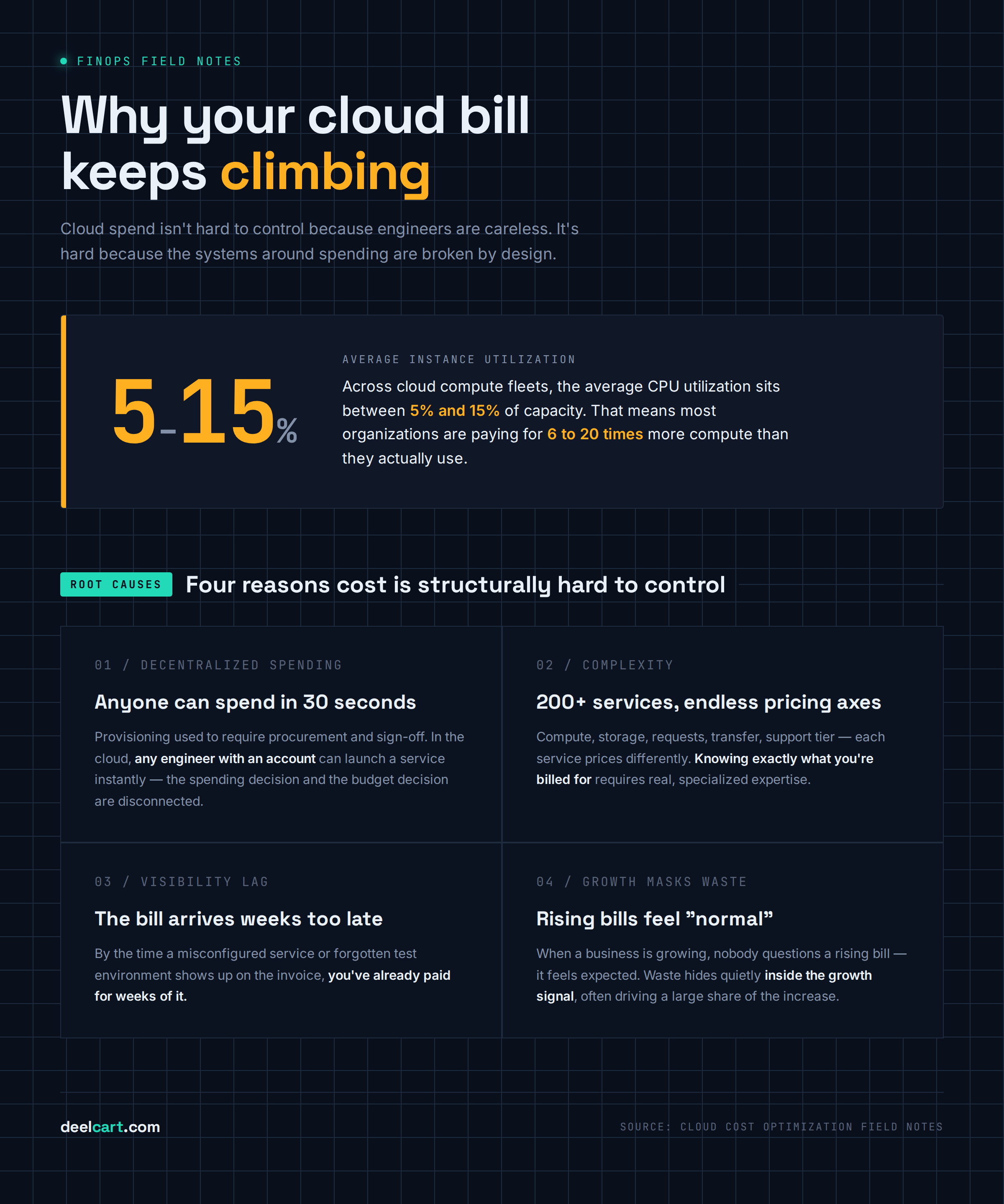
Decentralised spending. In a traditional IT environment, buying hardware required procurement approvals, purchase orders, and budget sign-off. In the cloud, any engineer with an account can provision a new service in thirty seconds. The spending decision and the budget decision are disconnected.
Complexity. AWS has over 200 services. Each service has multiple pricing dimensions — compute, storage, requests, data transfer, support tier, and more. Understanding exactly what you are being charged for and why requires significant expertise.
Visibility lag. Cloud bills arrive at the end of the month. By the time you see the cost of a mistake — a misconfigured service, a forgotten test environment, an unexpected data transfer charge — you have already paid for weeks of it.
Growth masks waste. When a company is growing, rising cloud costs feel natural and expected. Waste accumulates invisibly inside the growth signal. Nobody investigates a rising bill when the business is growing because the assumption is that growth is causing it. Often waste is causing a significant portion of it.
Reason 1 — Idle and Forgotten Resources
This is the most common and most fixable source of cloud waste. Resources that were provisioned for a purpose but are no longer actively used — still running, still billing, completely forgotten.
Development and test environments are the primary culprit. An engineer provisions a cluster to test a new architecture. The test concludes. The cluster is left running over the weekend. Then another week. Then forgotten entirely. Multiply this by every engineer on the team and every test environment ever created and the accumulated cost is significant.
Orphaned resources accumulate over time — snapshots, load balancers, Elastic IP addresses, unattached storage volumes, old AMIs. These are created as dependencies of other resources, the parent resources are deleted, and the dependencies are left behind because deleting them requires a separate action that is easy to forget.
Stopped instances that still incur costs. In AWS, stopping an EC2 instance stops compute charges — but attached EBS volumes, Elastic IP addresses, and other associated resources continue to bill. A stopped instance is not a free instance.
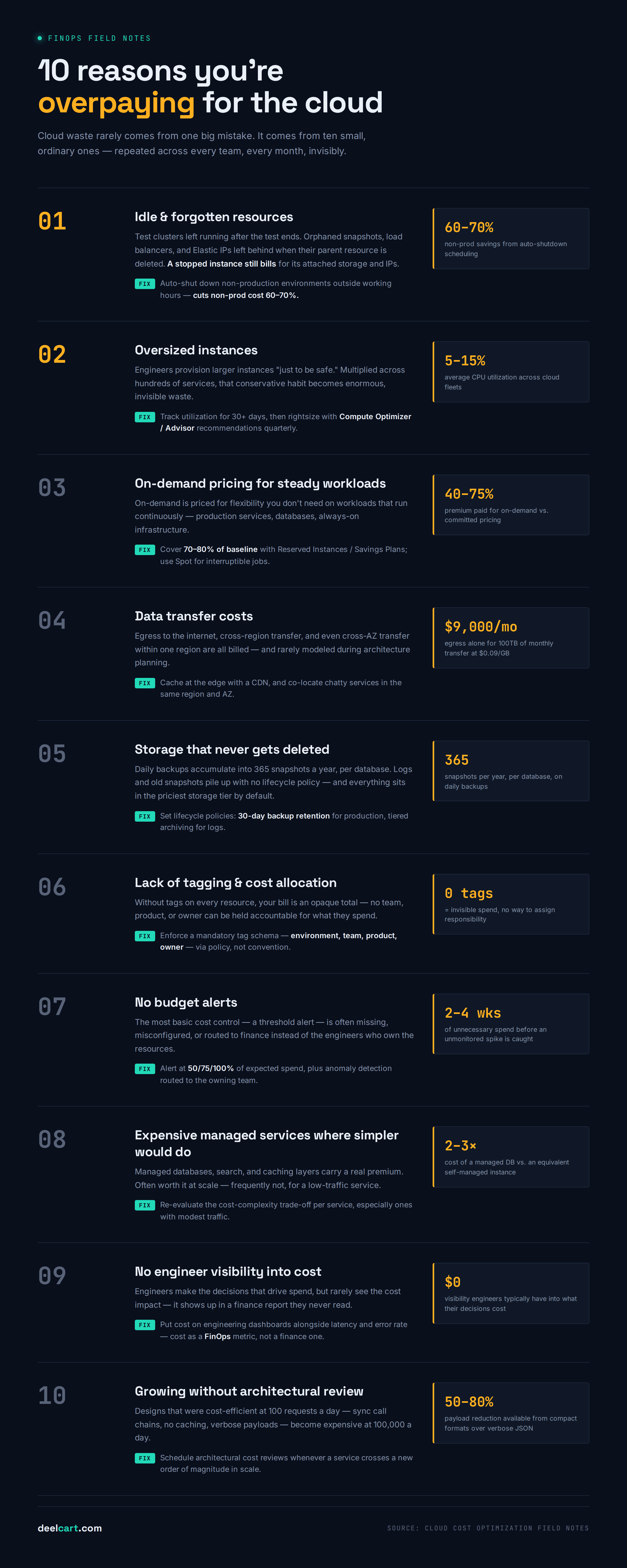
How to fix it: Set up automated resource discovery and tag everything. Run weekly reports of resources that have had no activity in the past 14 days. Create a policy that non-production environments are automatically shut down outside working hours and on weekends — this alone typically reduces non-production cloud costs by 60 to 70%. Use AWS Trusted Advisor, Azure Advisor, or Google Cloud Recommender to get automated recommendations for idle resources.
Reason 2 — Oversized Instances
The instinct when provisioning cloud resources is to overprovision. An engineer does not know exactly how much compute a service will need, and underprovisioning means degraded performance or outages. So they choose a larger instance than they think they need — just to be safe.
This is rational from an individual engineer's perspective. From a cost perspective, the cumulative effect of dozens of engineers making the same conservative choice across hundreds of services is enormous waste.
The numbers are striking. Industry data consistently shows that the average CPU utilisation across cloud compute instances is between 5% and 15%. The average instance is running at less than 15% of its available capacity. That means organisations are paying for six to twenty times more compute than they are actually using.
Memory is often oversized too. Services frequently need more memory than CPU — or more CPU than memory — but instances come in fixed ratios. Choosing a general-purpose instance when a memory-optimised or compute-optimised instance would fit the actual workload means paying for the wrong resources.
How to fix it: Instrument your services and collect CPU, memory, and disk utilisation metrics for at least 30 days before making rightsizing decisions. Use cloud provider rightsizing recommendations — AWS Compute Optimizer, Azure Advisor, and Google Cloud Recommender all analyse utilisation and recommend smaller instance types that would still handle the actual workload. Implement rightsizing as a quarterly review process, not a one-time exercise.
Reason 3 — On-Demand Pricing for Predictable Workloads
On-demand pricing is the most expensive way to run cloud compute. You pay a premium for the flexibility to start and stop instances without commitment. That premium is typically 40 to 75% more expensive than committed pricing options.
For workloads that run continuously — production services, databases, analytics infrastructure — paying on-demand pricing is simply unnecessary. These workloads will run regardless. The flexibility of on-demand adds no value.
Reserved Instances and Savings Plans in AWS, Reserved VM Instances in Azure, and Committed Use Discounts in Google Cloud all provide significant discounts in exchange for committing to use a certain amount of compute over one or three years. The discounts are substantial — typically 30 to 60% off on-demand pricing for one-year commitments and 50 to 75% for three-year commitments.
Spot Instances (AWS), Spot VMs (Azure), and Preemptible VMs (Google Cloud) offer even deeper discounts — typically 60 to 90% off on-demand — for workloads that can tolerate interruption. Batch processing, data analysis, machine learning training, and other interruptible workloads are excellent candidates.
How to fix it: Analyse your on-demand spend and identify workloads that have run consistently for the past 60 days. Purchase Reserved Instances or Savings Plans to cover that baseline. Use Spot capacity for interruptible workloads. A common target is covering 70 to 80% of baseline compute with committed pricing and using on-demand only for the variable portion above that baseline.
Reason 4 — Data Transfer Costs
Data transfer pricing is one of the most misunderstood and most surprising sources of cloud costs. Moving data within the cloud is not free — and the rules for when you are charged are complex.
Egress charges — data leaving the cloud to the public internet — are the most significant. AWS charges approximately $0.09 per GB for data leaving to the internet. On a service that transfers 100TB per month, that is $9,000 per month in egress alone — a line item that is easy to overlook during architectural planning.
Cross-region data transfer is charged even when both source and destination are in the same cloud provider. Moving data from us-east-1 to eu-west-1 on AWS incurs data transfer charges in both directions.
Cross-Availability Zone transfer within the same region is also charged — a common surprise for architectures that spread services across multiple AZs for redundancy without accounting for the inter-AZ data transfer cost.
How to fix it: Audit your data transfer line items on your cloud bill — they are broken out separately and are often more significant than teams expect. Review your architecture for unnecessary cross-region and cross-AZ data movement. Compress data before transfer. Use a CDN to cache frequently accessed content at the edge rather than serving it from your origin — this reduces origin egress dramatically. Co-locate services that communicate heavily in the same region and Availability Zone where possible.
Reason 5 — Storage That Never Gets Deleted
Storage costs are small per gigabyte — typically $0.02 to $0.05 per GB per month. But storage accumulates relentlessly. Data is added continuously. Old data is rarely deleted. Storage grows in one direction — upward — and the cost compounds month over month.
Database backups are a major contributor. Automated backup policies create daily snapshots. Those snapshots accumulate — one year of daily backups is 365 snapshots for every database. Retention policies are either not set or set too long.
Log storage compounds similarly. Application logs, access logs, CloudTrail logs, VPC flow logs — all continuously written to object storage. Without explicit lifecycle policies that expire or archive logs after a defined period, log storage grows indefinitely.
Old disk snapshots accumulate when engineers take snapshots before infrastructure changes and never delete them. Snapshots of deleted instances remain and bill indefinitely.
S3, Azure Blob, and Google Cloud Storage tiering is often not configured. Frequently accessed data should be in the most expensive tier — Standard. Infrequently accessed data should be in a cheaper tier — Standard-IA, Glacier for AWS. Data that is only needed for compliance should be in the cheapest archival tier. Without automatic lifecycle policies, everything stays in the most expensive tier.
How to fix it: Implement storage lifecycle policies for every bucket and database. Set retention policies for backups — 30 days is sufficient for most production databases, 7 days for non-production. Archive logs older than 90 days to cold storage and delete them after one year unless compliance requires longer retention. Run a monthly report of storage growth and investigate any buckets or databases growing faster than expected.
Reason 6 — Lack of Tagging and Cost Allocation
If you cannot see which team, product, or service is generating which costs, you cannot manage those costs effectively. Without tagging, your cloud bill is an opaque total — impossible to break down, impossible to assign responsibility for, impossible to analyse for waste.
Tagging means adding metadata to every cloud resource — team:payments, environment:production, product:checkout, owner:engineering-lead-name. When every resource has consistent tags, your cloud bill becomes a navigable dataset instead of an inscrutable total.
Without tags you cannot:
- Know which team's resources are driving cost increases
- Hold individual teams accountable for their cloud spending
- Show engineering leaders the cost of their team's infrastructure
- Identify which products have the highest cloud cost per unit of revenue
- Run meaningful showback or chargeback processes
How to fix it: Define a mandatory tag schema — environment, team, product, and owner at minimum. Enforce it with cloud provider policies that deny resource creation without required tags. Retroactively tag existing resources — use automated discovery tools to find untagged resources and assign them to teams for tagging. Set up cost dashboards broken down by tag so every team can see their own spending.
Reason 7 — No Budget Alerts
The most basic cost control mechanism — budget alerts that notify you when spending approaches or exceeds a threshold — is surprisingly often absent or misconfigured.
Without alerts, cost problems are discovered at the end of the month when the bill arrives. By then you have already paid for two to four weeks of whatever caused the spike. With alerts you can catch problems within hours.
Common alerting gaps:
- No budget alert at the account or project level
- Alerts set to thresholds so high they never trigger until the problem is severe
- Alerts that notify the billing team but not the engineering team responsible for the resources
- Anomaly detection not enabled — alerts only on absolute thresholds rather than unexpected increases
Reason 8 — Expensive Managed Services Where Simpler Would Do
Cloud providers make significant margin on managed services — databases, message queues, search services, caching layers. The convenience is real. Managed services reduce operational overhead. But the pricing premium is also real.
A managed RDS Multi-AZ instance with similar specifications to a self-managed PostgreSQL instance on EC2 costs approximately two to three times more. For a company processing thousands of transactions per second the managed service is worth that premium — the operational complexity of managing a database at that scale is enormous. For a small service with modest traffic, it may not be.
This is not an argument against managed services. For most teams at most scales, managed services are the right choice — the engineering time saved is worth more than the cost premium. The problem is using managed services without evaluating whether the cost-complexity trade-off makes sense for your specific situation.
Common patterns where simpler options are cost-effective:
- Using a managed Elasticsearch service for a simple search feature that a SQLite FTS extension would handle
- Running a managed Redis cluster for session storage on a service with modest traffic that a single self-managed Redis node would handle
- Using a managed Kubernetes service for a small number of services that would run comfortably on a single EC2 instance
Reason 9 — No Engineer Visibility Into Cost
Engineers make the decisions that drive cloud costs — which instance type to use, whether to clean up a test environment, whether to enable expensive features. But in most organisations engineers have no visibility into the cost of their decisions.
When a developer adds a feature that doubles the database query volume, they see the change in response time. They do not see the change in cloud cost — that shows up in a finance report they probably never read.
Shifting cost awareness to engineers — making cost a first-class metric that engineers see alongside performance metrics — is one of the most effective cost control levers available. When engineers can see that their service costs $3,400 per month and that a recent change caused a 30% cost spike, they make different decisions.
This is the core philosophy of FinOps — moving from cost as a finance problem to cost as an engineering responsibility.
How to fix it: Add cloud cost to your engineering dashboards alongside latency, error rate, and request volume. Show cost per service, per team, and per feature where possible. Use tools like Kubecost for Kubernetes cost attribution or Infracost for estimating cost changes before infrastructure changes are merged. Make cost anomalies visible to the engineer who owns the service, not just to a central platform team.
Reason 10 — Growing Without Architectural Review
As products grow, architectures that were cost-efficient at small scale become cost-inefficient at large scale. The design decisions that made sense for a service handling 100 requests per day may be expensive at 100,000 requests per day.
Common architectural patterns that become expensive at scale:
- Synchronous request chains where a single user request triggers many downstream API calls — each call may be cheap individually but the aggregate is significant at scale
- Full-page rendering or processing where incremental processing would work — reprocessing an entire dataset to update one record
- No caching layer — repeatedly querying a database for data that changes infrequently
- Verbose data formats where compact formats would work — JSON where binary encoding would reduce payload size and transfer cost by 50 to 80%
How to Build a Cloud Cost Control Process
Individual fixes help but the goal is a systematic process that prevents costs from getting out of control in the first place.
A practical cloud cost control process:
Weekly — review cost anomaly alerts and investigate any unexpected spikes. Check the list of resources with no recent activity and terminate or schedule termination of idle resources.
Monthly — review the full cloud bill broken down by service, team, and environment. Compare to the previous month and the previous year. Identify the top five cost drivers and evaluate whether they are justified. Review rightsizing recommendations and act on the most impactful ones.
Quarterly — review reserved instance and savings plan coverage. Purchase commitments to cover predictable baseline workloads. Review storage lifecycle policies. Conduct an architectural cost review of the highest-cost services.
Annually — review the full cloud strategy. Evaluate whether the organisation's mix of managed and self-managed services is appropriate at current scale. Review your CDN strategy and data transfer architecture. Set cloud cost targets for the coming year by team and product.
Cloud Cost Control Tools Worth Knowing
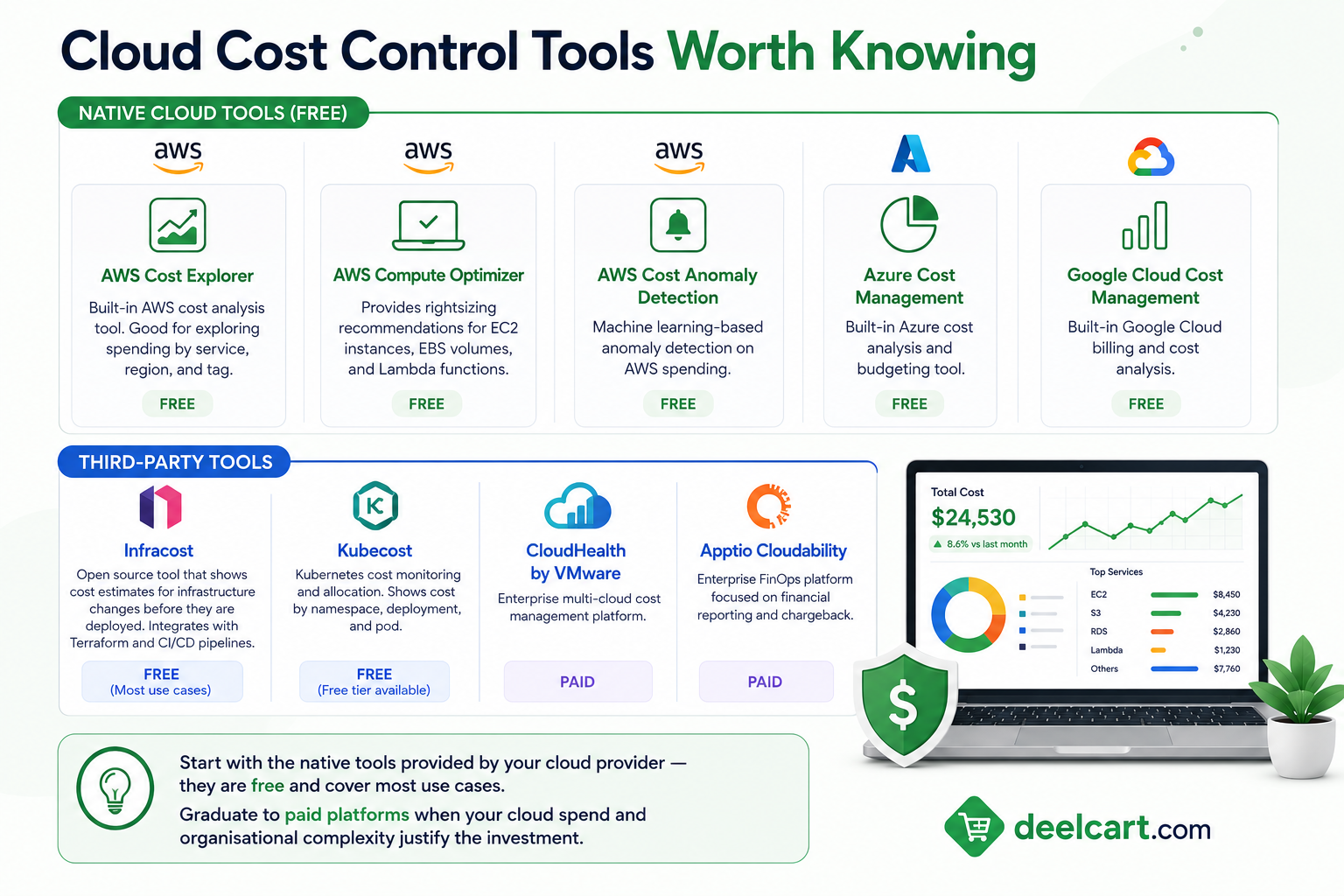
AWS Cost Explorer — built-in AWS cost analysis tool. Free. Good for exploring spending by service, region, and tag.
AWS Compute Optimizer — provides rightsizing recommendations for EC2 instances, EBS volumes, and Lambda functions. Free.
AWS Cost Anomaly Detection — machine learning-based anomaly detection on AWS spending. Free.
Azure Cost Management — built-in Azure cost analysis and budgeting tool. Free.
Google Cloud Cost Management — built-in Google Cloud billing and cost analysis. Free.
Infracost — open source tool that shows cost estimates for infrastructure changes before they are deployed. Integrates with Terraform and CI/CD pipelines. Free for most use cases.
Kubecost — Kubernetes cost monitoring and allocation. Shows cost by namespace, deployment, and pod. Free tier available.
CloudHealth by VMware — enterprise multi-cloud cost management platform. Paid.
Apptio Cloudability — enterprise FinOps platform focused on financial reporting and chargeback. Paid.
Start with the native tools provided by your cloud provider — they are free and cover most use cases. Graduate to paid platforms when your cloud spend and organisational complexity justify the investment.
Frequently Asked Questions
How much cloud waste is typical?
Industry research consistently estimates that 30 to 35% of cloud spend is wasted — idle resources, oversized instances, on-demand pricing for predictable workloads, and forgotten infrastructure. For organisations without a formal cost management practice, waste often exceeds 40%. Even organisations with mature FinOps practices typically have 10 to 15% waste — achieving zero waste is not realistic, but halving your waste is almost always achievable.
Should we hire a FinOps engineer or consultant?
For organisations spending over $500,000 per year on cloud, a dedicated FinOps engineer typically pays for themselves within months through cost reductions. Below that threshold, assigning part of a platform engineer's time to cost management is usually sufficient. Consultants are useful for an initial audit and process setup — they bring experience and tooling knowledge — but ongoing cost management requires internal ownership.
What is the fastest way to reduce a cloud bill immediately?
Terminate idle resources and shut down non-production environments outside working hours. These two actions are low risk, immediately impactful, and typically reduce bills by 15 to 30% within a week. Purchase Reserved Instances or Savings Plans for your predictable baseline workloads — this takes a few hours and produces immediate per-hour savings starting the next day.
Does using a multi-cloud strategy reduce costs?
Rarely. Multi-cloud strategy is usually driven by resilience, vendor lock-in concerns, or specific service capabilities — not cost. Managing infrastructure across multiple cloud providers adds operational complexity that typically increases costs. Within a single cloud provider, using the right services, right-sizing, and committed pricing produces much larger savings than switching providers.
How do Kubernetes clusters affect cloud costs?
Kubernetes clusters are a significant and complex source of cloud cost. Nodes must be sized to handle peak load for any pod that might run on them, leading to over-provisioning at cluster level even when individual workloads are right-sized. Tools like Karpenter (AWS) and Kubecost help — Karpenter provisions appropriately sized nodes based on actual pod requirements, and Kubecost allocates cluster costs to namespaces and teams. Cluster cost management is a discipline of its own within cloud cost management.
Is moving to serverless cheaper?
It depends entirely on workload characteristics. For spiky, unpredictable, or low-volume workloads, serverless is typically significantly cheaper than running a dedicated instance — you pay only for actual execution time. For high-volume steady workloads, serverless can be dramatically more expensive than a right-sized reserved instance. Always model the costs for your specific workload before migrating to serverless assuming it will be cheaper.
Justin is a self-taught developer who builds and runs DeelCart himself — from the articles to the server it runs on. He manages his own Linux infrastructure and writes guides based on tools and workflows he actually uses day to day.