Playwright Fixtures: Complete Guide with Examples in 2026
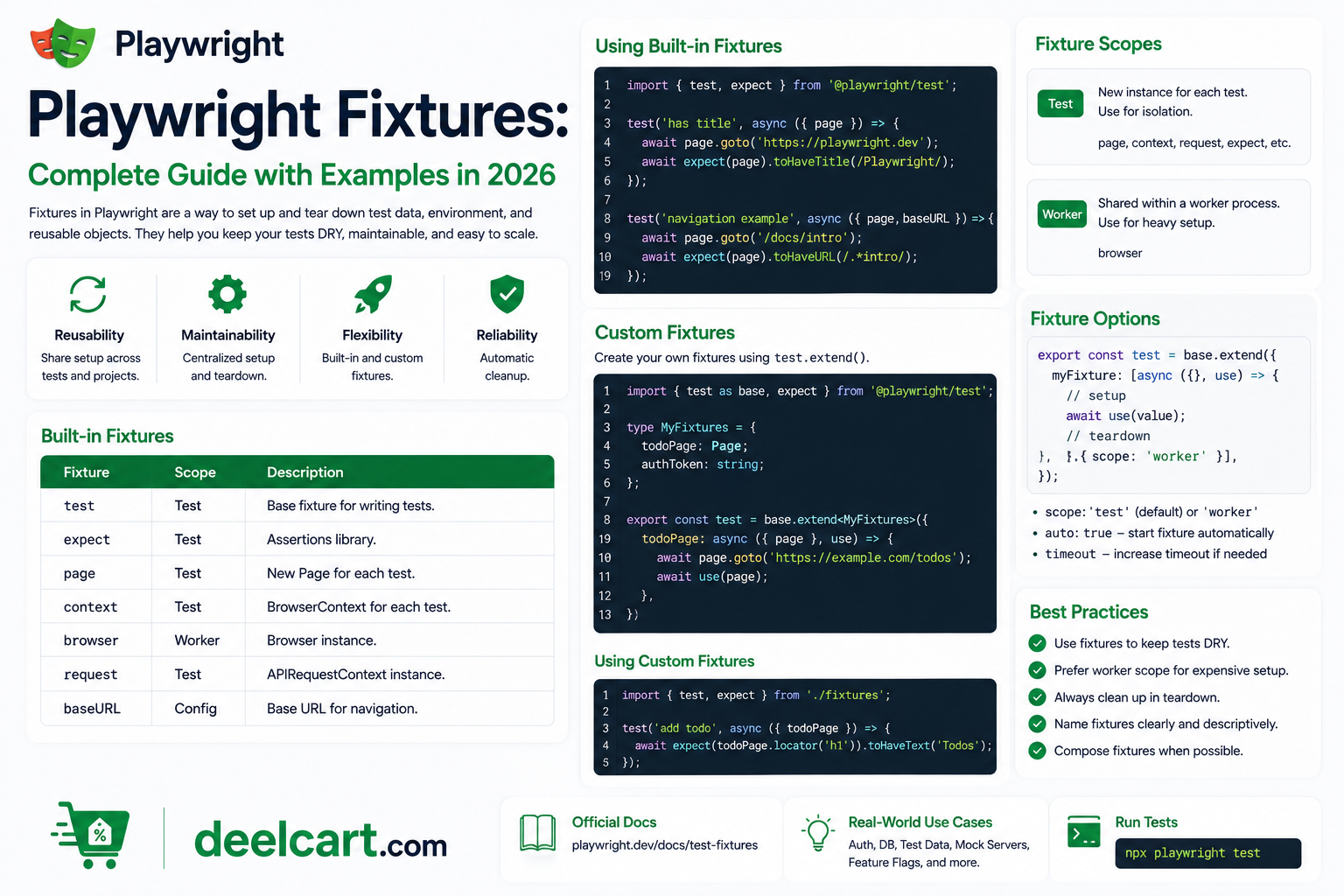
If you have ever copied the same login steps into ten different test files, fixtures are the solution. This guide covers everything you need to know about Playwright fixtures in 2026 — built-in fixtures, custom fixtures, fixture scopes, overriding fixtures, and best practices.
What Are Playwright Fixtures?
A fixture is a piece of shared setup and teardown logic that tests can use. Instead of writing the same before/after setup code in every test, you define it once as a fixture and declare it as a parameter in any test that needs it.
Playwright automatically runs the fixture setup before the test, injects the fixture value into the test function, and runs the fixture teardown after the test completes — even if the test fails.
Why fixtures are better than beforeEach:
- Fixtures are lazy — they only run if a test actually uses them
- Fixtures are composable — one fixture can use another fixture
- Fixtures are scoped — you control whether setup runs per test, per file, or per worker
- Fixtures are explicit — a test's dependencies are visible in its parameter list
- Fixtures handle teardown automatically — no need for afterEach blocks
Built-In Playwright Fixtures
Playwright ships with several built-in fixtures available in every test by default. You have already been using them — they appear as parameters in your test functions.
page
The page fixture provides a fresh browser page for each test. It is the most commonly used fixture in Playwright.
Every test that declares page as a parameter gets a new, isolated page. Changes made in one test do not affect another.
browser
The browser fixture provides access to the browser instance. It is scoped to the worker — meaning all tests in the same worker share the same browser instance, but each test still gets its own page.
Use the browser fixture when you need to create multiple pages or browser contexts within a single test.
browserName
The browserName fixture provides the name of the current browser being used — chromium, firefox, or webkit. This is useful when a test needs to behave differently depending on which browser is running.
context
The context fixture provides a new browser context for each test. A browser context is like a separate incognito window — it has its own cookies, localStorage, and session state isolated from other contexts.
request
The request fixture provides an API request context for making HTTP requests directly without a browser page. Use it for testing REST APIs or setting up test data via API calls before your UI test runs.
Creating Custom Fixtures
Custom fixtures are where the real power of the fixture system shows itself. You define them by extending the base test object from @playwright/test.
Basic Custom Fixture
The most common custom fixture is an authenticated page — a page that is already logged in before the test starts.
Define your custom fixtures in a separate file — conventionally called fixtures.ts or placed in a fixtures/ folder. You extend the base test with your custom fixtures and export the result as your new test function. Every test file that imports from your fixtures file gets access to your custom fixtures automatically.
The fixture itself uses the page built-in fixture, performs the login steps, and then calls use(page) to pass the prepared page to the test. Everything before use() is setup. Everything after use() is teardown.
Fixture with Teardown
Fixtures support teardown by writing cleanup code after the use() call. This runs after the test completes regardless of whether it passed or failed.
For example a database fixture might create test data before the test and delete it after — ensuring each test starts with a clean state and leaves no leftover data.
Fixtures Using Other Fixtures
Fixtures can depend on other fixtures. A loggedInPage fixture can use the built-in page fixture. An adminPage fixture can use the loggedInPage fixture. Playwright resolves the dependency chain automatically and runs them in the correct order.
Fixture Scopes
Fixtures can be scoped to control how often the setup and teardown runs.
Test Scope (Default)
A test-scoped fixture runs setup and teardown for every individual test that uses it. This is the default scope and the right choice for most fixtures — it ensures full isolation between tests.
Use test scope for things like authenticated pages, prepopulated forms, and any state that should be fresh for each test.
Worker Scope
A worker-scoped fixture runs setup once per worker process and is shared across all tests running in that worker. This is useful for expensive setup that does not need to be repeated — like starting a local server, connecting to a database, or launching a heavy external service.
Use worker scope sparingly and only for truly shared, stateless resources. If a worker-scoped fixture holds state, tests can interfere with each other.
To set worker scope, add scope: 'worker' to your fixture definition options.
Overriding Built-In Fixtures
You can override Playwright's built-in fixtures to customise their behaviour for your entire test suite.
Overriding the page Fixture
A common override is to set a baseURL or configure the page with default settings — for example automatically accepting cookies, setting viewport size, or navigating to a starting URL before every test.
By overriding page in your fixtures file, every test that uses page gets your customised version without any changes to the test files themselves.
Overriding the context Fixture
Override the context fixture to apply settings to every browser context — for example granting permissions, setting geolocation, or injecting storage state to simulate a logged-in user.
Automatic Fixtures
Most fixtures are only set up when a test explicitly declares them as parameters. Automatic fixtures run for every test in the scope regardless of whether the test declares them.
This is useful for things that should always happen — setting up request interceptors, starting a performance monitor, or logging test metadata. Set auto: true in your fixture options to make it automatic.
Using Fixtures Across Multiple Files
The most important pattern for organising fixtures in a real project is to define all your fixtures in one place and import from there instead of from @playwright/test directly.
Create a test.ts file in your fixtures folder that extends the base test with all your custom fixtures and exports the extended test, expect, and Page type. All your test files import from this file instead of directly from @playwright/test.
This pattern means you can add new fixtures in one place and every test file gets access to them immediately.
Common Fixture Patterns
Authenticated User Fixture
The most common fixture in any application with authentication. It logs in once, saves the browser storage state to a file, and restores that state in subsequent tests. This is dramatically faster than logging in through the UI for every single test.
API Client Fixture
A fixture that creates an authenticated API client your tests can use to set up test data, verify backend state, or clean up after a test. This is especially useful for tests that need specific data conditions that would be tedious to create through the UI.
Mock Server Fixture
A fixture that starts a mock HTTP server before the test and shuts it down after. Tests that use this fixture can make real network requests that are intercepted and handled by the mock server — giving you control over API responses without depending on a real backend.
Database Fixture
A fixture that seeds your test database with known data before the test and cleans it up afterwards. Worker-scoped database connection combined with test-scoped data seeding is the standard pattern for database fixtures.
Fixture Best Practices
Name fixtures clearly. A fixture named authenticatedPage is immediately understandable. A fixture named ap is not. Clear names make test parameter lists readable at a glance.
Keep fixtures focused. Each fixture should do one thing. An authenticatedPage fixture handles login. A seedProducts fixture creates product data. Combining them into one fixture makes both harder to reuse independently.
Use worker scope only for truly shared resources. Worker-scoped fixtures are shared across tests. Any state mutation in one test can affect another. Only use worker scope for stateless resources like server connections or compiled assets.
Put fixtures in a dedicated file. Keep all your custom fixtures in a fixtures/ folder and export a custom test object. Import from there in every test file. This is the standard Playwright project structure and makes fixtures easy to find and maintain.
Use fixtures instead of beforeEach for setup that is reused. If the same setup appears in beforeEach in more than one file, it belongs in a fixture.
Playwright Fixtures vs beforeEach
| Feature | Fixtures | beforeEach |
|---|---|---|
| Reusability across files | Yes — import and use anywhere | No — scoped to one file |
| Lazy execution | Yes — only runs if test uses it | No — always runs |
| Composability | Yes — fixtures can use fixtures | Limited |
| Scoping options | Test or worker scope | Test scope only |
| Teardown | Inline after use() | Separate afterEach block |
| Visibility of dependencies | Explicit in test parameters | Implicit — hidden in hook |
Frequently Asked Questions
What is the difference between a fixture and beforeEach in Playwright?
A beforeEach hook runs before every test in a file and is scoped to that file only. A fixture is defined once, can be reused across any number of test files, only runs when a test actually uses it, and handles teardown inline. Fixtures are more powerful and more reusable than beforeEach hooks.
Can a fixture use another fixture?
Yes. Fixtures can depend on other fixtures — including both built-in fixtures like page and custom fixtures you define. Playwright resolves the dependency chain automatically and runs fixtures in the correct order.
What is the difference between test scope and worker scope?
Test-scoped fixtures run setup and teardown for every individual test. Worker-scoped fixtures run setup once per worker process and are shared across all tests in that worker. Use test scope for isolated state and worker scope for expensive shared resources.
How do I share login state across tests using fixtures?
The recommended pattern is to create an authenticatedPage fixture that logs in once, saves the browser storage state using context.storageState(), and restores it in subsequent tests using storageState in the context options. This avoids logging in through the UI for every test and makes your suite significantly faster.
Can I override built-in Playwright fixtures?
Yes. You can override any built-in fixture — including page, context, browser, and request — by redefining them in your custom test extension. This is useful for applying global defaults like base URL, viewport size, or permissions to every test without modifying individual test files.
Do fixtures work with Playwright's parallel execution?
Yes. Fixtures are designed to work correctly in parallel. Test-scoped fixtures create isolated instances for each test. Worker-scoped fixtures are shared within a worker but isolated between workers. This means you can run hundreds of tests in parallel safely as long as your fixtures are properly scoped.
Justin is a self-taught developer who builds and runs DeelCart himself — from the articles to the server it runs on. He manages his own Linux infrastructure and writes guides based on tools and workflows he actually uses day to day.