Playwright Best Practices: Complete Guide for 2026
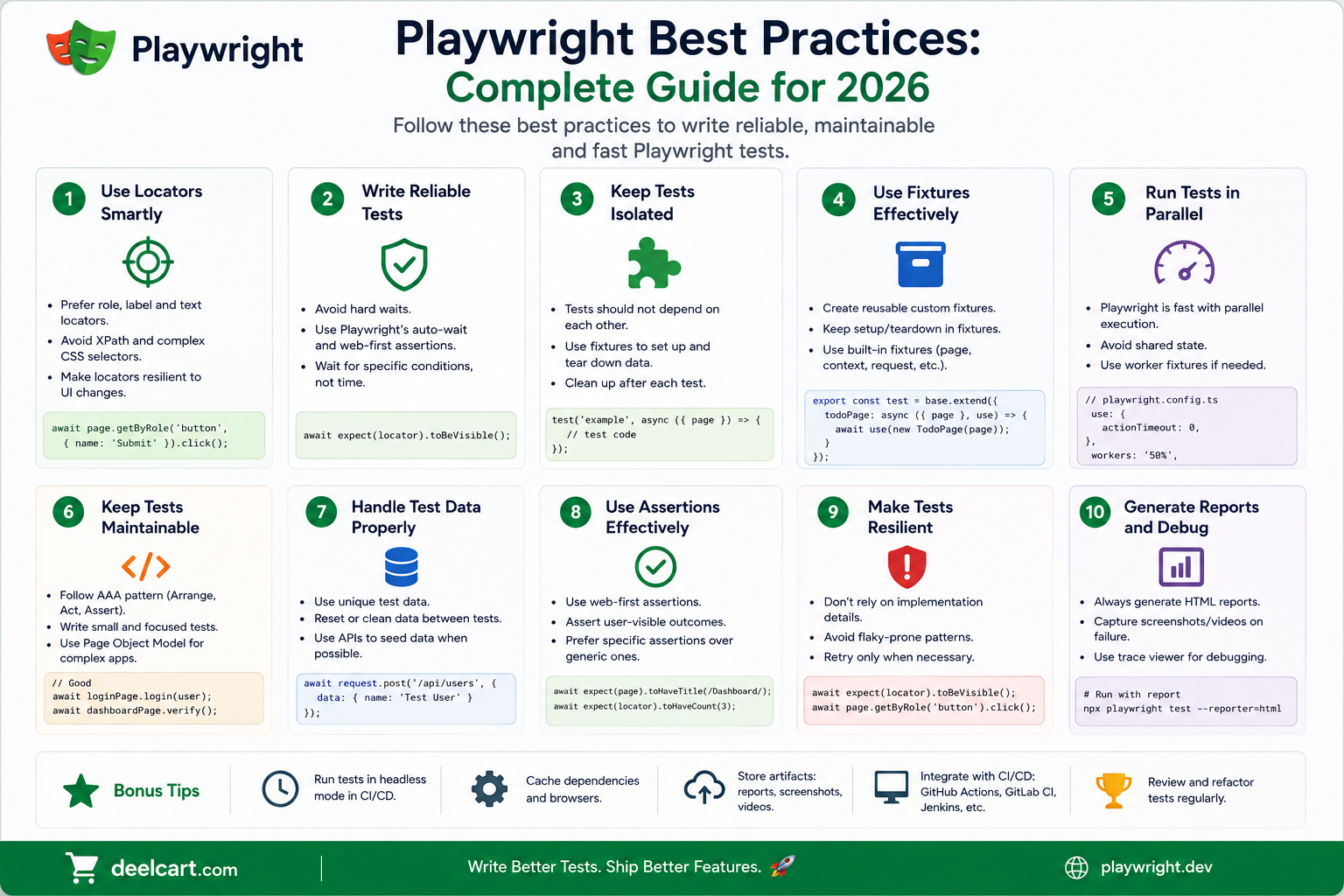
Most test suites start clean and become a maintenance burden over time. Tests break for the wrong reasons, flakiness creeps in, the suite becomes slow, and eventually the team stops trusting it. This guide covers the best practices that prevent those problems — how to write Playwright tests that stay reliable as your application grows.
1. Use Role-Based Locators Over CSS Selectors
The locator you use to find elements is the single most important factor in test reliability. Tests that use CSS selectors or XPath break whenever a developer changes a class name, restructures the HTML, or moves an element to a different container. These are implementation details — and tests should not depend on them.
Playwright provides locators that reflect how users actually interact with a page — by role, label, text, and placeholder. These locators are resilient to HTML changes because they target what the element means rather than how it is styled.
Prefer these locators:
page.getByRole()— finds elements by their ARIA role and accessible namepage.getByLabel()— finds form inputs by their associated labelpage.getByText()— finds elements by their visible text contentpage.getByPlaceholder()— finds inputs by placeholder textpage.getByTestId()— finds elements by adata-testidattribute
- CSS selectors like
page.locator('.btn-primary')— break on style changes - XPath like
page.locator('//div[2]/button')— break on structure changes - Positional selectors like
page.locator('button:nth-child(3)')— fragile and unclear
page.getByRole('button', { name: 'Submit' }) is far more resilient than page.locator('.form-submit-btn'). The first breaks only if the button's accessible name or role changes. The second breaks any time the CSS class changes.2. Add data-testid Attributes to Your Application
For elements that do not have a natural role or label — custom components, interactive widgets, specific containers — add data-testid attributes directly in your application code and use page.getByTestId() to target them in tests.
This creates a clear contract between your application and your tests. The data-testid attribute communicates that this element is used in tests and should not be removed without updating the tests. It also makes refactoring safer — you can change the HTML structure freely as long as you preserve the data-testid.
Keep data-testid values descriptive and stable — data-testid="checkout-submit-button" is better than data-testid="btn1". Use kebab-case consistently across your codebase.
3. Never Use page.waitForTimeout
page.waitForTimeout(2000) is a fixed delay — the test stops for two seconds regardless of whether the page is ready. It is the most common cause of slow and flaky tests.
It makes tests slow because you always wait the full duration even when the page is ready in 200 milliseconds. It makes tests flaky because on a slow CI runner the page might not be ready after two seconds either.
Replace every page.waitForTimeout() with a proper web-first assertion or wait:
await expect(locator).toBeVisible()— waits until the element is visibleawait expect(locator).toHaveText('Success')— waits until the element has the expected textawait page.waitForURL('**/dashboard')— waits until the URL matchesawait page.waitForLoadState('networkidle')— waits until network activity settles
4. Use Web-First Assertions
Always prefer web-first assertions from expect(locator) over evaluating values manually and asserting on the result.
Web-first assertions retry until the condition passes or times out. If an element is not yet visible when the assertion runs, Playwright waits and retries rather than immediately failing. This handles asynchronous page updates without any manual waiting code.
await expect(page.getByText('Order confirmed')).toBeVisible() is better than checking await page.locator('...').textContent() and asserting on the string. The first retries automatically. The second checks once and fails if the text is not immediately present.
5. Keep Tests Independent
Every test should be able to run on its own in any order and produce the same result. Tests that depend on the state left by a previous test are fragile — when you run tests in a different order, in parallel, or after a test failure, they break in unexpected ways.
Rules for test independence:
- Never share mutable state between tests through global variables
- Never rely on a previous test having created data that this test reads
- Never rely on a previous test having navigated to a specific page
- Each test should set up everything it needs — either in the test itself or in a fixture
6. Use Fixtures for Shared Setup
If the same setup code appears in more than one test, it belongs in a fixture. Fixtures are reusable, composable, and properly scoped — they run before the test that uses them and clean up after it automatically.
The most common and valuable fixture is an authenticated page — a browser page that is already logged in. Instead of writing login steps in every test that needs authentication, define a single authenticatedPage fixture and declare it as a parameter in tests that need it.
Fixtures also handle teardown cleanly. Write cleanup code after the use() call inside the fixture definition — it runs after every test that uses the fixture, whether the test passed or failed.
Keep fixtures focused on one responsibility. An authenticatedPage fixture should only handle login. A seedProducts fixture should only create product data. Combining multiple concerns into one fixture makes both harder to reuse independently.
7. Organise Tests by Feature, Not by Page
A common mistake is organising test files by page — home.spec.ts, products.spec.ts, checkout.spec.ts. This works initially but breaks down as features span multiple pages.
Organise tests by feature or user journey instead — user-registration.spec.ts, product-search.spec.ts, complete-checkout.spec.ts. Each file covers one complete feature from a user's perspective, even if that feature involves multiple pages.
Within each file, group related tests using test.describe() blocks. Give each block a descriptive name that describes the scenario being tested — test.describe('when the cart is empty') or test.describe('as an admin user').
8. Write Descriptive Test Names
A test name should describe exactly what is being verified — specific enough that when it fails you immediately know what broke without reading the test code.
Bad test names:
test('login works')test('test 1')test('checkout')
test('shows an error message when the password is less than 8 characters')test('redirects to the dashboard after successful login')test('disables the submit button while the order is processing')
test('checkout') fails you have no idea which part of checkout is broken.9. Use Page Object Models for Complex Pages
For pages with complex interactions that appear in many tests, the Page Object Model (POM) pattern reduces duplication and makes tests easier to read and maintain.
A page object is a class that encapsulates the locators and actions for a specific page. Instead of writing page.getByLabel('Email').fill('[email protected]') and page.getByLabel('Password').fill('password') and page.getByRole('button', { name: 'Sign In' }).click() in every test that logs in, you define a LoginPage class with a login(email, password) method and call that instead.
When the login form changes — a new field is added, a label changes — you update the page object in one place rather than every test that interacts with the login form.
Use page objects for pages with many interactions. Do not create page objects for simple pages with one or two interactions — the abstraction adds complexity without enough benefit.
10. Handle Authentication Efficiently
Logging in through the UI before every test is the most common performance problem in Playwright test suites. A login flow that takes three seconds adds three seconds to every single test that needs authentication — and that adds up to hours across a large suite.
The recommended pattern is to log in once, save the browser storage state to a file, and restore it at the start of each test. Playwright's context.storageState() saves all cookies and localStorage. Passing storageState to your browser context in a fixture restores the session instantly without touching the UI.
For applications with multiple user roles, save a storage state file for each role — admin, regular user, guest — and create a separate fixture for each one. Tests that need an admin user use the adminPage fixture. Tests that need a regular user use the userPage fixture.
11. Configure Retries Correctly
Retries help absorb genuine flakiness in CI but should not be used to hide poorly written tests.
Set retries to zero locally so failures are immediately visible during development. Set retries to one or two in CI to handle real-world flakiness — network delays, slower runners, timing variations. Use the process.env.CI check in your config to set different values automatically.
If a test fails consistently even with retries the problem is in the test or the application — not flakiness. Fix the root cause rather than increasing retries.
12. Run Tests in Parallel
Playwright runs tests in parallel by default using workers. Make sure your tests are actually taking advantage of this by keeping them independent — parallel execution only works safely when tests do not share state.
Tune the number of workers based on your machine or CI runner. On a local machine with 8 cores, workers: 4 is a reasonable starting point. On a standard GitHub Actions runner with 2 cores, workers: 2 is appropriate.
For large test suites use sharding to distribute across multiple CI jobs. Each shard runs a subset of tests in parallel and the total suite time drops proportionally.
13. Use Soft Assertions for Multi-Check Tests
When you need to verify multiple things on a page and want to see all failures at once rather than stopping at the first one, use soft assertions with expect.soft().
Soft assertions record failures but allow the test to continue. At the end of the test Playwright reports all failures together. This is particularly useful for page validation tests where you are checking multiple elements at once — seeing all ten failures at once is far more useful than stopping at the first one and re-running to discover the next nine.
Use regular hard assertions for the main flow of a test and soft assertions for multi-property validation steps.
14. Use the Playwright Code Generator to Start
When writing tests for a new page or flow, use npx playwright codegen to record the interactions first. The generated code gives you a starting point with correct locators and structure that you then refine.
The code generator uses role-based locators by default — which aligns with best practices. Treat the output as a draft rather than finished code. Review it, add assertions, improve locator specificity, and extract repeated patterns into fixtures or page objects.
15. Test the Right Things
Not everything needs to be an end-to-end Playwright test. Playwright tests are powerful but they are also the slowest and most expensive tests to run and maintain.
Use Playwright for:
- Critical user journeys — signup, login, checkout, core workflows
- Interactions that cannot be tested at a lower level — file uploads, drag and drop, multi-tab flows
- Visual verification of key pages
- Integration points between frontend and backend
- Pure unit logic — use unit tests
- API behaviour — use API tests or Playwright's request fixture
- Every permutation of form validation — test the happy path and one or two key error states in E2E, cover edge cases in unit tests
Playwright Best Practices Summary
| Practice | Why It Matters |
|---|---|
| Use role-based locators | Tests survive HTML and CSS changes |
| Add data-testid attributes | Clear contract between app and tests |
| Never use waitForTimeout | Eliminates slow and flaky tests |
| Use web-first assertions | Auto-retry handles async page updates |
| Keep tests independent | Safe for parallel execution and reordering |
| Use fixtures for shared setup | Reusable, composable, auto-teardown |
| Organise tests by feature | Tests reflect user journeys not implementation |
| Write descriptive test names | Failures are immediately understandable |
| Use page object models | One place to update when UI changes |
| Handle auth with storage state | Dramatically faster than UI login per test |
| Configure retries correctly | Absorbs CI flakiness without hiding bugs |
| Run tests in parallel | Keeps suite fast as it grows |
Frequently Asked Questions
What is the most common cause of flaky Playwright tests?
The most common cause is timing — tests that use page.waitForTimeout() or check element state without retrying. Replace fixed waits with web-first assertions that retry automatically. The second most common cause is test interdependence — tests that rely on state created by a previous test. Keep tests fully independent.
Should I use Page Object Models in every Playwright project?
No. Page objects add value for complex pages that appear in many tests. For small projects or simple pages the abstraction adds complexity without enough benefit. Start without page objects and introduce them when you notice the same locators and interactions being repeated across multiple test files.
How many Playwright tests should a project have?
There is no universal number. A focused set of 50 to 100 tests covering critical user journeys is more valuable than 500 tests that cover every permutation of every form. Playwright tests are expensive to write and maintain — invest them where they provide the most confidence.
How do I deal with tests that are sometimes slow in CI?
Increase the assertion timeout for specific slow assertions using the timeout option. Check whether the CI runner is under-resourced — too many workers competing for limited CPU causes slowness. Use the Playwright trace viewer to see exactly where time is being spent in failing tests.
Is it okay to have long Playwright tests that cover multiple steps?
Yes for critical user journeys — a checkout flow that covers adding to cart, entering shipping, entering payment, and confirming the order makes sense as one test. Avoid extremely long tests that cover unrelated scenarios — if one step fails the whole test fails and you lose information about the other steps.
How do I know if my tests are testing the right things?
Ask whether each test would catch a real bug that matters to users. If a test would still pass after a significant feature is broken, it is not testing the right thing. Focus tests on user-visible outcomes — the heading shows the right text, the order confirmation email is sent, the item count updates after adding to cart.
Justin is a self-taught developer who builds and runs DeelCart himself — from the articles to the server it runs on. He manages his own Linux infrastructure and writes guides based on tools and workflows he actually uses day to day.