Playwright Assertions: Complete Guide with Examples in 2026
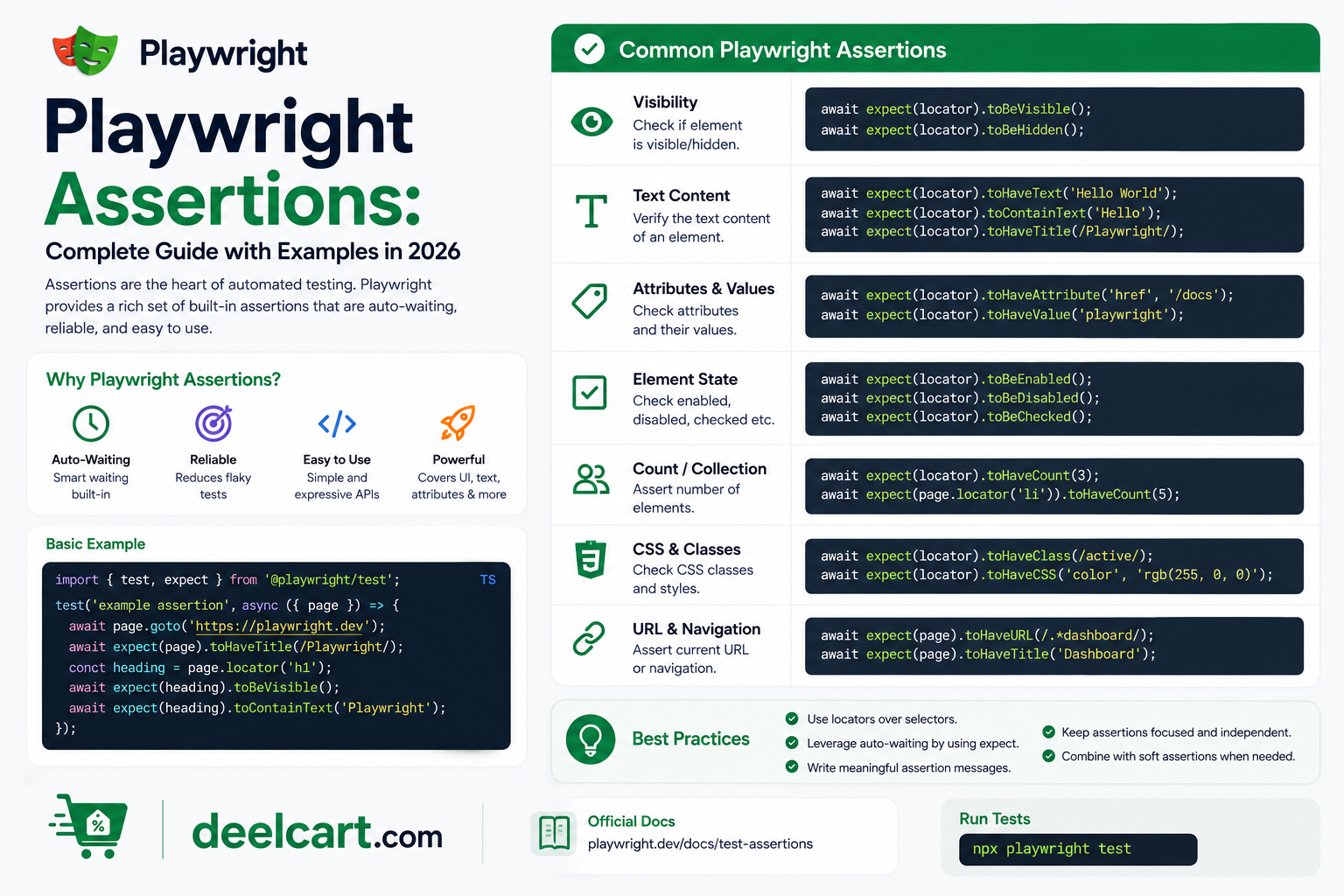
This guide covers everything you need to know about Playwright assertions — from basic expect statements to web-first assertions, soft assertions, negative assertions, and custom matchers — with clear examples throughout.
What Are Playwright Assertions?
An assertion is a check that verifies your application is behaving as expected. In Playwright, assertions are written using the expect() function. You pass a value or a page element to expect() and chain a matcher that describes what you expect to be true.
If the assertion passes the test continues. If it fails Playwright marks the test as failed, captures a screenshot, and records the failure in your test report.
A simple example:
After navigating to a page you might assert that the page title contains the word "Dashboard", that a success message is visible, or that a button is enabled. These checks confirm that your application did what it was supposed to do.
Web-First Assertions vs Regular Assertions
Playwright has two types of assertions and understanding the difference is important.
Web-first assertions are designed specifically for testing web pages. They automatically retry until the condition is met or the timeout expires. This means if an element is not yet visible when the assertion runs — because the page is still loading — Playwright waits and retries rather than immediately failing.
Regular assertions check a value once and either pass or fail immediately. They do not retry.
For most web testing scenarios you should use web-first assertions because web pages are dynamic — content loads asynchronously and elements appear after delays. Web-first assertions handle this automatically without any manual waiting.
Basic Playwright Assertions
Asserting Page Title
Check that the page has the correct title using expect(page).toHaveTitle():
await expect(page).toHaveTitle('My App — Dashboard');
You can also use a regular expression for partial matching:
await expect(page).toHaveTitle(/Dashboard/);
Asserting Page URL
Check that the page navigated to the correct URL using expect(page).toHaveURL():
await expect(page).toHaveURL('https://myapp.com/dashboard');
Or with a regex pattern:
await expect(page).toHaveURL(/.*dashboard/);
Asserting Element Visibility
Check that an element is visible on the page using expect(locator).toBeVisible():
await expect(page.getByText('Welcome back')).toBeVisible();
Check that an element is hidden:
await expect(page.getByTestId('error-message')).toBeHidden();
Asserting Element Text
Check that an element contains specific text using expect(locator).toHaveText():
await expect(page.getByRole('heading', { name: 'Dashboard' })).toHaveText('Dashboard');
For partial text matching use toContainText():
await expect(page.getByRole('paragraph')).toContainText('successfully');
Asserting Input Values
Check the current value of an input field using expect(locator).toHaveValue():
await expect(page.getByLabel('Email')).toHaveValue('[email protected]');
Element State Assertions
Playwright provides assertions for checking the state of interactive elements.
Checking if an Element is Enabled or Disabled
await expect(page.getByRole('button', { name: 'Submit' })).toBeEnabled();
await expect(page.getByRole('button', { name: 'Submit' })).toBeDisabled();
Checking if a Checkbox is Checked
await expect(page.getByLabel('Accept terms')).toBeChecked();
await expect(page.getByLabel('Newsletter')).not.toBeChecked();
Checking if an Element is Editable
await expect(page.getByLabel('Username')).toBeEditable();
Checking if an Element is Empty
await expect(page.getByTestId('search-input')).toBeEmpty();
Checking if an Element is Focused
await expect(page.getByLabel('First name')).toBeFocused();
Attribute and CSS Assertions
Asserting an Element Has a Specific Attribute
Check that an element has an attribute with a specific value using toHaveAttribute():
await expect(page.getByRole('img')).toHaveAttribute('alt', 'Company logo');
await expect(page.getByRole('link')).toHaveAttribute('href', '/about');
Asserting CSS Classes
Check that an element has a specific CSS class using toHaveClass():
await expect(page.getByTestId('status-badge')).toHaveClass(/active/);
Asserting CSS Property Values
Check a computed CSS property value using toHaveCSS():
await expect(page.getByTestId('header')).toHaveCSS('color', 'rgb(0, 0, 0)');
Count and List Assertions
Asserting the Number of Elements
Check how many elements match a locator using toHaveCount():
await expect(page.getByRole('listitem')).toHaveCount(5);
This is useful for verifying that a list renders the correct number of items.
Asserting Text Content of Multiple Elements
Check the text content of all elements matching a locator using toHaveText() with an array:
await expect(page.getByRole('listitem')).toHaveText(['Item 1', 'Item 2', 'Item 3']);
Negative Assertions
Add .not before any matcher to assert the opposite condition:
await expect(page.getByText('Error')).not.toBeVisible();
await expect(page.getByRole('button')).not.toBeDisabled();
await expect(page).not.toHaveURL(/login/);
await expect(page.getByTestId('modal')).not.toBeAttached();
Negative assertions are useful for verifying that error messages do not appear after a successful action, or that a modal closes after clicking the dismiss button.
Soft Assertions
By default, when a Playwright assertion fails the test stops immediately. Soft assertions change this behaviour — they record the failure but allow the test to continue running.
This is useful when you want to check multiple things on a page and see all failures at once rather than stopping at the first one.
Use expect.soft() instead of expect() for soft assertions:
await expect.soft(page.getByTestId('title')).toHaveText('Welcome');
await expect.soft(page.getByTestId('subtitle')).toBeVisible();
await expect.soft(page.getByRole('button')).toBeEnabled();
All three assertions above will run even if one fails. At the end of the test Playwright reports all failures together.
API Response Assertions
Playwright can also assert on API responses. This is useful when testing backend integrations or checking that requests return the correct data.
After making a request you can assert on the response status, headers, and body:
const response = await page.request.get('https://api.example.com/users');
await expect(response).toBeOK();
toBeOK() passes if the response status code is between 200 and 299.
You can also check the status code directly:
expect(response.status()).toBe(200);
Snapshot Assertions
Playwright supports snapshot testing — comparing the current state of an element or page against a previously saved snapshot.
Text Snapshot
Assert that element text matches a saved snapshot:
await expect(page.getByTestId('invoice-summary')).toMatchAriaSnapshot();
Screenshot Snapshot
Assert that a page or element looks exactly like a previously saved screenshot:
await expect(page).toHaveScreenshot('homepage.png');
await expect(page.getByTestId('chart')).toHaveScreenshot('chart.png');
On the first run Playwright saves the screenshot as the baseline. On subsequent runs it compares against the saved baseline and fails if there are visual differences. This is called visual regression testing.
Custom Assertion Timeout
By default Playwright waits up to 5 seconds for web-first assertions to pass. You can override this per assertion:
await expect(page.getByText('Data loaded')).toBeVisible({ timeout: 15000 });
You can also set a global default timeout for all assertions in your playwright.config.ts by setting expect: { timeout: 10000 } in your configuration.
Assertion Best Practices
Use web-first assertions over manual waits. Instead of using page.waitForTimeout(2000) followed by a regular check, use a web-first assertion like toBeVisible() that retries automatically. This makes tests faster and more reliable.
Prefer role-based locators. Using page.getByRole(), page.getByLabel(), and page.getByText() makes your assertions resilient to HTML structure changes. Tests that rely on CSS selectors break more often than tests that use semantic locators.
Keep assertions close to the action. Place your assertion immediately after the action it is verifying. This makes tests easier to read and debug.
Use meaningful locators. A test that asserts expect(page.getByTestId('submit-btn')).toBeEnabled() is far clearer than one using a CSS selector. Add data-testid attributes to your application's important elements to make them easy to target.
Assert on what the user sees. Good assertions verify the user-visible outcome — the heading text, the success message, the updated count — rather than internal implementation details.
Complete Playwright Assertions Reference
| Assertion | What It Checks |
|---|---|
toHaveTitle() |
Page title matches |
toHaveURL() |
Page URL matches |
toBeVisible() |
Element is visible |
toBeHidden() |
Element is hidden |
toHaveText() |
Element text matches exactly |
toContainText() |
Element contains text |
toHaveValue() |
Input field value matches |
toBeEnabled() |
Element is enabled |
toBeDisabled() |
Element is disabled |
toBeChecked() |
Checkbox is checked |
toBeEditable() |
Element is editable |
toBeEmpty() |
Element has no text or value |
toBeFocused() |
Element has focus |
toHaveAttribute() |
Element has specific attribute |
toHaveClass() |
Element has CSS class |
toHaveCount() |
Number of matching elements |
toHaveScreenshot() |
Visual screenshot matches |
toBeOK() |
API response is successful |
Frequently Asked Questions
What is the difference between toHaveText and toContainText?
toHaveText() checks that the element's text matches exactly. toContainText() checks that the element's text includes the specified string anywhere — it does not need to match the full text. Use toContainText() when you only care about part of the text.
Why do Playwright assertions retry automatically?
Web-first assertions retry because web pages are dynamic. Content loads asynchronously, animations take time to complete, and elements appear after delays. Automatic retrying means your tests are less flaky without any manual wait configuration.
What happens when a Playwright assertion fails?
When an assertion fails Playwright stops the test, marks it as failed, captures a screenshot at the point of failure, and records the error in the test report. If tracing is enabled it also saves a full trace you can inspect in the trace viewer.
How do I increase the timeout for a single assertion?
Pass a timeout option to the assertion: await expect(locator).toBeVisible({ timeout: 15000 }). This overrides the default timeout for that specific assertion only.
Can I use Playwright assertions without the test runner?
Yes. You can use expect() from @playwright/test in standalone scripts, but the automatic retry behaviour only works within the Playwright test runner context.
What is the default assertion timeout in Playwright?
The default timeout for web-first assertions is 5000 milliseconds — 5 seconds. You can change this globally in your playwright.config.ts by setting expect: { timeout: 10000 }.
Justin is a self-taught developer who builds and runs DeelCart himself — from the articles to the server it runs on. He manages his own Linux infrastructure and writes guides based on tools and workflows he actually uses day to day.