Detecting and Recovering From a Cryptomining Compromise on a VPS

The First Signal: Resource Usage That Doesn't Match Traffic
The pattern to watch for isn't just "high CPU" — plenty of legitimate things spike CPU temporarily. It's sustained high CPU with no corresponding spike in requests, cron activity, or anything else you'd expect to explain it. A quick first check:
top
# or, for a persistent view
htop
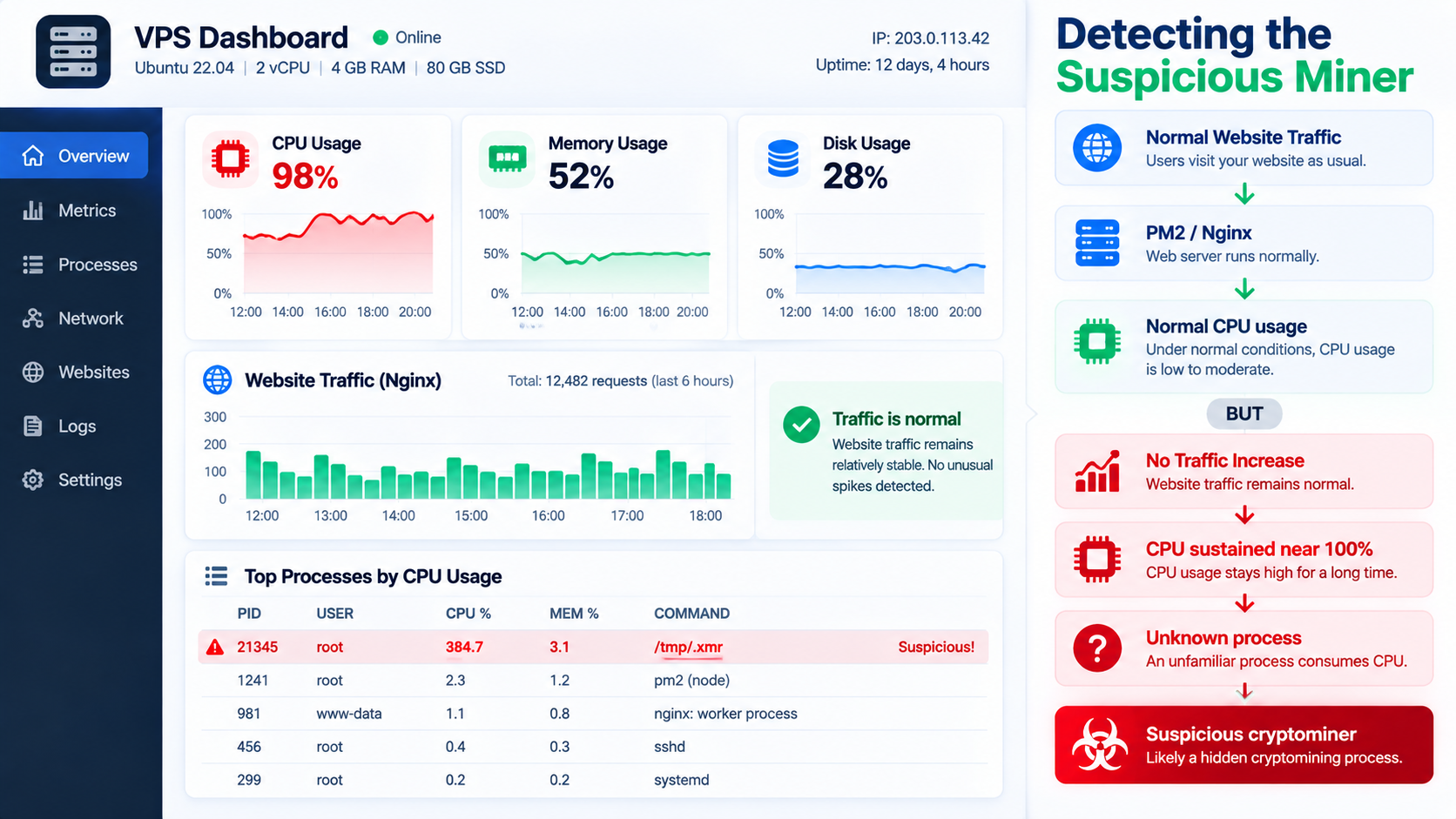
A cryptominer process will typically show up as one of the highest CPU consumers, often running under a generic or disguised name, and often not tied to any of your actual application processes in pm2 list or your web server's process tree.
Confirming It's Actually a Miner, Not Something Legitimate
Before killing anything, confirm what the process actually is rather than guessing. A few checks that matter:
# What's actually running, sorted by CPU usage
ps aux --sort=-%cpu | head -20

# What's the process's executable path — often revealing on its own
ls -la /proc/<PID>/exe

# What's it connecting to — miners phone home to a mining pool
netstat -antp | grep <PID>
# or
ss -antp | grep <PID>
A process running from an unusual path (/tmp, a hidden directory, somewhere outside your normal application directories), with an unfamiliar name, making outbound connections to an unfamiliar IP on a non-standard port, is the pattern to look for. Legitimate application processes on my server have a known, predictable location and name — anything that doesn't match that baseline gets treated as suspicious by default rather than assumed benign.
Immediate Containment
Once a process is confirmed suspicious, the priority is stopping it and cutting off whatever let it persist — not immediately trying to understand the full story. Understanding comes after containment, not before.
# Kill the process
kill -9 <PID>

# Check if it respawns — many miners have a persistence mechanism
ps aux | grep <suspicious name>
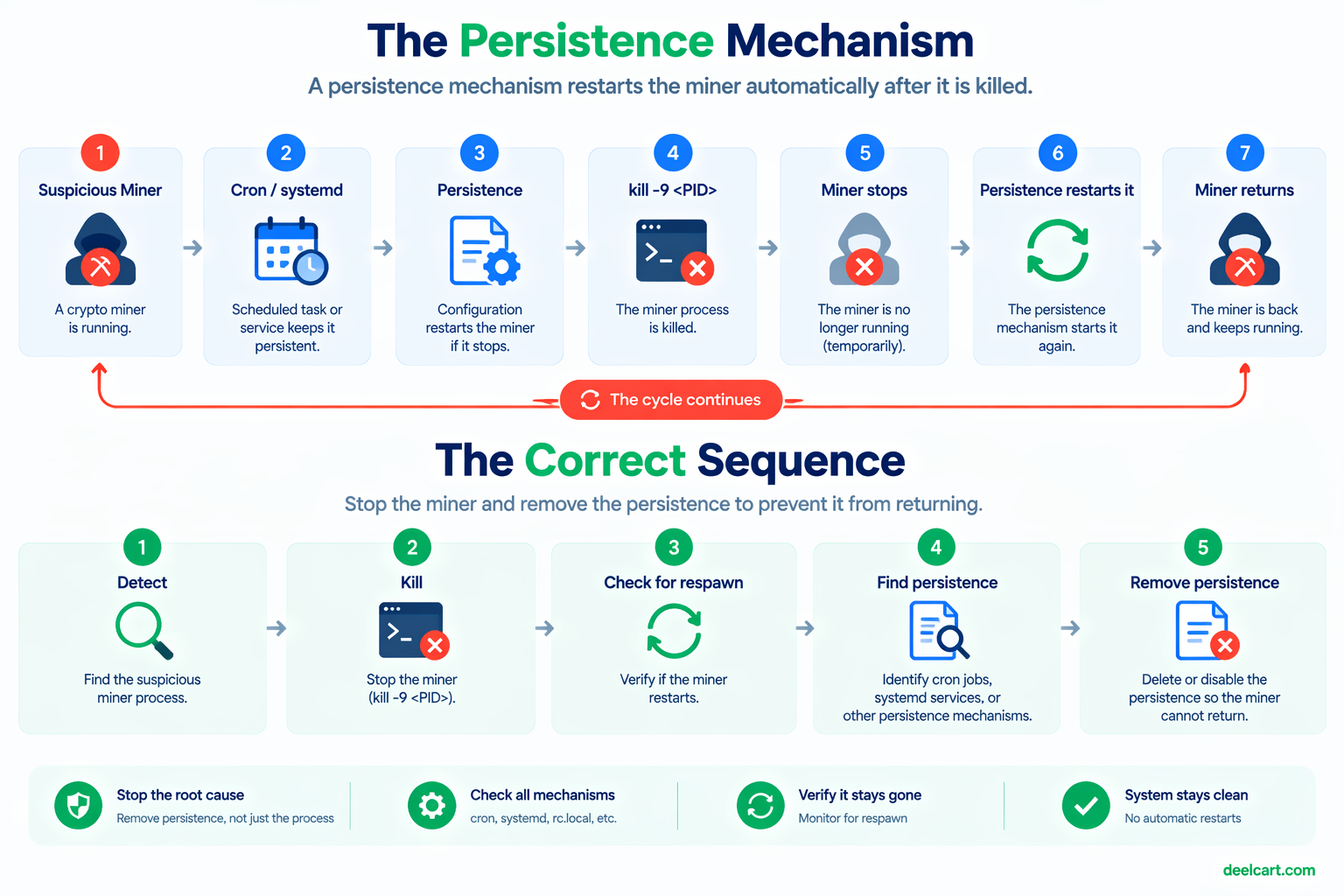
If it comes back after being killed, something is restarting it — a cron job, a systemd service, or an init script it planted. That persistence mechanism has to be found before the process staying dead means anything:
# Check user crontabs
crontab -l
for user in $(cut -f1 -d: /etc/passwd); do crontab -u $user -l 2>/dev/null; done

# Check system-wide cron locations
cat /etc/crontab
ls /etc/cron.d/ /etc/cron.daily/ /etc/cron.hourly/

# Check for unfamiliar systemd services
systemctl list-units --type=service | grep -v -E "known-good-pattern"
In my case, the persistence was in a cron entry — a scheduled job that redownloaded and relaunched the miner on an interval, meaning killing the process alone would only have bought a temporary reprieve. Finding and removing that entry was what actually stopped it for good, not the initial kill.
Finding the Entry Point
Containing the immediate problem doesn't tell you how it got in, and skipping this step means you've cleaned up the symptom while leaving the actual vulnerability open. A few places worth checking:
SSH access logs — for unfamiliar login attempts, especially successful ones from unfamiliar IPs:
grep "Accepted" /var/log/auth.log | tail -50Authorized keys — for any SSH key you don't recognize added to any user's authorized_keys:
cat ~/.ssh/authorized_keys
# check for every user on the box, not just root
Recently modified files — a compromise usually involves writing something to disk, and a timestamp-based search can surface it even without knowing what to look for specifically:
find / -type f -mtime -7 -not -path "/proc/*" 2>/dev/nullExposed services with weak or default credentials — anything listening on a port that shouldn't be publicly reachable, or reachable with a weak/default password, is a common and mundane entry point that's worth ruling out even though it's not exciting to find.
In my case, the entry point traced back to an exposed service with weak authentication — not an exotic zero-day, which is the far more common reality of how these compromises actually happen. Most of the time it's a mundane misconfiguration, not a sophisticated attack.
Closing the Hole and Hardening Afterward
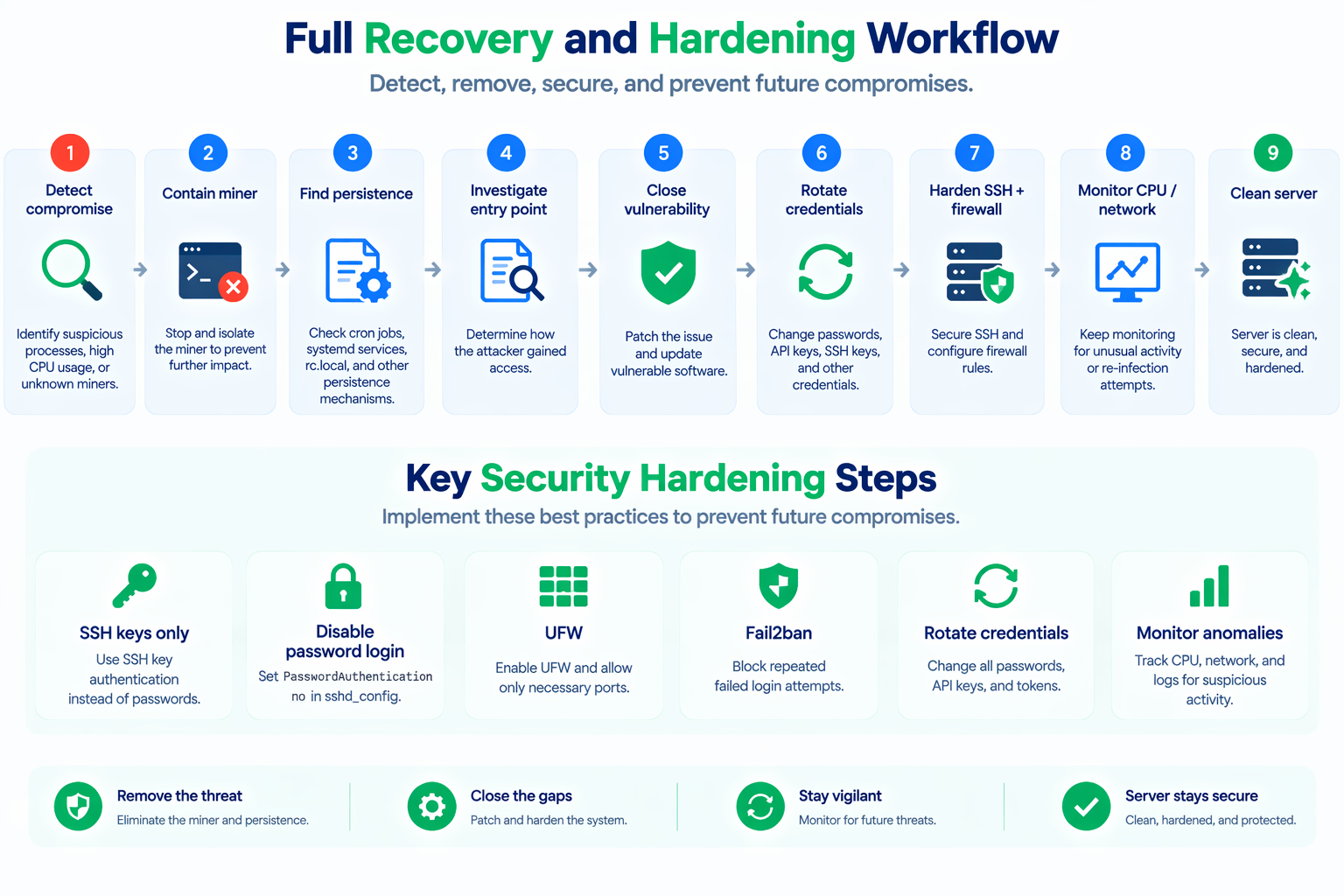
Once the entry point is identified and closed, a few hardening steps are worth doing regardless of exactly how this one got in, since they reduce the attack surface for future attempts generally:
SSH key-only authentication, password auth disabled:
# in /etc/ssh/sshd_config
PasswordAuthentication no
PubkeyAuthentication yes
A firewall that only allows what's actually needed:
sudo ufw default deny incoming
sudo ufw allow ssh
sudo ufw allow http
sudo ufw allow https
sudo ufw enable
Fail2ban to rate-limit repeated login attempts:
sudo apt install fail2ban
sudo systemctl enable fail2ban
Rotating every credential that could plausibly have been exposed — SSH keys, any API keys or database credentials stored on the box, and any passwords for services running on it. If there's genuine doubt about what was accessed, treat everything reachable from that server as potentially exposed rather than trying to guess precisely what was and wasn't touched.
Ongoing monitoring, even something lightweight, so a repeat doesn't sit unnoticed for as long next time:
# a simple resource-usage check, run periodically, alerting on sustained anomalies
# rather than relying on noticing manually
What I'd Do Differently
The gap between "the compromise happened" and "I noticed" was the real cost here — not the compromise itself, but how long it ran before the CPU pattern was obvious enough to investigate. Lightweight automated monitoring that alerts on sustained anomalous resource usage would have caught this faster than a manual check happening to coincide with the compromise being active. That's the single change that would have mattered most.
Frequently Asked Questions
How do I tell a cryptominer apart from a legitimate CPU-heavy process?
Look at the combination of factors, not any one alone: an unfamiliar process name or path, CPU usage with no matching legitimate cause (no traffic spike, no scheduled job that should be running), and outbound network connections to an unfamiliar destination. Any single factor alone can have an innocent explanation; the combination is what's telling.
Should I rebuild the server from scratch instead of cleaning it in place?
For anything beyond a clearly understood, fully contained compromise, a fresh rebuild from a clean image with credentials rotated is the safer option precisely because you can never be fully certain nothing else was planted. Cleaning in place is faster but carries residual risk that something beyond the miner itself went unnoticed.
Does this mean shared VPS hosting is inherently unsafe?
No — this kind of compromise is about the server's own exposed services and configuration, not something inherent to VPS hosting as a model. A properly configured server (key-only SSH, minimal open ports, no weak or default credentials anywhere) is meaningfully more resistant to this class of compromise regardless of hosting type.
What's the actual financial or performance cost of a compromise like this?
Beyond the CPU being unavailable for legitimate work while the miner runs, there's a real cost in bandwidth and, on a metered or resource-constrained plan, the risk of hitting limits or triggering the host's own abuse detection. The bigger cost is usually the time spent investigating and cleaning up rather than the mining activity itself.
Justin is a self-taught developer who builds and runs DeelCart himself — from the articles to the server it runs on. He manages his own Linux infrastructure and writes guides based on tools and workflows he actually uses day to day.