Handling Slug Collisions in an Automated Content Pipeline (MongoDB E11000 Errors)
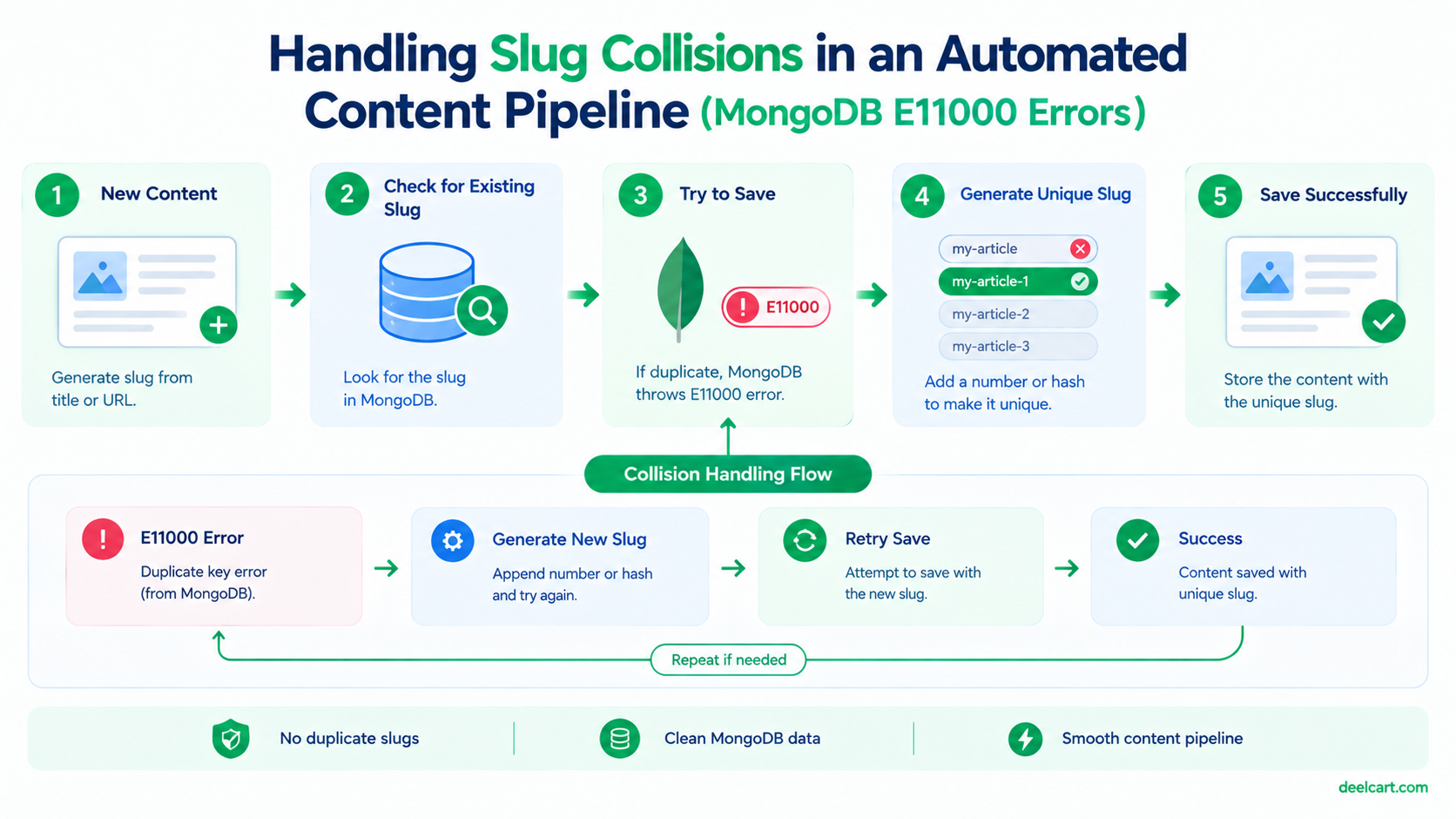
E11000 duplicate key error collection: mydb.articles index: slug_1 dup key: { slug: "some-article-title" }I see this regularly on one of my import pipelines. For a long time my instinct was to treat it as a bug to eliminate. It mostly isn't — it's a unique index doing exactly its job. What actually needs fixing is how the pipeline responds when a collision happens.
Why Slug Collisions Happen in the First Place
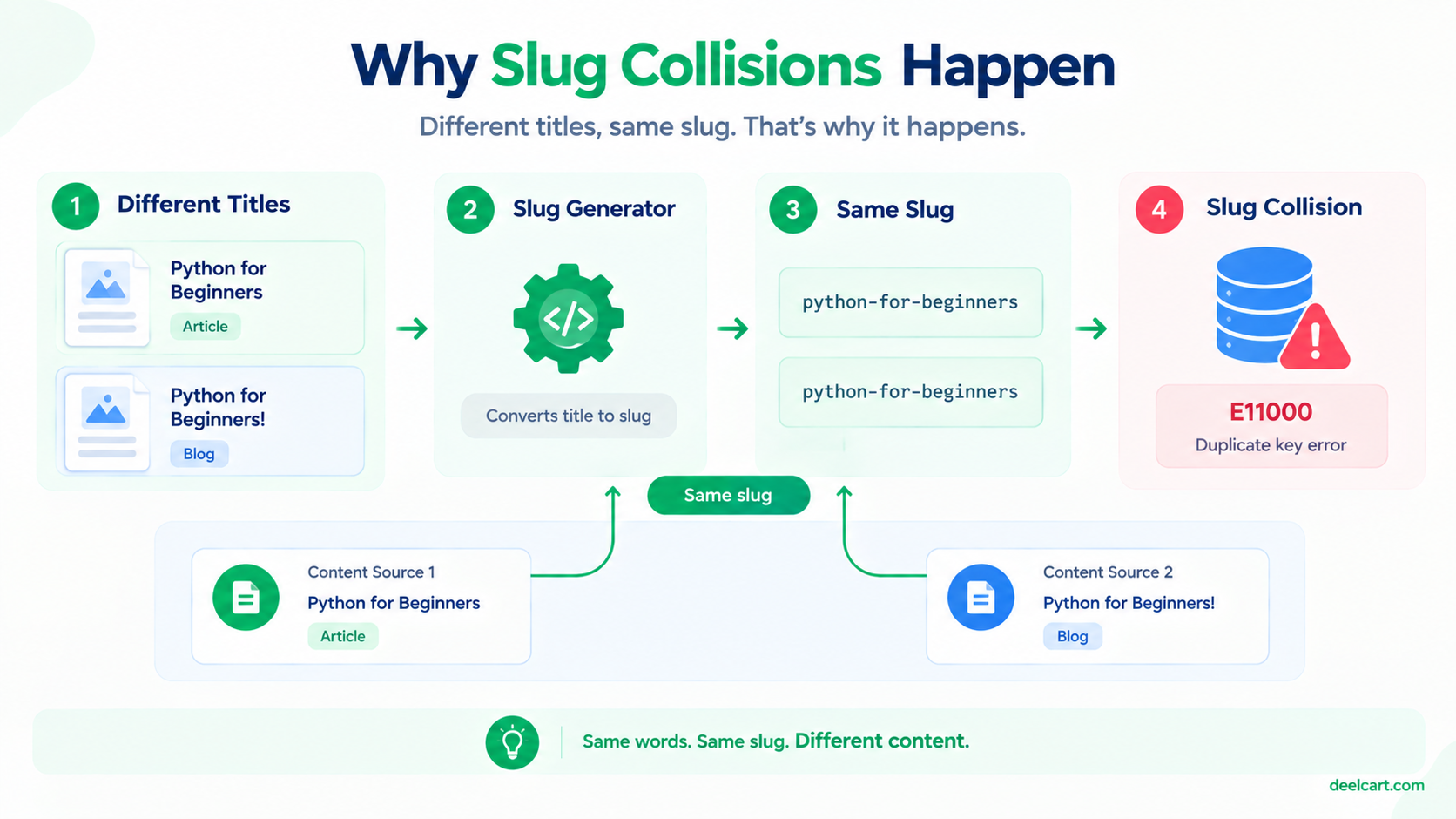
A slug is typically derived from a title: lowercase it, strip punctuation, replace spaces with hyphens. That transformation is lossy by design, which means genuinely different titles can collapse into identical slugs:
"Python for Beginners"and"Python for Beginners!"→ both becomepython-for-beginners"React vs. Vue"and"React vs Vue"→ both becomereact-vs-vue- Two different sources publishing an item with the exact same title
The Wrong Fixes (And Why They're Wrong)
There are three tempting responses to this error, and all of them make things worse:
Removing the unique index. This makes the error disappear, which feels like a fix. What it actually does is let duplicate slugs into the database, which means two different pieces of content resolve to the same URL. Depending on how your route handler queries, one of them becomes permanently unreachable — the lookup returns whichever document the database happens to return first. You've traded a loud, visible error for silent, invisible data corruption. The unique index is the thing protecting your URL space; keep it.
Catching the error and silently skipping. Slightly better, because nothing breaks, but you're now dropping content without knowing it. If the incoming item was genuinely new content that just happened to share a title with something existing, you've silently lost it.
Blindly appending a timestamp to every slug. This guarantees uniqueness but produces ugly, unstable URLs (python-for-beginners-1735689412) for every item, including the vast majority that never had a collision at all.
The Approach That Actually Works
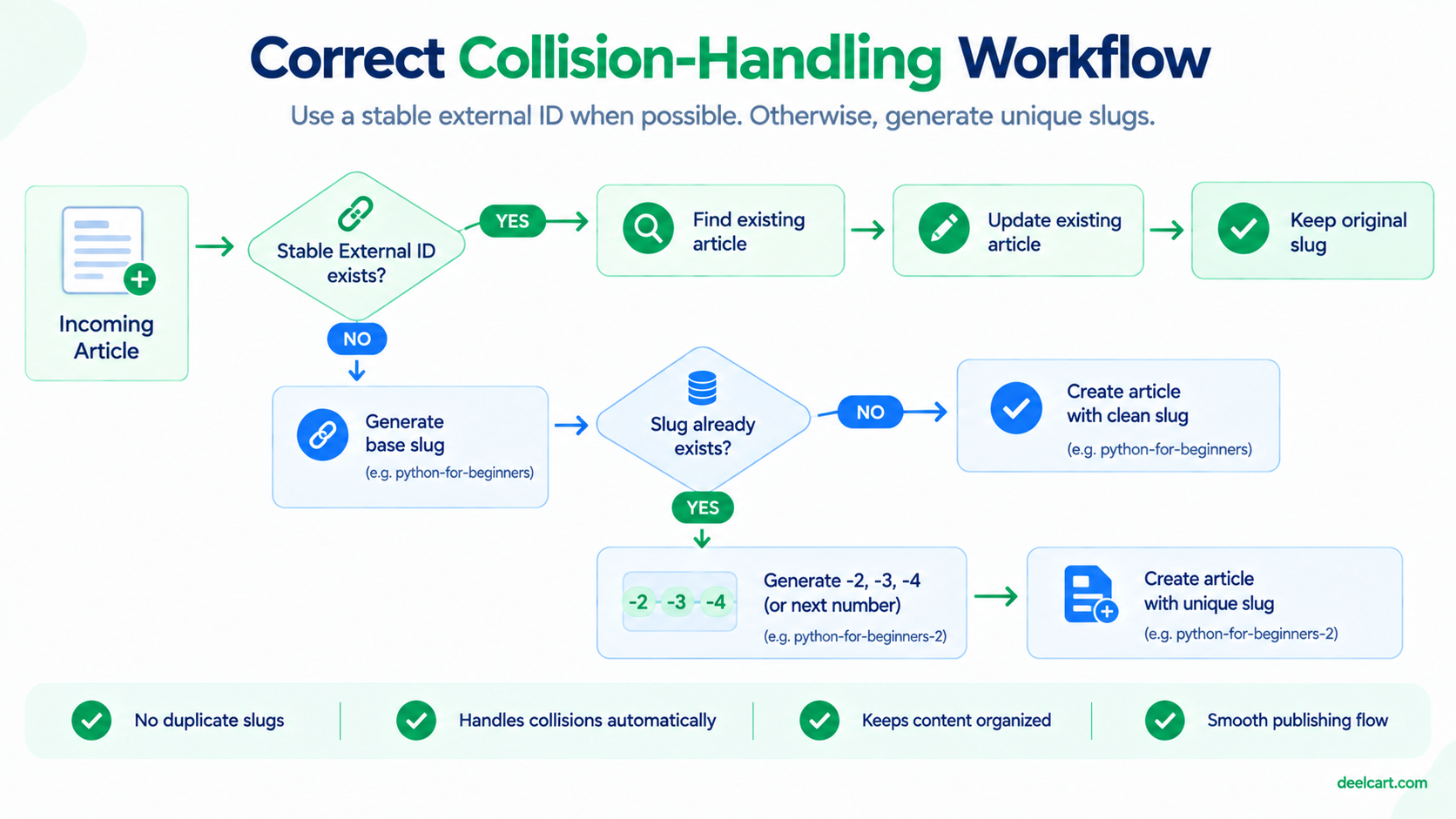
The right response depends on answering one question first: is this the same content arriving again, or different content that happens to collide?
That distinction matters enormously. Re-importing the same item should be an update, not an insert. Genuinely different content needs a distinct slug. Treating both cases identically is where most pipelines go wrong.
Step 1: Check for a Stable External Identifier
Most feeds and APIs give you something more stable than the title to identify an item — an ID, a canonical URL, a GUID. If you have one, that's your real deduplication key, not the slug:
// Prefer matching on a stable external ID, not the slug
const existing = await Article.findOne({ externalId: item.id });

if (existing) {
  // Same item, re-imported: update in place, keep the original slug
  await Article.updateOne(
    { _id: existing._id },
    { $set: { title: item.title, content: item.content, updatedAt: new Date() } }
  );
  return { action: 'updated' };
}
This handles the most common case entirely — the same item appearing again in a feed — and it never touches the slug, which means the URL stays stable. That last part matters: a URL that changes on re-import breaks any existing links and confuses search engines.
Step 2: Resolve Genuine Collisions With an Incrementing Suffix
If there's no matching external ID, the content is genuinely new but the slug is taken. Now you need a distinct slug — and the cleanest option is a numeric suffix, applied only to the item that actually collided:
async function generateUniqueSlug(baseSlug) {
  let slug = baseSlug;
  let counter = 2;

  while (await Article.exists({ slug })) {
    slug = `${baseSlug}-${counter}`;
    counter++;
  }

  return slug;
}
The first item keeps the clean python-for-beginners. A genuine second one becomes python-for-beginners-2. Readable, stable, and only applied where actually needed.
Step 3: Handle the Race Condition Anyway
Here's the subtlety that catches people out: the check-then-insert pattern above has a race condition. Between Article.exists({ slug }) returning false and your insert actually executing, another concurrent process can insert that same slug. Your check passed, your insert still fails.
If your pipeline runs a single process at a time, this is rare enough to ignore. If you have concurrent workers, or a cron job that can overlap with itself on a slow run, it will happen. The fix is to keep the check (it handles the common case efficiently) but also catch the error as a backstop:
async function insertWithUniqueSlug(data, maxRetries = 5) {
  let slug = await generateUniqueSlug(data.baseSlug);

  for (let attempt = 0; attempt < maxRetries; attempt++) {
    try {
      return await Article.create({ ...data, slug });
    } catch (err) {
      // 11000 is MongoDB's duplicate key error code
      if (err.code === 11000 && err.keyPattern?.slug) {
        slug = await generateUniqueSlug(data.baseSlug);
        continue;
      }
      throw err; // any other error is a real problem, don't swallow it
    }
  }

  throw new Error(`Could not generate unique slug after ${maxRetries} attempts`);
}
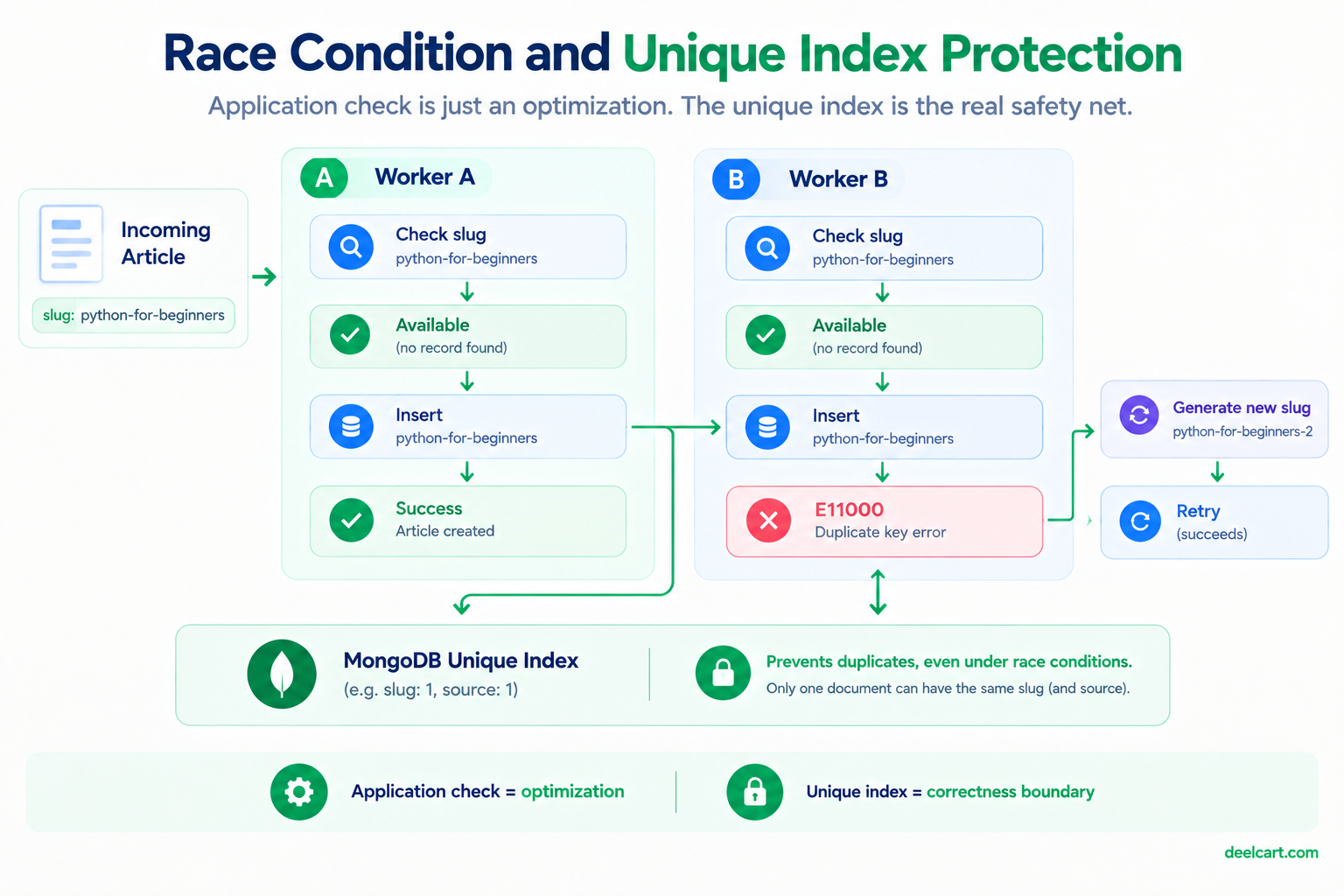
Two details worth calling out. First, err.keyPattern?.slug — only retry if the duplicate was specifically on the slug index. A duplicate on some other unique field is a different problem entirely, and retrying with a new slug won't fix it, it'll just loop pointlessly. Second, the retry cap: without it, a bug elsewhere could spin this loop indefinitely.
Don't Silence the Log Entirely
Once collisions are handled gracefully, there's a temptation to stop logging them. I'd push back on that — a sudden spike in collisions is a useful signal that something upstream changed. If a feed starts sending the same items with slightly altered titles, or an external ID field disappears from a response, collision volume jumps. Logging at a low level (with a periodic count rather than a line per occurrence) keeps that signal available without drowning your logs.
Frequently Asked Questions
Should I use the database's unique index, or just check in application code?
Both, and the index is the more important of the two. The application-level check handles the common case efficiently and produces nice sequential slugs. The unique index is your actual guarantee — it's enforced at the database level regardless of bugs, race conditions, or a second process you forgot about. Application checks are an optimization; the index is the correctness boundary.
What if two genuinely different items should share a URL?
They shouldn't. If two items are similar enough that you'd want one URL, that's a signal they should be one merged record, not two records fighting over a slug. Resolve it at the content level rather than working around it in the slug logic.
Is a numeric suffix bad for SEO compared to a fully unique descriptive slug?
A -2 suffix is unremarkable and won't meaningfully hurt you. What would hurt is the alternative failure modes: duplicate content at colliding URLs, or URLs that change on every re-import. A stable, slightly-suffixed URL beats an unstable "prettier" one every time.
Should the slug ever change after publication?
Ideally never. Once a URL is live it may be linked, bookmarked, or indexed. If you genuinely must change one, treat it as a URL migration — keep the old slug as a stored alias and redirect it to the new one, rather than silently breaking the old URL.
Further Reading
Justin is a self-taught developer who builds and runs DeelCart himself — from the articles to the server it runs on. He manages his own Linux infrastructure and writes guides based on tools and workflows he actually uses day to day.