Automating Cross-Posting to Social Media with Puppeteer
Why Browser Automation Instead of Official APIs
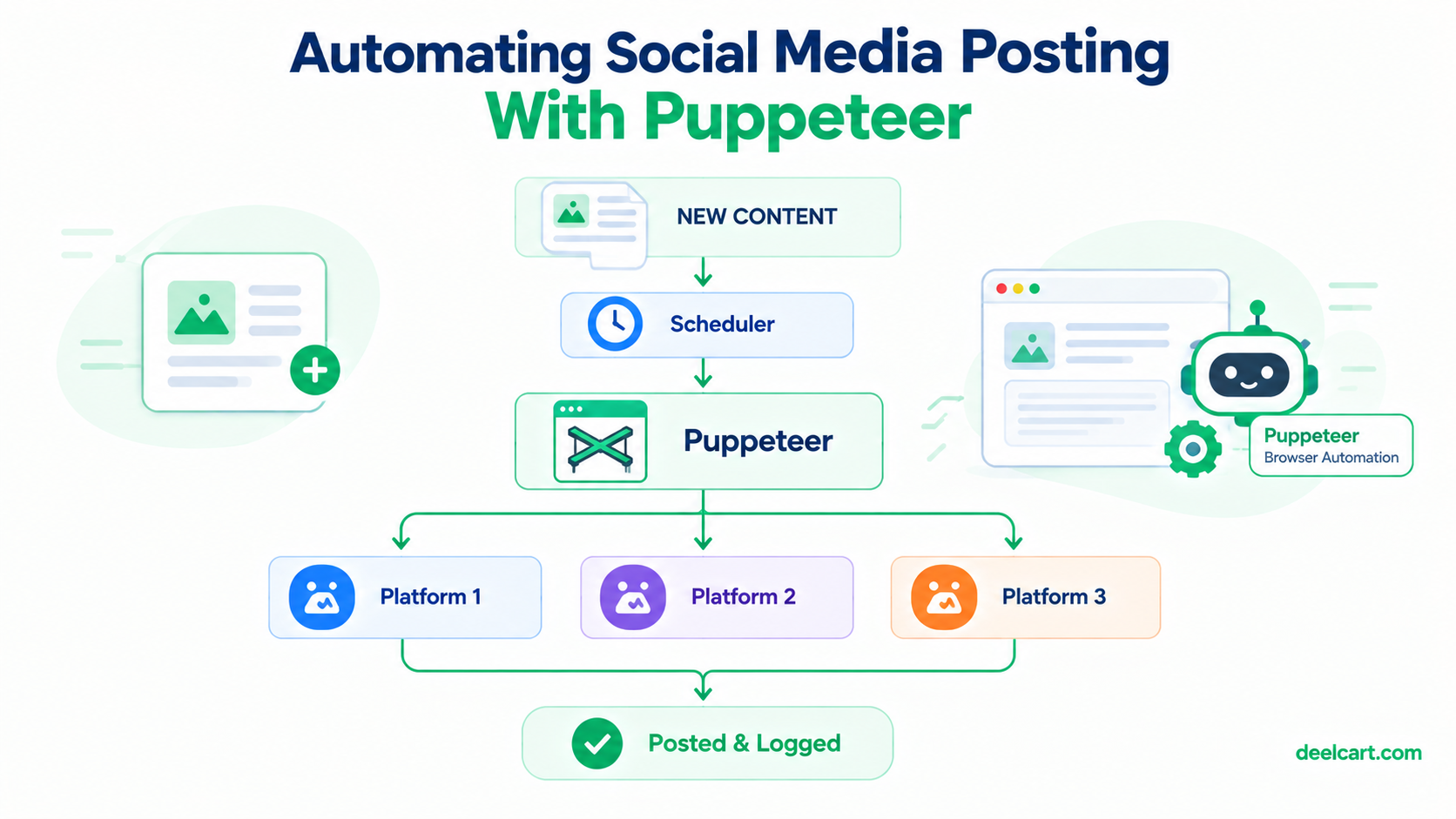
The first question worth asking is why use Puppeteer at all instead of each platform's official posting API. The honest answer: for a personal or small-scale project, official APIs often come with approval processes, rate limits far stricter than what a browser session gets, or pricing tiers that don't make sense at low volume. Puppeteer automates an actual browser, which means it interacts with a platform the same way a human using a browser would — no separate API approval, no API-specific rate limit tier.
The trade-off is real: browser content-site" class="auto-interlink" title="Building a Smart Internal Linking System for a Large Content Site (1,500+ Pages)">automation is more fragile (a platform's UI changing breaks your selectors, where an API's contract is more stable), and it sits closer to a platform's terms of service gray area than an official integration does. This is a legitimate trade-off to weigh for your specific situation, not a decision to make without thinking about it — for higher-volume or commercial use, an official API is usually the better long-term choice despite the friction of getting one set up.
Keeping Sessions Alive Instead of Logging In Every Run
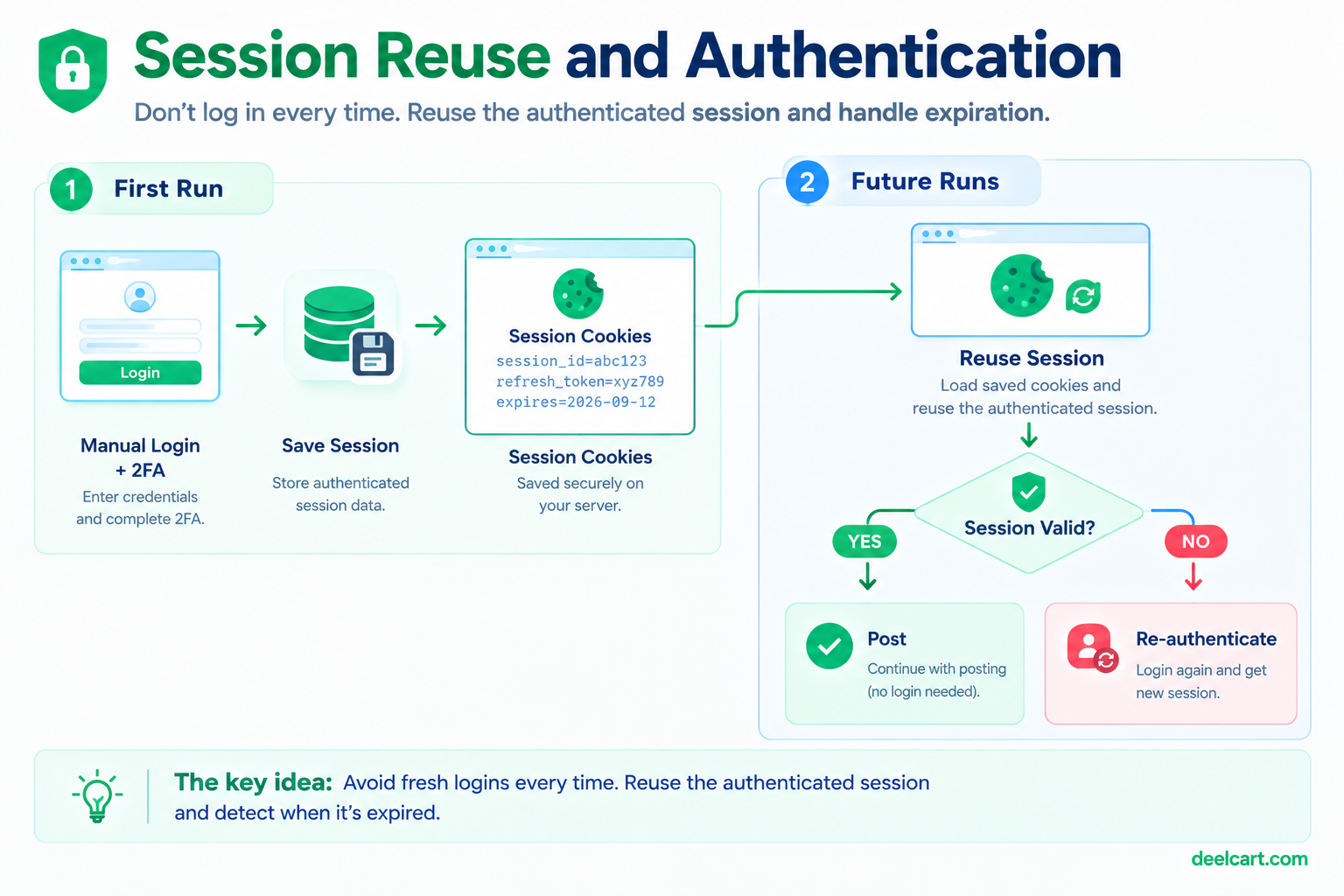
The single biggest reliability improvement I made was switching from "log in fresh every time the script runs" to "reuse a saved session." Logging in on every run is slower, and repeated fresh logins from an automated script are exactly the kind of pattern that draws attention from a platform's bot-detection systems.
const puppeteer = require('puppeteer');
const fs = require('fs');

async function getBrowserWithSession(platform) {
  const browser = await puppeteer.launch({ headless: true });
  const page = await browser.newPage();

  const cookiesPath = `./sessions/${platform}-cookies.json`;

  if (fs.existsSync(cookiesPath)) {
    const cookies = JSON.parse(fs.readFileSync(cookiesPath));
    await page.setCookie(...cookies);
  } else {
    // first-run manual login flow, then save the session
    await page.goto(`https://${platform}.example.com/login`);
    // ... manual or credential-based login here ...
    const cookies = await page.cookies();
    fs.writeFileSync(cookiesPath, JSON.stringify(cookies));
  }

  return { browser, page };
}
A saved session gets reused across runs until it actually expires, at which point the script needs to detect that and re-authenticate rather than failing silently. Checking for a login-page redirect after navigating somewhere that should require being logged in is a reliable way to catch this:
async function isSessionValid(page, platform) {
  await page.goto(`https://${platform}.example.com/home`);
  const url = page.url();
  return !url.includes('/login'); // redirected to login = session expired
}
Looking and Behaving Less Like a Bot
Puppeteer's default configuration has a handful of fingerprints that make it distinguishable from a real browser session — a few adjustments reduce (not eliminate) how detectable the automation is:
const browser = await puppeteer.launch({
  headless: true,
  args: [
    '--disable-blink-features=AutomationControlled',
    '--no-sandbox',
  ],
});

const page = await browser.newPage();
await page.setUserAgent(
  'Mozilla/5.0 (Windows NT 10.0; Win64; x64) AppleWebKit/537.36 (KHTML, like Gecko) Chrome/120.0.0.0 Safari/537.36'
);
await page.setViewport({ width: 1366, height: 768 });
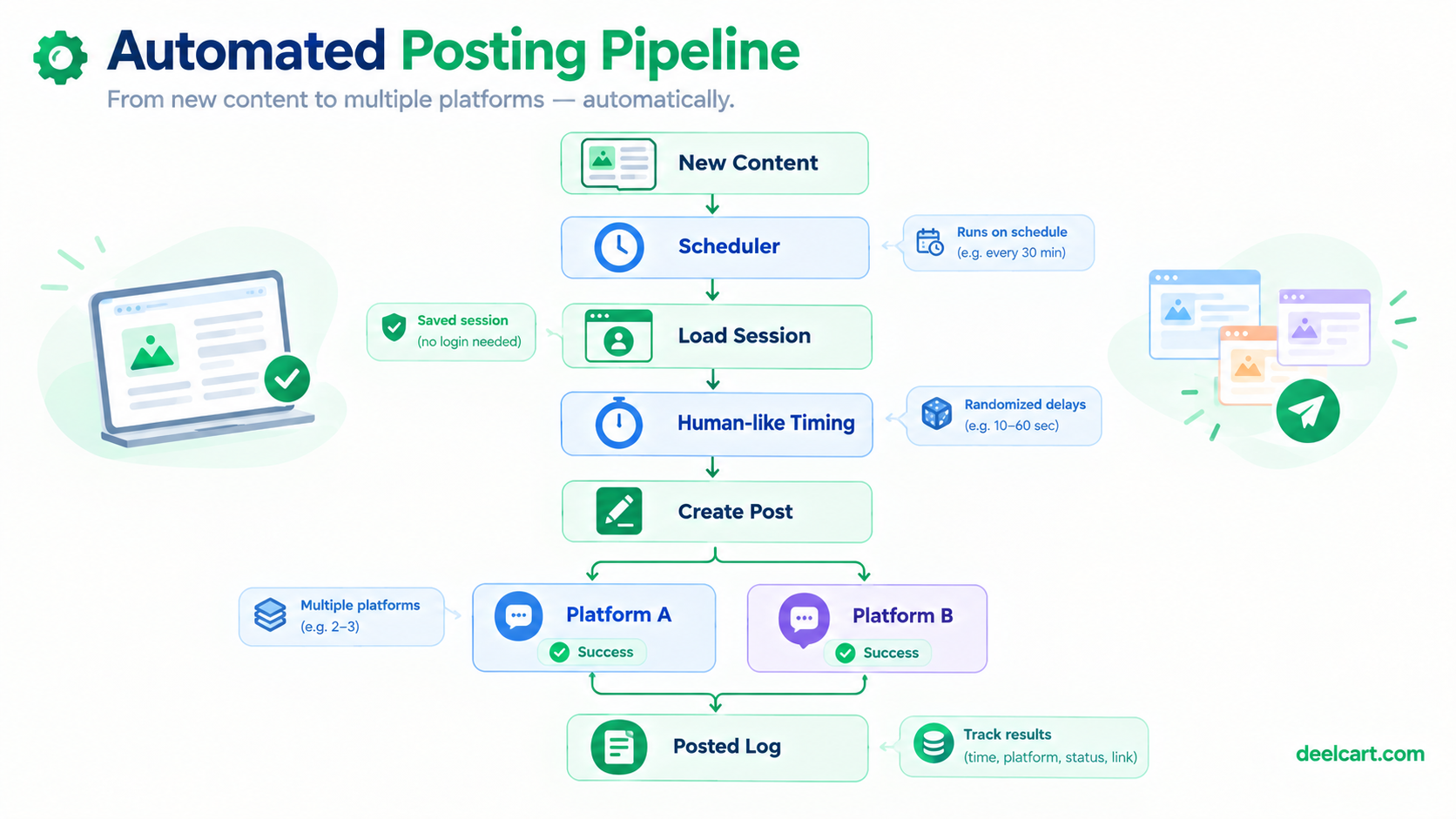
Beyond browser configuration, timing matters as much as fingerprinting. A script that posts instantly, with mechanically identical delays between actions, looks nothing like a human — I add randomized delays between actions rather than fixed ones, and avoid posting at a perfectly regular interval (exactly every N hours, forever) in favor of some natural variance in timing.
function randomDelay(minMs, maxMs) {
  return new Promise(resolve =>
    setTimeout(resolve, minMs + Math.random() * (maxMs - minMs))
  );
}

// used between actions, not just before the final submit
await page.type('#post-content', content, { delay: 50 + Math.random() * 100 });
await randomDelay(1000, 3000);
await page.click('#submit-button');
Deduplication: Don't Post the Same Thing Twice
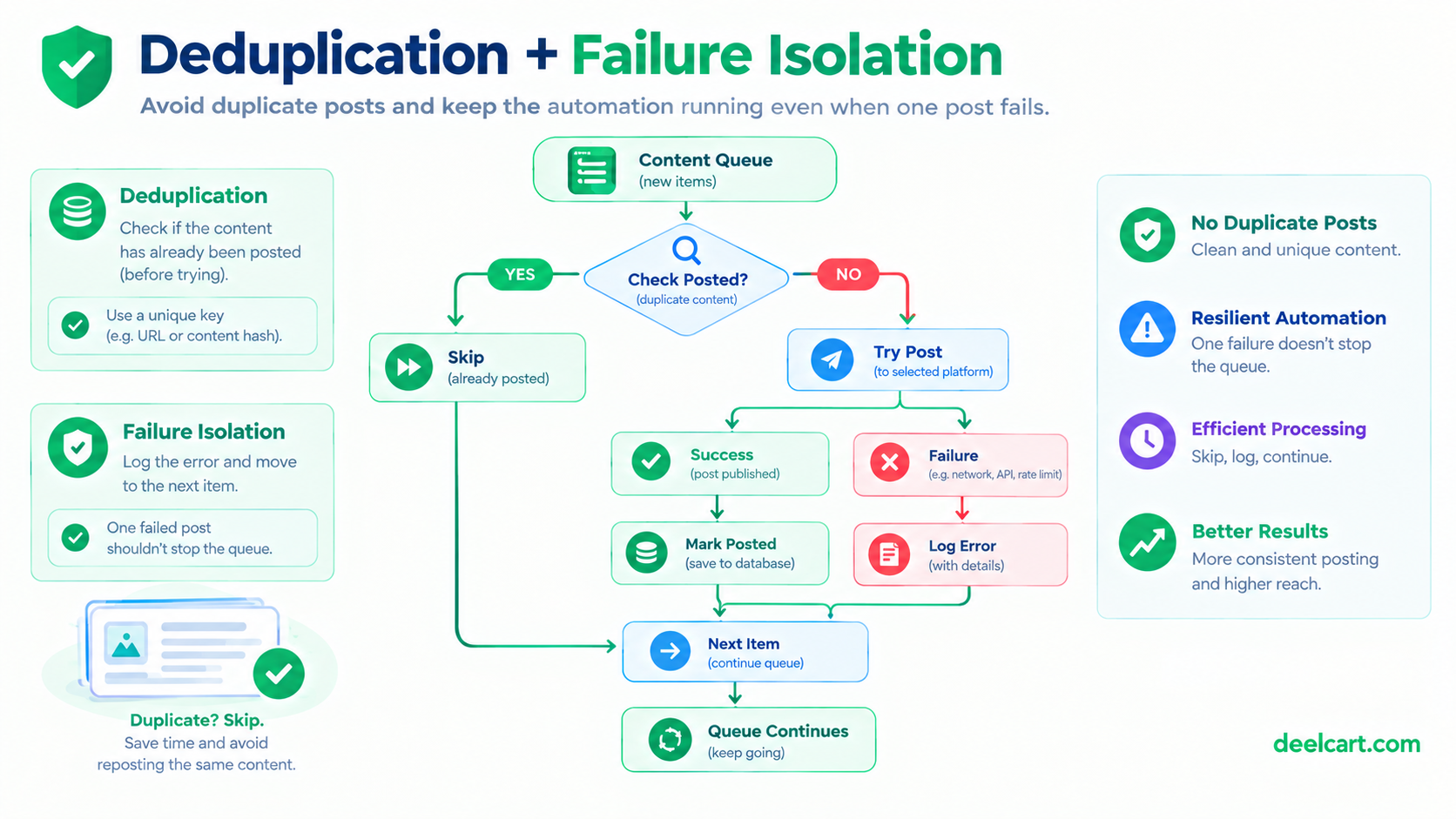
Once posting is automated and running on a schedule, it's very easy to accidentally post the same item twice if the script runs again before you're certain what's already gone out. I keep a simple record of what's already been posted per platform, checked before anything gets queued:
const postedLog = require('./posted-log.json'); // { platform: [itemId, itemId, ...] }

function alreadyPosted(platform, itemId) {
  return postedLog[platform]?.includes(itemId) ?? false;
}

function markPosted(platform, itemId) {
  postedLog[platform] = postedLog[platform] || [];
  postedLog[platform].push(itemId);
  fs.writeFileSync('./posted-log.json', JSON.stringify(postedLog));
}
This has to be written *after* a post succeeds, not before — writing it before means a failed post still gets marked as done and silently never retried.
One Failure Shouldn't Block Everything Else
The first version of this script processed a queue sequentially and stopped entirely if any single post failed — one platform being briefly down, or one post hitting an unexpected UI state, meant nothing after it in the queue ran either. The fix is straightforward but easy to skip if you're not thinking about failure modes up front: wrap each individual post attempt so one failure logs and moves on, rather than halting the whole run.
async function processQueue(items, platform) {
  for (const item of items) {
    if (alreadyPosted(platform, item.id)) continue;

    try {
      await postItem(platform, item);
      markPosted(platform, item.id);
    } catch (err) {
      console.error(`[${platform}] Failed to post ${item.id}:`, err.message);
      // deliberately continue to the next item rather than throwing
    }

    await randomDelay(2000, 5000);
  }
}
Frequently Asked Questions
Is this against a platform's terms of service?
This depends entirely on the specific platform and what the automation does — many platforms explicitly prohibit automated posting outside their official API, while others tolerate it within limits. Read the specific terms of service for each platform you're automating against rather than assuming a blanket answer, and understand that using browser automation instead of an approved API carries real account-risk regardless of what the terms technically say.
How do I handle a platform that requires two-factor authentication?
Session cookie reuse (as shown above) sidesteps needing to complete 2FA on every run — you authenticate once, including 2FA, and reuse that session until it expires. When it does expire and 2FA is required again, that step generally can't be fully automated without either a dedicated app-specific credential (where the platform supports one) or accepting that re-authentication needs manual intervention periodically.
What happens when a platform changes their page layout and breaks my selectors?
This is the recurring maintenance cost of browser automation that an official API wouldn't have — a UI change can break a selector with no warning. Wrapping key actions in try/catch with clear logging (as shown in the queue processing example) at least means a breakage shows up as a clear, specific error rather than a silent failure, which makes fixing it faster when it inevitably happens.
Is it better to run this on a schedule via cron, or keep a long-running process?
For something that runs periodically rather than continuously, a scheduled cron job that starts the script, does its work, and exits is simpler to reason about and easier to restart cleanly than a long-running process that has to manage its own internal scheduling and recover from its own crashes.
Justin is a self-taught developer who builds and runs DeelCart himself — from the articles to the server it runs on. He manages his own Linux infrastructure and writes guides based on tools and workflows he actually uses day to day.