Preventing VPS CPU Spikes: Implementing and Auditing Compound Indexes in MongoDB
What a Collection Scan Actually Costs
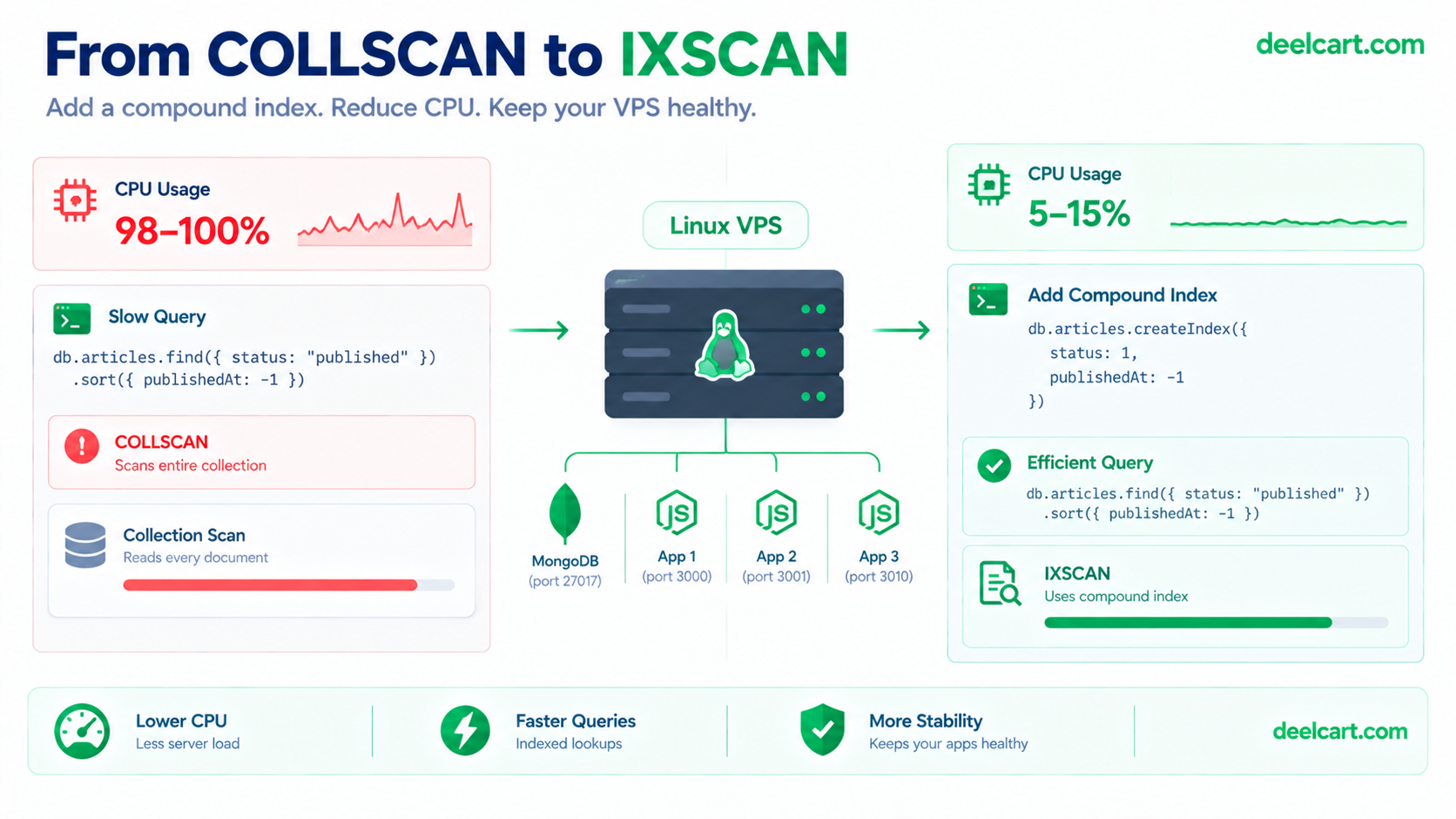
Take a query every content site runs constantly: the most recent published articles.
db.articles.find({ status: "published" }).sort({ publishedAt: -1 }).limit(20)Without a suitable index, MongoDB has no way to jump to the matching documents. It performs a collection scan, which shows up as COLLSCAN in the query plan: it reads every document in the collection, checks each one against the filter, then sorts whatever matched. The sort is the second cost. With no index to read the documents in order, MongoDB has to sort the results in memory.
To be precise about what this does to a small machine: the scan pulls documents through the storage engine's cache, which pushes out pages that other queries were about to reuse, and forces disk reads when the data doesn't fit. Add the CPU time spent comparing every document and sorting the results, and one query that looks harmless in application" class="auto-interlink" title="Python Mobile App Development: Build 8+ Mobile Application">development becomes a real load once it runs on every page view or every background sweep.

Confirming It Before Changing Anything
Guessing which query is slow wastes time. MongoDB's profiler records slow operations so you can see them directly:
// Log operations slower than 100 ms
db.setProfilingLevel(1, { slowms: 100 })

// After some traffic, look at the most recent slow operations
db.system.profile.find().sort({ ts: -1 }).limit(5).pretty()
Look for operations with a high number of documents examined compared to documents returned. That mismatch is the signature of a missing index. Turn the profiler back off when you're done, since it adds its own overhead:
db.setProfilingLevel(0)Designing the Index: The ESR Rule
For a query that filters on one field and sorts on another, a compound index covers both in a single structure. The guideline for ordering its fields is called ESR, documented in the MongoDB manual's ESR guideline: Equality fields first, then Sort fields, then Range fields.
The reasoning is practical. Equality fields narrow the index to a small contiguous slice. Within that slice, entries are already stored in sort order, so MongoDB can return results in order without sorting anything. A range condition placed before the sort field would break that ordering and bring the in-memory sort back.
For the query above, status is the equality field and publishedAt is the sort field:
import mongoose from 'mongoose';

const ArticleSchema = new mongoose.Schema({
  title: String,
  slug: { type: String, unique: true },
  status: String,        // equality
  publishedAt: Date,     // sort
});

// Equality first, then sort
ArticleSchema.index({ status: 1, publishedAt: -1 });

const Article = mongoose.models.Article || mongoose.model('Article', ArticleSchema);
export default Article;
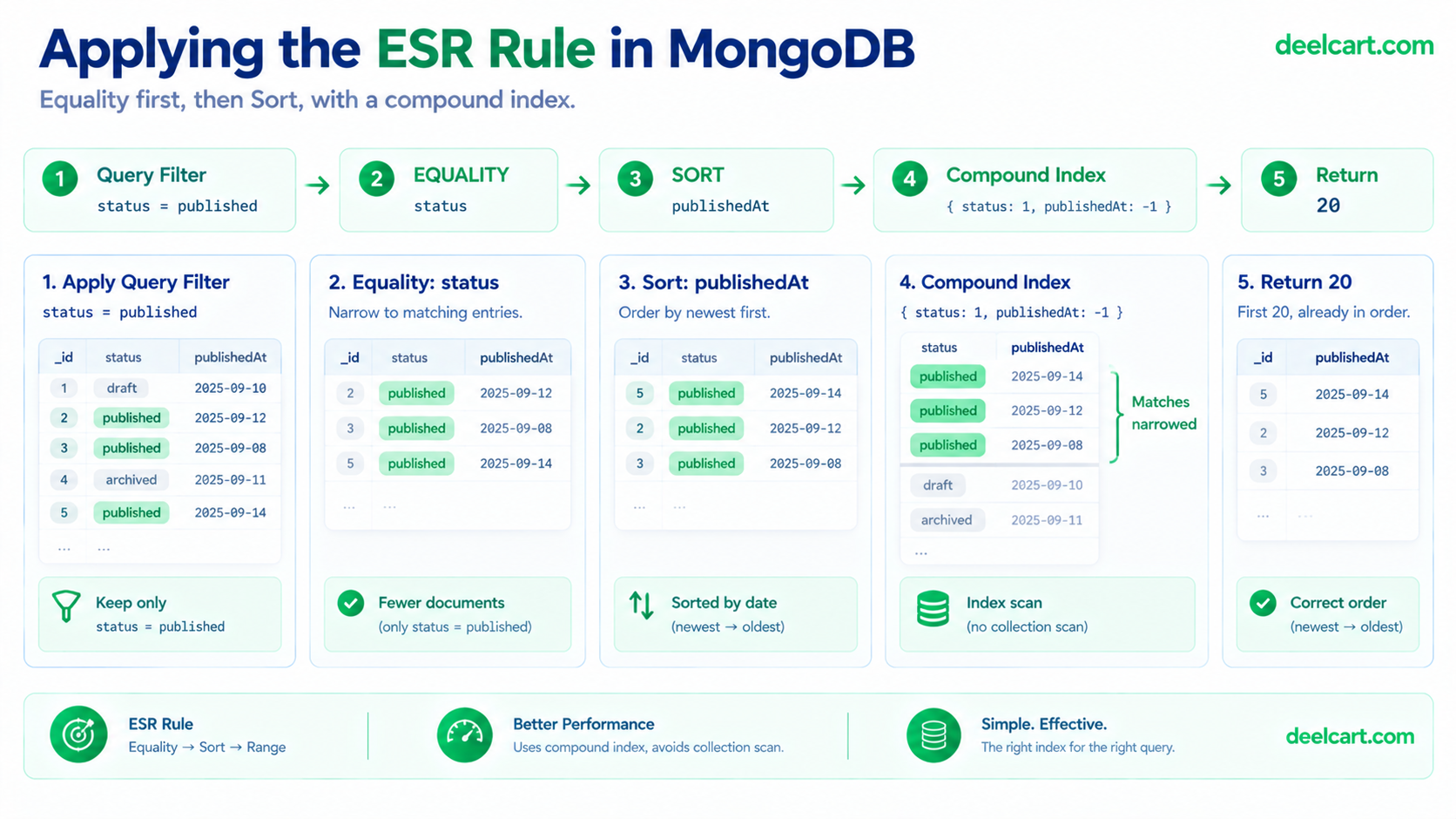
Notice that status has no separate single-field index here. A compound index also serves queries on its leading fields, so a query filtering on status alone already uses the compound index. A second index on status by itself would be redundant: extra disk space and extra work on every write for no benefit.
If you later add another equality filter, such as a category, it slots in before the sort field:
ArticleSchema.index({ status: 1, category: 1, publishedAt: -1 });Cursor-style pagination that adds a range condition on the date still fits the same index, because the range and the sort are on the same field.
Auditing: Prove the Index Is Being Used
Creating an index doesn't prove the database chooses it. The explain method shows exactly what MongoDB did. Run it with the same filter, sort, and limit your application uses:
db.articles
  .find({ status: "published" })
  .sort({ publishedAt: -1 })
  .limit(20)
  .explain("executionStats")
The full output is long. These are the parts that matter, shown in abridged form (exact structure varies by MongoDB version, and your numbers will differ):
# Healthy: the plan reads the index, then fetches only the documents it needs
winningPlan: LIMIT -> FETCH -> IXSCAN (index on status, publishedAt)
nReturned:         20
totalKeysExamined: 20
totalDocsExamined: 20# Unhealthy: a full collection scan followed by an in-memory sort
winningPlan: SORT -> COLLSCAN
nReturned: 20
totalDocsExamined: every document in the collection
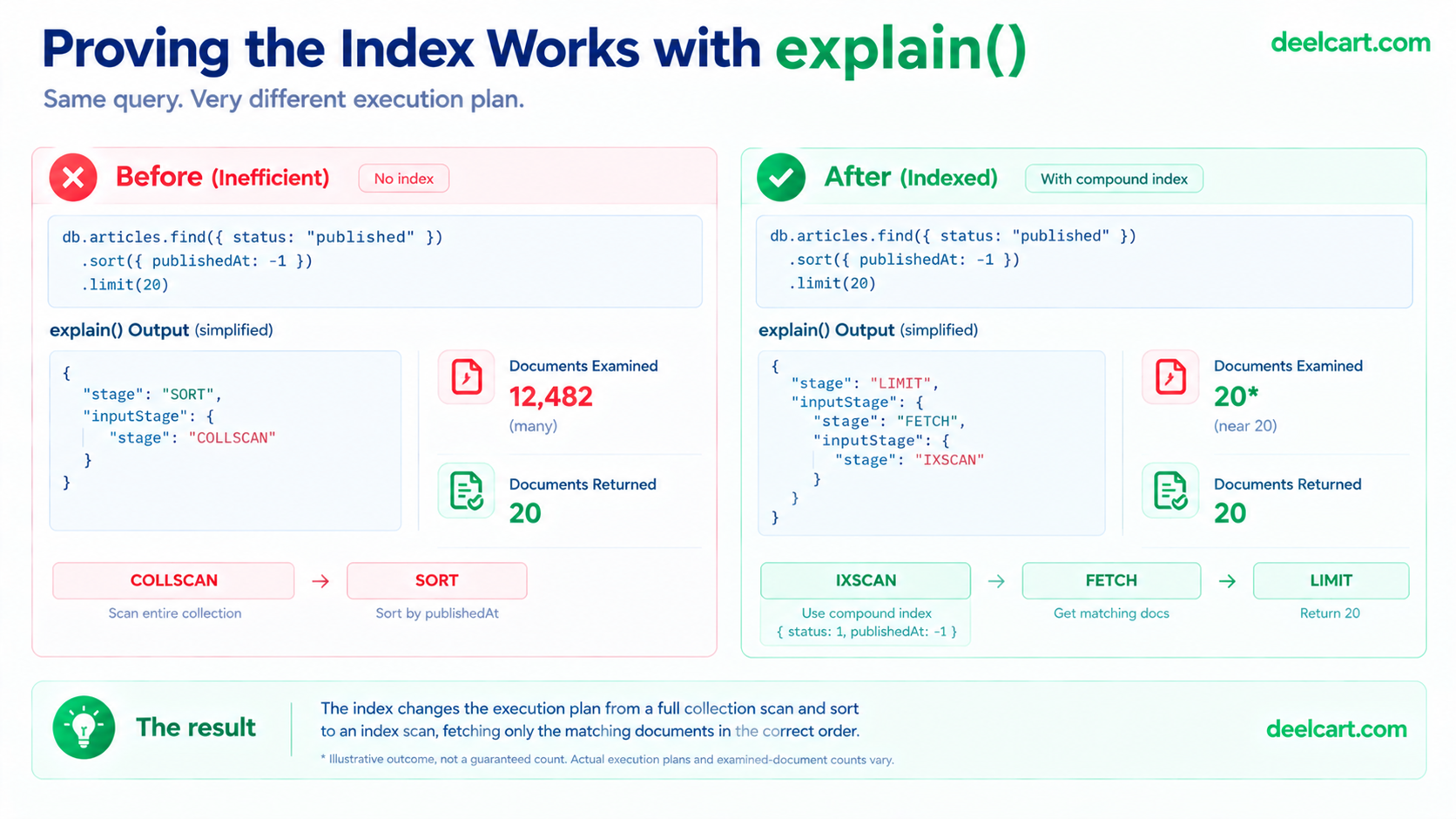
Two checks decide it. First, the stage names: IXSCAN means an index was used, COLLSCAN means it wasn't, and a SORT stage sitting above the scan means an in-memory sort is happening. Second, compare totalDocsExamined with nReturned. When the two are close, the query reads almost nothing it doesn't return. When examined is orders of magnitude larger than returned, work is being wasted. The explain results reference documents every field if you need to dig deeper.
Building the Index Without Hurting Production
Mongoose builds the indexes declared in a schema automatically when the application starts. That's convenient in development, but Mongoose's own guidance recommends turning it off in production, because index creation can have a significant performance impact. On a small server you don't want that build to start at an arbitrary moment during a deploy.
ArticleSchema.set('autoIndex', false);Then build the index yourself, at a quiet time, from the shell:
db.articles.createIndex({ status: 1, publishedAt: -1 })Run the explain check again afterward to confirm the plan changed.
Indexes Aren't Free on a Low-RAM Server
It's tempting to respond to one slow query by indexing everything. On a small VPS that backfires, and it helps to be accurate about why. Indexes are stored on disk. What matters for speed is whether the parts of them you actually use stay in memory. MongoDB's storage engine keeps a cache, and per the MongoDB storage FAQ the default size is the larger of 50% of (RAM minus 1 GB) or 256 MB. On a 1 GB server that works out to the 256 MB floor, and on a 2 GB server to about 512 MB. That default also assumes MongoDB is the only major process on the machine, which isn't true when Node.js apps share the box.
Every extra index competes for that small cache with your data and with other indexes, and every index also has to be updated on each insert and update. When the working set stops fitting, the database falls back to disk reads, and if the operating system starts swapping too, everything slows down together.
Two checks keep this honest. First, see how much space your indexes take:
db.articles.totalIndexSize()Second, find indexes nothing is using. The $indexStats stage reports how often each index has been used since the server started:
db.articles.aggregate([{ $indexStats: {} }])
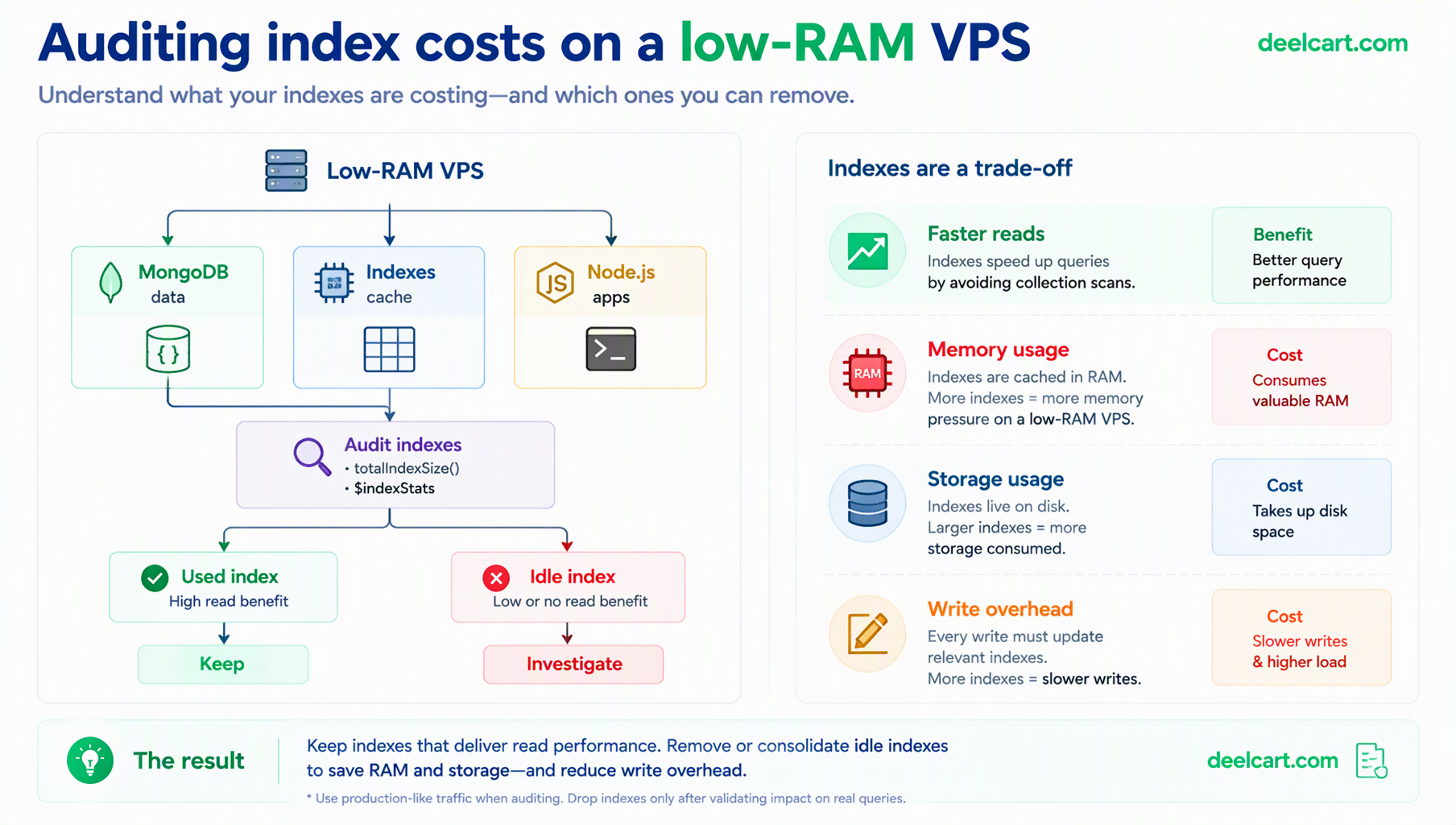
An index with a usage count near zero after a representative period is costing you space and write speed for nothing. Every index should be able to justify itself against a real query.
Frequently Asked Questions
Will an index alone fix a CPU spike?
Only if a scan really is the cause, which is why the profiler and explain steps come first. High CPU can also come from a runaway process, a memory leak that triggers constant garbage collection, or a crash loop. Confirm the cause before building anything.
Does the order of fields in a compound index matter?
Yes, a lot. An index on status then publishedAt supports different queries than one on publishedAt then status. Follow ESR: equality fields first, then sort, then range, and check the result with explain.
How many indexes is too many?
There's no fixed number. The practical limit is memory and write cost: each index uses cache space and must be updated on every write. On a small server, keep only the ones your real queries use, and remove any that the usage statistics show are idle.
Is swap a fix for running out of memory here?
It's a buffer, not a cure. Swap can absorb a short spike and stop a process from being killed, but a database that regularly relies on swap is telling you the working set doesn't fit. The fixes are fewer or leaner indexes, a smaller data set in memory, or more RAM.
Justin is a self-taught developer who builds and runs DeelCart himself — from the articles to the server it runs on. He manages his own Linux infrastructure and writes guides based on tools and workflows he actually uses day to day.