Setting Up Automated Let's Encrypt SSL Renewals Behind Nginx Reverse Proxies
Why "It Renews Automatically" Isn't Automatically True
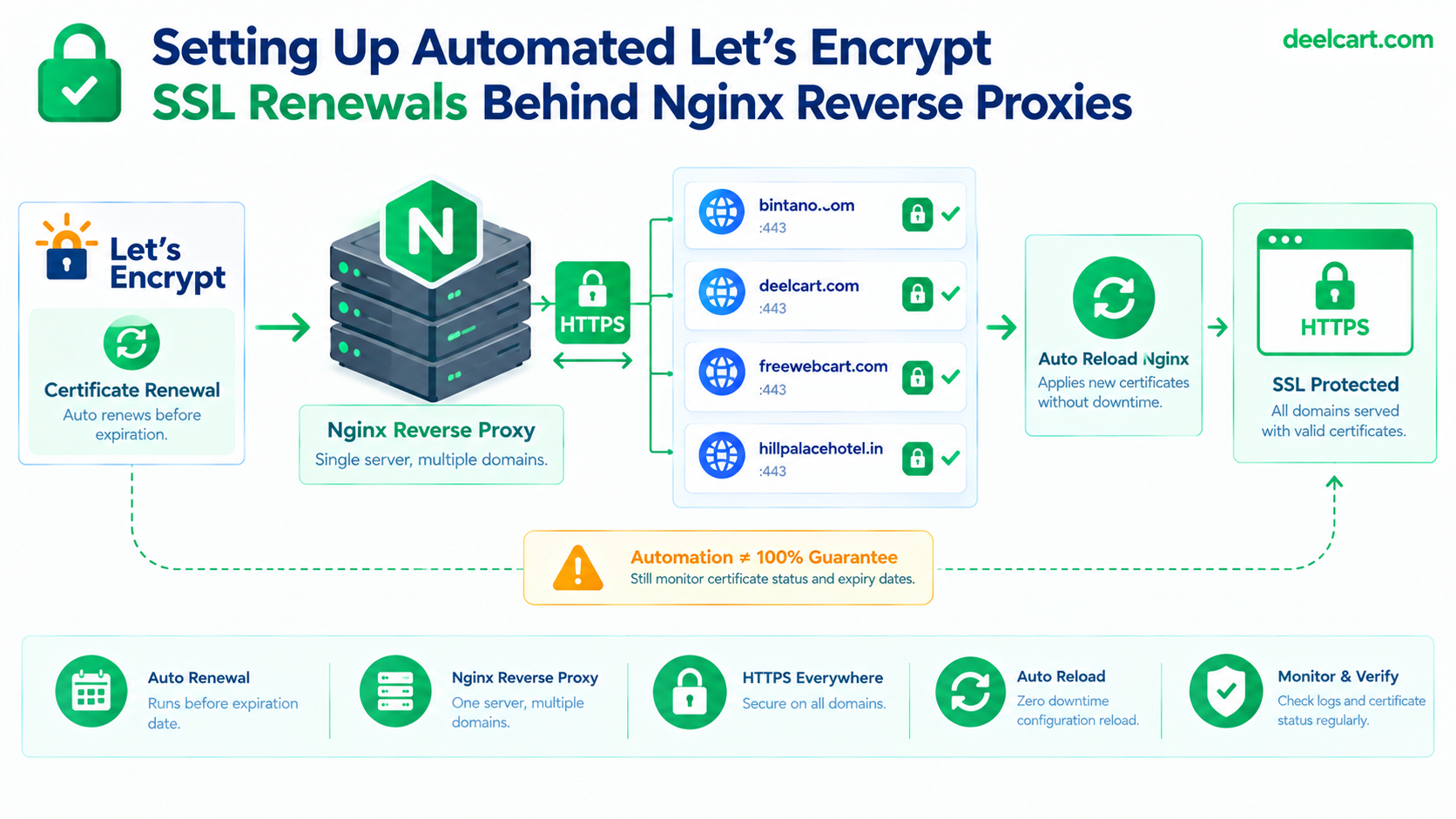
Certbot genuinely does install an automated renewal mechanism during setup — a systemd timer or a cron entry that runs certbot renew on a schedule. That part works reliably. What can silently fail, per-domain, without affecting the others, is any of a few things: the domain's HTTP validation challenge failing to reach the server correctly through the reverse proxy, the renewed certificate not actually getting picked up because Nginx was never told to reload, or the renewal timer itself not being enabled in the first place.
None of these produce an obvious error you'd notice in normal operation. The certificate on disk can be stale, renewal can be failing every single cycle, and the site keeps serving HTTPS just fine right up until the old certificate's expiry date arrives.
Confirming the Renewal Mechanism Actually Exists
Before assuming it's working, check that the automated systemd timer is genuinely installed and enabled:
systemctl list-timers | grep certbotIf nothing shows up, certbot's automatic renewal was never actually wired into systemd — some install methods set this up automatically, others don't, depending on how certbot was installed (package manager, snap, pip). A missing timer here is silently the whole problem, and it's a one-line check that takes less time than the failure it prevents.
Testing Renewal Without Waiting for It to Fail For Real
Certbot has a dry-run mode that exercises the entire renewal process — including domain validation — without actually replacing your live certificates:
sudo certbot renew --dry-run
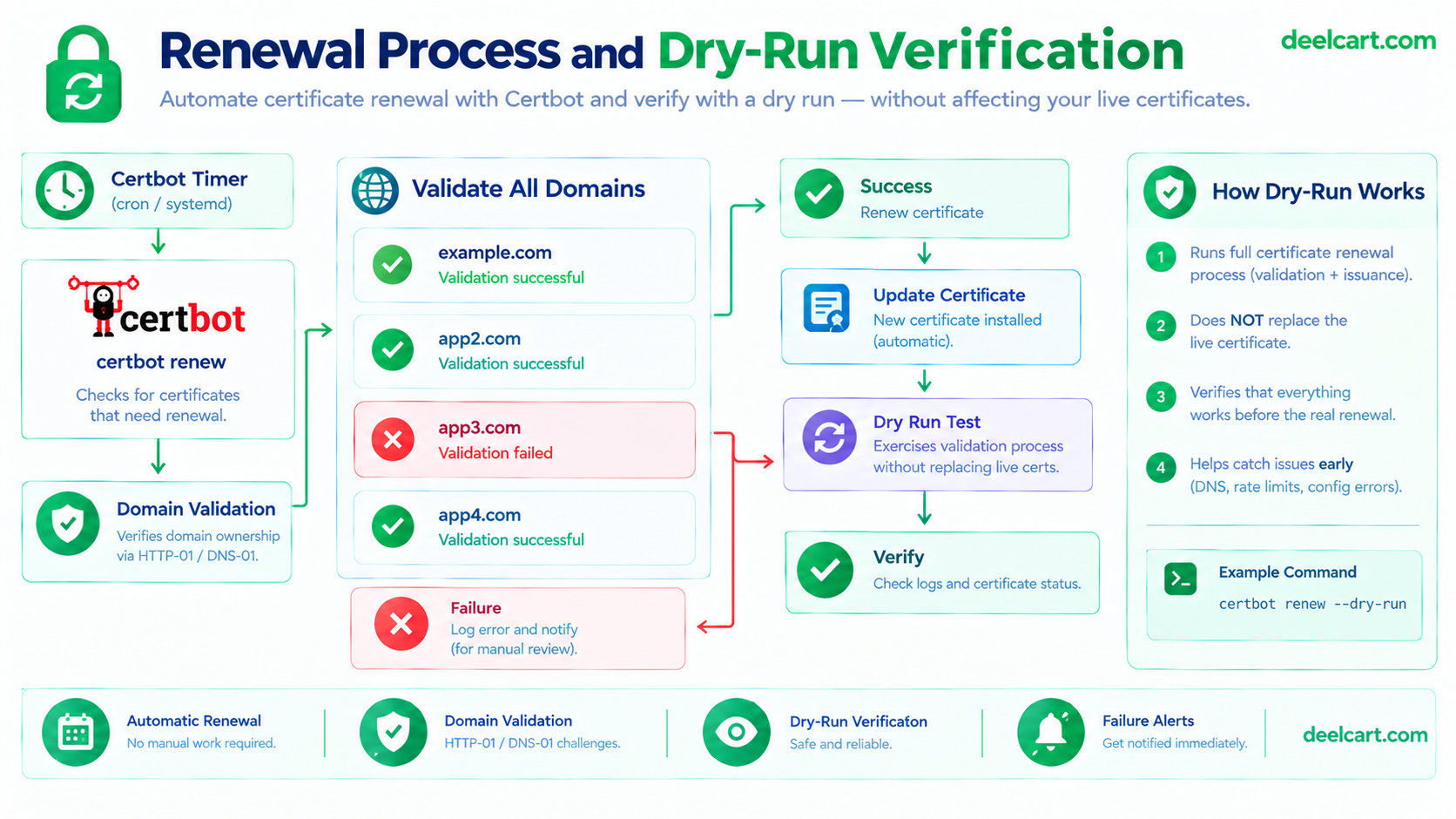
Running this periodically (not just once, right after setup) is the single most useful habit here. A dry run that starts failing for one specific domain is the exact early warning that would have caught my actual expired certificate weeks before it became a real outage, instead of after.
The Deploy Hook Almost Nobody Adds
A successful renewal writes a new certificate file to disk. It does not, on its own, make Nginx start using it — Nginx has the old certificate loaded in memory and keeps serving it until it's told to reload. This is a genuinely easy step to skip, because renewal can succeed silently for months while Nginx quietly keeps serving an old cert that happens to still be valid, until the point where it isn't and the gap between "renewed on disk" and "actually in use" finally matters.
sudo certbot renew --deploy-hook "systemctl reload nginx"
Setting this once, as part of the renewal command itself (rather than trusting it happens some other way), closes that gap permanently — every successful renewal reloads Nginx automatically, so a fresh certificate is what's actually being served, not just what's sitting on disk.
Certbot's Nginx Plugin vs. Webroot: Why I Switched
Certbot offers two common ways to prove domain ownership and configure Nginx, both covered in certbot's own user guide: the --nginx plugin, which edits your server blocks directly, and the --webroot method, which just needs a directory to drop a validation file into, leaving your Nginx configuration entirely untouched.
I started with the --nginx plugin because it's the more "automatic" option, and moved away from it after it became clear it doesn't play well with a hand-maintained configuration. I keep security headers in a shared, included snippet file across all four domains' server blocks — the --nginx plugin edits server block files directly when issuing or renewing certificates, which is a real risk of it silently duplicating directives, reordering things, or fighting with configuration that's meant to be maintained by hand rather than by a tool.
--webroot avoids this entirely:
sudo certbot certonly --webroot -w /var/www/letsencrypt -d example.com -d www.example.comThis requires an Nginx location block that serves the validation directory, but only once, as a small, static piece of configuration that never needs to change:
location /.well-known/acme-challenge/ {
    root /var/www/letsencrypt;
}
With this in place, certbot only ever needs to write validation files into that directory — it never touches the rest of the server block configuration again, which means my shared security-headers snippet and everything else I maintain by hand stays exactly as I wrote it, renewal after renewal.
One Certificate Per Domain, or One Covering All of Them
Certbot supports issuing a single certificate covering multiple domains (a SAN certificate) or a separate certificate per domain. I run separate certificates per domain rather than one combined certificate, specifically because it isolates failure: if renewal for one domain has a problem (a DNS change, a validation issue specific to that domain), it doesn't put the other three at risk of also failing or needing to be reissued together. The trade-off is more moving pieces to track, which is exactly why the monitoring step below matters more with this approach than it would with a single combined certificate.
Actually Monitoring Expiry, Instead of Trusting the Process Blindly
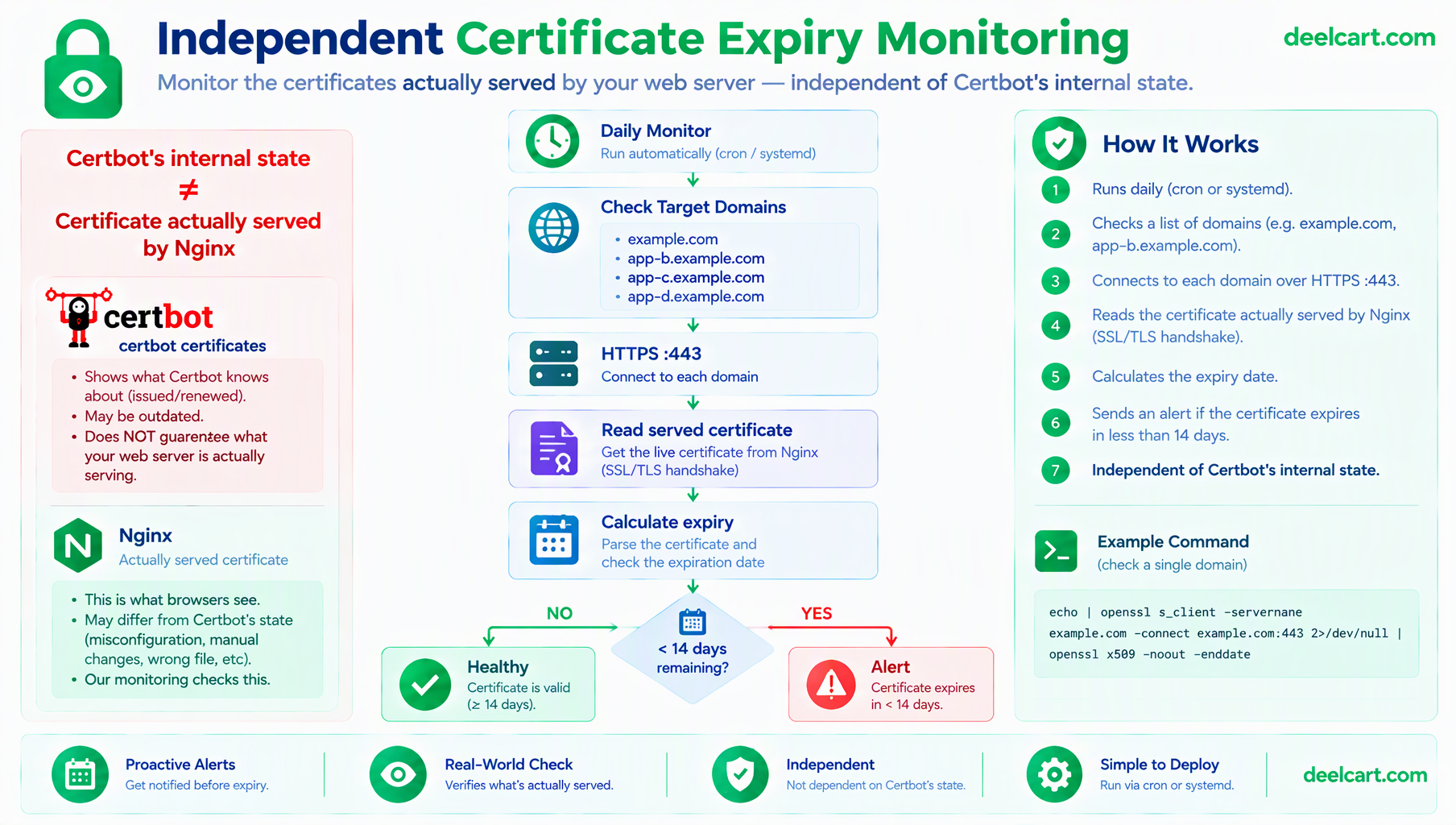
Dry runs and deploy hooks reduce the chance of a silent failure, but they don't eliminate it, and the actual lesson from my expired certificate is that unattended automation still deserves a second, independent check rather than blind trust. A small script that checks real expiry dates directly, separate from certbot's own renewal logic entirely, catches a failure even if the renewal mechanism itself has a problem certbot's own logs never surface clearly:
#!/bin/bash
DOMAINS=("example.com" "app-b.example.com" "app-c.example.com" "app-d.example.com")

for domain in "${DOMAINS[@]}"; do
  expiry=$(echo | openssl s_client -servername "$domain" -connect "$domain:443" 2>/dev/null \
    | openssl x509 -noout -enddate | cut -d= -f2)
  expiry_epoch=$(date -d "$expiry" +%s)
  now_epoch=$(date +%s)
  days_left=$(( (expiry_epoch - now_epoch) / 86400 ))

  if [ "$days_left" -lt 14 ]; then
    echo "WARNING: $domain certificate expires in $days_left days"
  fi
done
This connects to each domain the same way a real visitor's browser would and reads the certificate that's actually being served — not what certbot's internal records claim, which is exactly the layer where my original failure was invisible. Running this on its own daily cron job, independent of certbot's own scheduling, means a failure in one system doesn't also blind the check meant to catch it.
Frequently Asked Questions
How often does Let's Encrypt actually require renewal?
Let's Encrypt certificates are valid for 90 days — a deliberate choice explained in their certificate lifetime documentation, which favors shorter lifetimes specifically because they limit damage from a compromised key and push the ecosystem toward automation rather than manual renewal. Certbot's default renewal timer typically attempts renewal twice daily but only actually renews a certificate once it's within 30 days of expiry, which gives a wide margin for a transient failure to be caught and retried before it becomes urgent — provided something is actually watching for repeated failures rather than assuming eventual success.
Is the --nginx plugin wrong to use in general?
No — for a simple, single-domain setup with a standard configuration, it's genuinely convenient and works well. The specific issue is when you have carefully hand-maintained configuration (shared snippets, custom directives) that you don't want an automated tool silently rewriting alongside its own changes. --webroot trades a small amount of manual setup for leaving your Nginx configuration completely untouched afterward.
What happens to visitors if a certificate does expire?
Their browser shows a hard security warning and blocks easy access to the site by default, which is a significantly worse experience than a slow page or a minor bug — most visitors won't click through a certificate warning at all. This is part of why silent renewal failures are worth taking seriously rather than assuming "it'll probably renew eventually."
Should the monitoring script alert somewhere other than a log file?
For anything beyond a purely personal project, yes — a log file nobody's actively watching provides no real protection against exactly the kind of silent failure this whole setup is meant to prevent. Piping the warning into an email, a Slack/Telegram webhook, or any alert you'll actually see turns a passive log entry into something that reaches you before a visitor sees a certificate warning instead. If you're setting this up for the first time and something doesn't behave as expected, Let's Encrypt's community forum is a genuinely active place where real renewal edge cases — including ones specific to a given Nginx setup — get discussed in detail.
Justin is a self-taught developer who builds and runs DeelCart himself — from the articles to the server it runs on. He manages his own Linux infrastructure and writes guides based on tools and workflows he actually uses day to day.